Invoicing software that sends a GST invoice in 30 seconds
GST invoices with automated reminders and card payments built in.
Invoicing software is the tool a business uses to create, send, and track payment requests. In Australia that means more than a PDF: it means valid tax invoices with 10% GST and your ABN, reminders that chase overdue money, and a Pay Now link so customers can settle by card. OneBookPlus does all of it from your phone or desk, free to start.
Free plan, no card needed. Replaces Xero Invoicing, QuickBooks, FreshBooks
What makes invoicing software Australian
A US invoicing app can send a PDF. Australian invoicing software has to produce a valid tax invoice: the ATO has rules, and OneBookPlus follows them by default.
10% GST, done right
Automatic 10% GST on every invoice and quote, inclusive or exclusive. The total, the GST line, and the subtotal always reconcile.
Valid tax invoices
Your ABN and the words 'Tax Invoice' on every document, the fields the ATO expects, plus real-time ABN validation for your clients.
AUD payments
Australian dollar formatting and AUD card payments via Stripe Connect. Customers pay by tapping a link; the invoice flips to Paid.
BAS-ready summaries
Every paid invoice feeds GST collected into a BAS-ready summary, so quarter-end isn't a spreadsheet rebuild.
Not sure what the ATO expects on an invoice? Read the plain-English guide to tax invoice requirements in Australia, including the $82.50 threshold and the extra fields needed over $1,000.
Everything in OneBookPlus Invoicing
Not a stripped-back invoice generator: recurring invoices, reminders, card payments, status tracking, and quote conversion are all part of the same tool.
30-second invoices
Smart defaults pre-fill your client details, services, and GST so you can invoice on the spot: in the field or at your desk.
Automatic GST calculation
10% GST calculated instantly on every line item. Toggle GST-inclusive or exclusive per invoice. ABN printed on every document.
Automated payment reminders
Set reminder schedules: 3 days before due, on due date, 7 days overdue: and let OneBookPlus chase payments for you.
Stripe card payments
Every invoice includes a 'Pay Now' button. Clients pay by card in seconds. Funds hit your bank automatically.
Tap to Pay on iPhone
Coming to the iOS app: take contactless cards, Apple Pay and Google Pay in person, straight on a recent iPhone, no card reader or terminal. We will add no platform fee on in-person taps; you pay only Stripe's processing.
Professional PDF invoices
Your logo, brand colours, ABN, and payment terms on every invoice. Download or email a polished PDF in one click.
Recurring invoices
Set up weekly, fortnightly, or monthly invoices for retainer clients. They generate and send automatically on schedule.
Invoice status tracking
See every invoice as Draft, Sent, Paid, Overdue, or Cancelled at a glance. Filter and search across thousands of records.
Duplicate & convert
Duplicate any invoice in one click, or convert an accepted quote straight to an invoice: no retyping.
From quoting and invoicing software to paid, without retyping a thing
Most invoice mistakes happen at the handover: the price on the invoice doesn't match the quote, a line item goes missing, or the GST treatment changes between the two documents. That happens because quotes and invoices usually live in different tools, or in a quoting spreadsheet and an invoicing app that have never met.
In OneBookPlus the quote and the invoice are the same record at two stages of its life. You price the job, the customer accepts online, and one click converts the accepted quote to a tax invoice: same line items, same GST setting, same contact. Because nothing is re-keyed, the invoice can't drift from what the customer agreed to, and there is no Friday-afternoon session copying figures between apps. The OneBookPlus quoting software page covers the quoting half, including online acceptance and quote analytics.
Quote
priced on-site, sent from your phone
Accepted online
customer approves with one tap
Tax invoice
converted in one click, nothing re-keyed
Paid
card payment via the Pay Now link
Quote
priced on-site, sent from your phone
Accepted online
customer approves with one tap
Tax invoice
converted in one click, nothing re-keyed
Paid
card payment via the Pay Now link
Invoicing software for sole traders
If you're a sole trader, your invoicing tool has one job: get the invoice out the moment the work is done, then get out of the way. You don't have an admin person, so every minute spent formatting a document or chasing a payment is a minute of unbillable time. OneBookPlus is built around that reality. The Free plan covers the whole sole-trader loop, invoices, quotes, contacts, and reminders, with no card required and no trial clock.
The GST side adapts to where your business is at. Under the $75,000 turnover threshold and not registered for GST? Your invoices go out without a GST line and without the "Tax Invoice" wording, exactly as the ATO expects. Once you register, flip the setting and every new invoice carries 10% GST and the compliant wording automatically. OneBookPlus even nudges you when your invoice settings and your GST registration status disagree, which is the mistake that quietly costs sole traders 1/11th of every sale.
Reminders matter even more when you're a one-person business, because the person who has to make the awkward "just following up" call is you. Set the schedule once (for example 3 days before due, on the due date, 7 days overdue) and the emails and SMSes go out on their own until the invoice is paid. If you're still working out what to charge in the first place, the free hourly rate calculator and sole trader tax calculator help you land on a rate that survives tax time.
On the tools all day? Our comparison of the best invoicing software for tradies prices OneBookPlus against ServiceM8, Tradify and Fergus on the things that matter from the ute: quoting on-site, GST invoicing, and whether the books come with it.
What the invoicing looks like
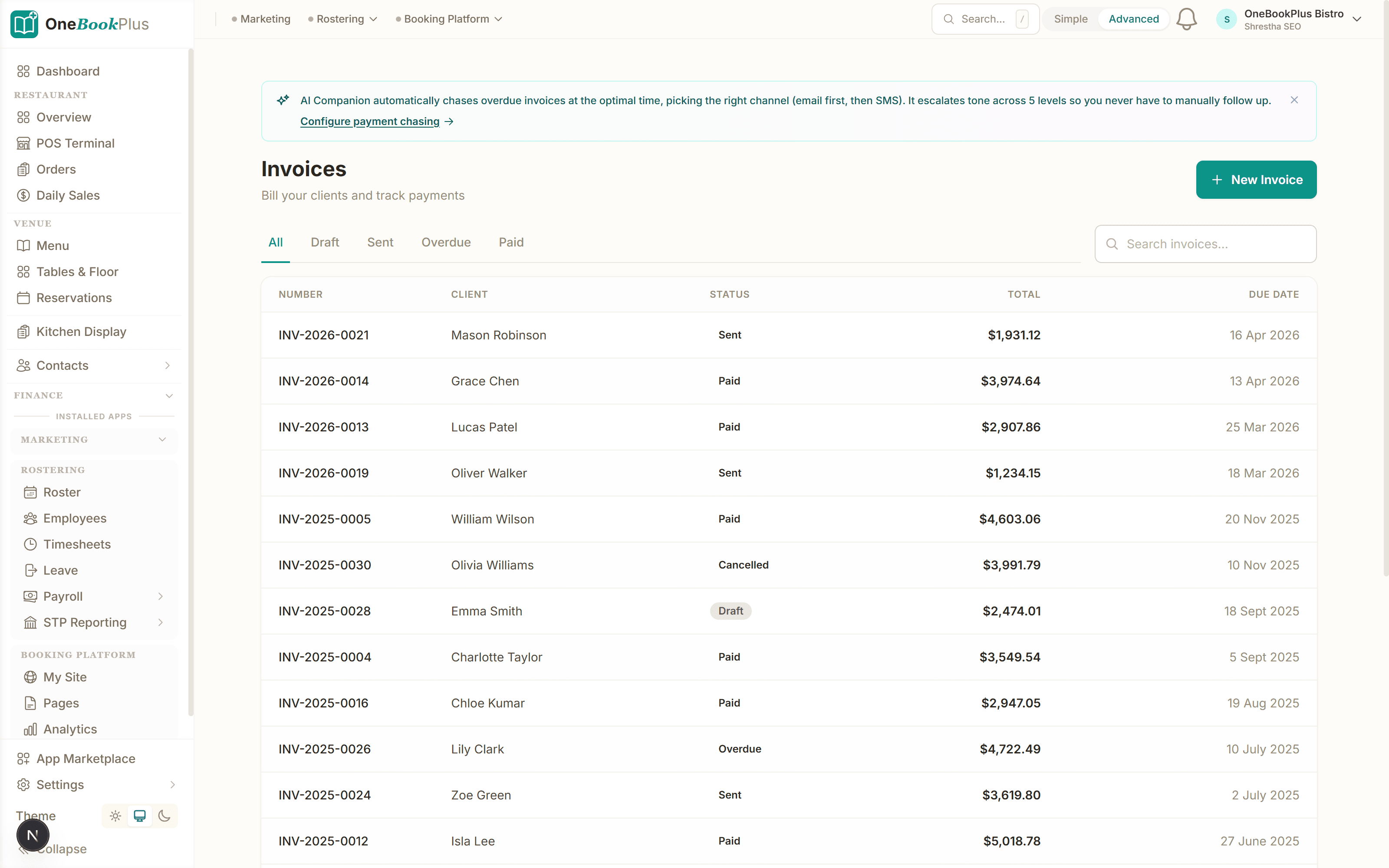
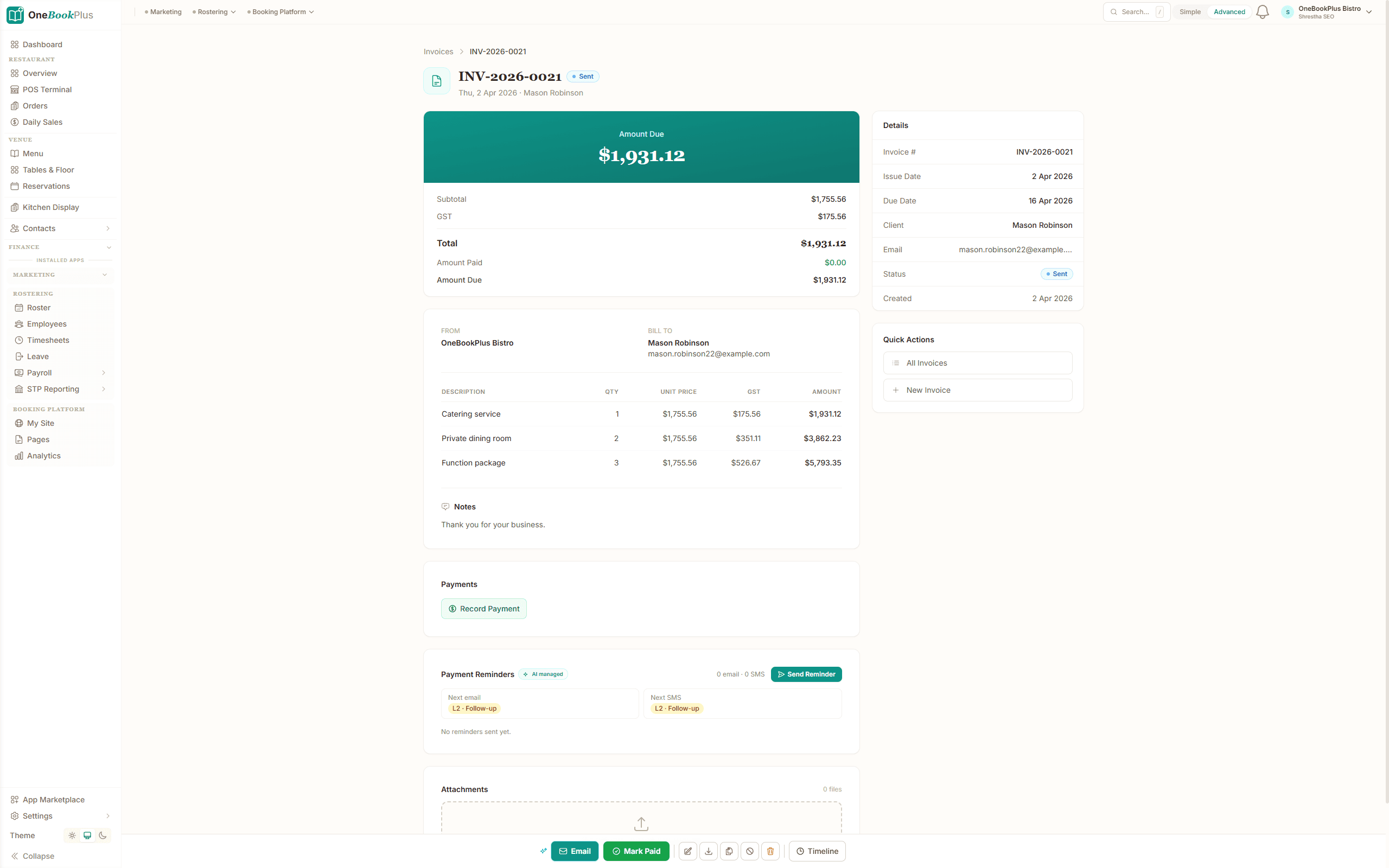
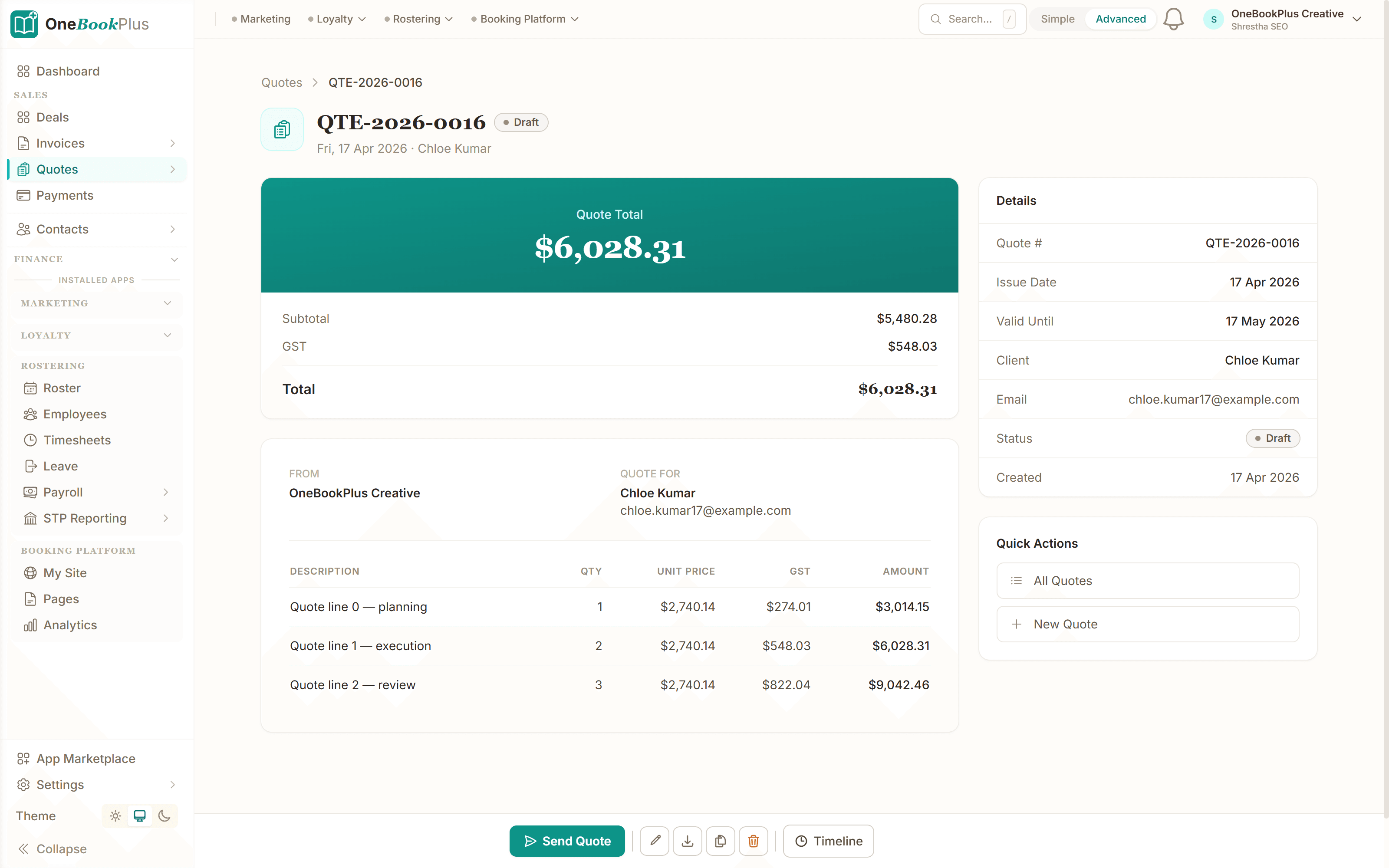
Screenshots captured from the OneBookPlus app itself: the invoice list you work from, a finished tax invoice, and the quote it started as.
Every invoice, one list
The invoice list with status filters. See at a glance what's draft, sent, overdue, or paid, and who still owes you money.
A finished tax invoice
Line items, 10% GST calculated automatically, your ABN, the words 'Tax Invoice', and a Stripe Pay Now link. This is the document your customer receives.
The quote it converts from
A quote your customer accepts online. One tap converts it to the tax invoice above: same line items, same contact, nothing re-keyed.
OneBookPlus vs Xero, QuickBooks & MeMate for invoicing
Xero and QuickBooks are full general ledgers built for bookkeepers; MeMate is a job-management platform. If your day is quote, invoice, get paid, here is how the invoicing side stacks up, with pricing taken from each vendor's own AU pricing page.
| Feature | OneBookPlus | Xero | QuickBooks | MeMate |
|---|---|---|---|---|
| Free plan with GST invoicing | Yes ($0/mo) | No (from $35/mo) | No (from $25/mo) | No (from $99.85/mo) |
| GST-compliant tax invoices | Yes, by default | Yes | Yes | Yes |
| Real-time ABN validation | Yes, against the ABR | Manual entry | Manual entry | Manual entry |
| Quote to invoice in one click | Yes | Yes (quotes) | Yes (estimates) | Yes |
| Automated payment reminders | Email + SMS | Templated follow-ups | ||
| Online booking page included | Yes | No | No | No |
| CRM + email marketing in the same plan | Yes | No (contacts only) | No | CRM yes, marketing no |
| BAS-ready GST summaries | Yes | Yes | Yes | Not documented |
| Price (AUD, monthly) | $0 / $29 / $49 / $69 | From $35 (Ignite) | From $25 (Simple Start) | From $99.85 (Business) |
Sources: pricing checked against Xero's AU pricing plans, QuickBooks' AU pricing page, and MeMate's pricing page. Vendor pricing changes; check the linked pages for current figures. OneBookPlus pricing (inc. GST) is on the OneBookPlus pricing page.
Want the line-by-line breakdowns? Read the full OneBookPlus vs Xero comparison, the OneBookPlus vs QuickBooks comparison, or the OneBookPlus vs MeMate comparison, where every competitor claim is cited to the vendor's own site. For a vendor-by-vendor roundup, the guide to the best invoicing software in Australia compares the wider field.
Example walkthrough
What a Tuesday looks like on OneBookPlus
An illustrative walkthrough of a typical sole-trader electrician's day
It's Tuesday morning and you've just finished a switchboard upgrade. Standing at the van you open OneBookPlus on your phone. The quote you sent last week is already accepted, so you tap "Convert to invoice". The job's line items, the 10% GST, and your ABN are already on it; you don't retype anything.
You email the tax invoice before you've pulled out of the driveway. Because the customer record came across from the original quote, there's no re-keying a name, address, or email: the invoice, the quote, and the contact are one record.
The due date is set to 7 days. You forget about the invoice, and that's the point. On day 8, OneBookPlus sees it's unpaid and sends an automatic reminder by SMS. No spreadsheet of who owes what, no awkward "just checking in" call.
Your customer taps the pay link, pays by card in AUD, and the invoice flips to Paid. The GST on that sale lands in your BAS summary automatically. Quote to paid, start to finish, without sitting at a desk once.
Stop overpaying
How much are you spending on software?
Most small businesses stitch together 4-6 tools that don't talk to each other. Here's what that typically costs.
How OneBookPlus Invoicing works
Add your client
Search for an existing contact or create a new one. Client details auto-fill from your CRM: ABN, address, email, all there.
Add your line items
Type a service or select from your saved services catalogue. GST calculates instantly. Add a description, quantity, or discount per line.
Send in one click
Email the invoice directly from OneBookPlus. Your client receives a professional branded email with a PDF attachment and Pay Now button.
Get paid automatically
OneBookPlus tracks payment status. If it goes overdue, reminders fire automatically. When paid, the invoice closes and your accounts update.
What BAS-ready record keeping requires
"BAS-ready" is a specific claim, so it is worth spelling out what sits behind it. Each quarter (or month, for larger businesses) a business activity statement reports the GST you collected on sales and the GST you paid on purchases, and the difference is what you owe the ATO or get back. To report that without a quarter-end spreadsheet rebuild, every sale needs its GST treatment captured at the moment you invoice, not reconstructed later from bank lines that only show totals.
In practice that comes down to three things. First, a valid tax invoice for each sale, carrying the fields covered earlier on this page: the words "Tax Invoice", your ABN, the issue date, a description of what was sold, and the GST amount. Second, GST treatment that stays consistent from quote to payment, so an amount entered as GST-inclusive cannot quietly become exclusive along the way; in OneBookPlus the subtotal, the GST line, and the total always reconcile, and you can check any single figure against the free GST calculator. Third, a record of when each invoice was paid, because if you report GST on a cash basis it is the payment date, not the invoice date, that decides which quarter a sale belongs to.
OneBookPlus keeps all three as a by-product of normal invoicing: every invoice stores its GST treatment, and the moment it is paid the GST feeds the BAS-ready summary for that quarter. If you want to sanity-check a quarter before you lodge, the free BAS calculator estimates the position from your totals. If the records are currently a shoebox, the bookkeeping cost calculator shows what catching up costs when you pay someone else to do it, and the late payment interest calculator puts a number on the invoices sitting unpaid in the meantime. This is general information, not tax advice; your BAS or tax agent has the final say on your own lodgement.
Make an invoice now, no signup
The same GST and tax-invoice maths OneBookPlus runs automatically, available as free tools you can use before you create an account.
Frequently asked questions
Common questions about invoicing software in Australia.
Is OneBookPlus invoicing really free?
Yes. The Free plan includes GST-compliant invoicing, quotes, a contact record for every customer, and payment reminders, with no credit card required and no time limit. Paid plans (from $29/month inc. GST) lift volume limits and add team members, Stripe Connect payments, recurring invoices, and the rest of the suite. The pricing page lists the per-tier limits.
What does the ATO require on a tax invoice?
For sales of $82.50 or more (including GST) the ATO requires a tax invoice showing the words 'Tax Invoice', your identity and ABN, the issue date, a description of what was sold, and the GST amount (or a statement that GST is included in the price). Sales over $1,000 must also identify the buyer. OneBookPlus puts all of these on every invoice by default, so a compliant document is the starting point rather than something you configure.
Do I need separate accounting software like Xero as well?
Not for most small businesses. OneBookPlus invoicing feeds a built-in Finance module with a real double-entry ledger and BAS-ready GST summaries, so the quote-to-paid-to-BAS loop lives in one app. Xero and MYOB are full general ledgers aimed at bookkeepers and accountants; if you don't need advisor-managed multi-entity books, paying for a second subscription just to send invoices is overkill. If you're switching, the Opening Balances wizard brings your closing balances across from Xero or MYOB.
I'm a sole trader who isn't registered for GST. Can I still use it?
Yes. If your turnover is under the $75,000 GST registration threshold you can issue regular invoices without GST, and OneBookPlus formats them correctly (no GST line, no 'Tax Invoice' wording where it doesn't apply). It also nudges you if your invoice settings and GST registration status don't match, so you don't accidentally charge GST you can't collect.
How do the automated payment reminders work?
You set a reminder schedule once, for example 3 days before due, on the due date, and 7 days overdue. OneBookPlus sends the reminders automatically by email or SMS until the invoice is marked paid. No spreadsheet of who owes what, and no awkward phone calls.
Can my customers pay by card, and what are the fees?
Yes. With Stripe Connect every invoice includes a Pay Now button; customers pay by card and the funds are deposited to your bank account automatically. A 2.5% platform fee applies to online card payments on top of Stripe's standard processing fees. In-person Tap to Pay on iPhone payments carry no platform fee; you pay only Stripe's processing.
How does quote-to-invoice conversion work?
You send a quote, your customer accepts it online, and one click converts it to a tax invoice with the same line items, the same GST treatment, and the same contact record. Nothing is retyped, so the invoice can't drift from the price the customer agreed to. The quoting software page covers the quoting side in detail.
What records do I need to keep for my BAS?
For the GST side of a business activity statement you need each sale recorded with its GST amount, tax invoices for the purchases you claim credits on, and the dates payments landed if you report GST on a cash basis. OneBookPlus keeps the sales side as a by-product of invoicing: every invoice stores its GST treatment and payment date, and the BAS-ready summary totals them for the quarter. This is general information, not tax advice; your BAS or tax agent should look over your figures before you lodge.
Can I send an invoice from my phone?
Yes. OneBookPlus is mobile-first: the iPhone and iPad apps let you quote on-site, convert an accepted quote to a tax invoice in one tap, and take payment before you leave the job. Everything syncs to the web dashboard automatically, so nothing has to be re-entered at the office.
Australian Owned
Built in Melbourne, AU
GST Compliant
ATO-ready from day one
Encrypted & Isolated
TLS in transit, AES-256 at rest, tenant isolation at the database layer, read the security page
Free Plan Available
No credit card needed
Works great with
Other OneBookPlus products that pair naturally with Invoicing.
About the author

Bishal Shrestha
Founder & CEO, OneBookPlus
Bishal spent a decade running digital projects for Australian small businesses before founding OneBookPlus. OneBookPlus is built and supported from Melbourne for Australian small and medium businesses. Its invoicing is GST- and ABN-aware by default: a valid tax invoice is the starting point, not a setting you configure.
Read the founder bioSend your first tax invoice today
GST and ABN handled for you. Free to start, no credit card. Upgrade when you're ready for the full suite.
Last reviewed and updated: by Bishal Shrestha
Comparisons
Tools & Apps