OneBookPlus vs ServiceM8
The complete ServiceM8 alternative
ServiceM8 is great for job management, but it's only job management. OneBookPlus gives Australian tradies and small businesses invoicing, CRM, bookings, marketing, accounting, and job management in one affordable app.
Key takeaways
5- ServiceM8 pricing (AUD, inc. GST, verified against servicem8.com/au/pricing): Free $0/month (30 jobs/month), Starter $29/month (50 jobs), Growing $79/month (150 jobs), Premium $149/month (500 jobs), Premium Plus $349/month (1,500+ jobs), pricing is per-job tier, not per-user, and SMS allowances scale with the tier you buy.
- ServiceM8 doesn't include accounting, so Australian tradies run ServiceM8 plus a Xero or MYOB subscription and pay two bills for one workflow.
Show 3 moreShow less
- OneBookPlus replaces this stack with one platform from $0/month (Free), $29/month (Starter), $49/month (Plus), or $69/month (Growth), invoicing + jobs + CRM + accounting + bookings + marketing all bundled, no per-job tier limits, AUD billing.
- Both handle GST-compliant invoicing, customer online booking, photo evidence per job, and mobile-first job entry from the field. ServiceM8 is iOS-only on the field app; OneBookPlus has a native iOS app and works in any browser on Android.
- ServiceM8 wins on: 15+ years of trade-specific feature depth, a mature add-on marketplace, a strong Capterra Australia review record, and an ecosystem of trade-trained bookkeepers. OneBookPlus wins on: total cost (no per-job tier ceiling, accounting bundled), any-browser Android access (ServiceM8's field app is iOS-only), and one customer record across booking + invoicing + accounting.
Dispatch depth, or the whole customer-to-BAS trail
OneBookPlus
From $0/mo. Bookings, invoicing, CRM and accounting on one plan; AI and payroll are add-ons
- GST invoicing & quoting
- CRM & contact management
- Online booking page
- Email marketing & campaigns
- Accounting & P&L reports
- BAS / ATO tax summaries
- Job scheduling & dispatch
- Google review requests
- Mobile-first design
ServiceM8
Free plan (30 jobs/mo), paid from $29/mo, job management focus
- Invoicing & quoting
- CRM & contacts
- Online bookings
- Built-in email marketing
- Accounting & P&L
- BAS / ATO reports
- Job scheduling & dispatch
- Review management
- Requires Xero/MYOB for accounting
OneBookPlus vs ServiceM8, detailed comparison
See exactly what's included in each platform. OneBookPlus replaces ServiceM8 and the extra tools Australian tradies typically pay for.
| Feature | OneBookPlus | ServiceM8 |
|---|---|---|
| GST-compliant invoicing | Yes | Yes |
| Quoting with one-click accept | Yes | Yes |
| Job scheduling & dispatch | Yes | Yes |
| CRM & contact management | Yes | Yes |
| Online booking page | Yes | Yes |
| Calendar subscription link (Apple, Google, Outlook) | Yes | Yes |
| Built-in email marketing (no Mailchimp add-on) | Yes | No |
| Accounting & P&L reports | Yes | No |
| BAS / ATO tax summaries | Yes | No |
| Expense tracking with receipts | Yes | Yes |
| Google review requests | Yes | No |
| Payment reminders | Yes | Yes |
| Menu & order management | Yes | No |
| Job management & pipeline | Yes | Yes |
| Basic sales register (full POS $39/mo add-on) | Yes | No |
| Native iOS app | Yes | Yes |
| Native Android app | No | No |
| Free plan available | Yes | Yes |
| Mature add-on ecosystem & electronic forms library | No | Yes |
| Decade-plus AU field-service track record | No | Yes |
| Price (AUD) | From $0/mo | From $0/mo (30-job cap) |
| All included | Jobs only |
The 16 dimensions tradies weigh before changing job software
Capability rows where the difference between a per-job dispatch tool and an all-in-one AU-tax-native platform shows up. Cited against ServiceM8’s public pages.
| Category | Feature | OneBookPlus | ServiceM8 |
|---|---|---|---|
| Verticals | Vertical-specific dashboards | 18 verticals | Trades / field service only (source: servicem8.com feature overview) |
| Quotes & jobs | Quote to job to invoice pipeline | Yes | Yes (source: servicem8.com feature overview) |
| Invoicing | GST-native invoicing + ABN validation | Yes | GST yes; ABN validation not documented (source: servicem8.com feature overview) |
| Payments | Stripe + Stripe Tax surcharging | Stripe + Stripe Tax | Stripe / Square / payment add-ons (source: servicem8.com feature overview) |
| Bookings | Customer-facing online booking widget | Yes | Yes (source: servicem8.com online booking) |
| Customer portal | Customer portal, book, pay, accept quote | Book, pay a deposit and accept a quote; the portal carries OneBookPlus branding | Quote acceptance, statements and asset portal, no self-serve booking (source: servicem8.com feature overview) |
| Bank feeds | Australian bank feeds + AI categorisation | Withdrawn while we replace the provider | No (source: servicem8.com feature overview) |
| GST / BAS | Quarterly BAS-ready reports (G1, 1A, 1B) | Yes | Via Xero/MYOB only (source: servicem8.com feature overview) |
| STP / Payroll | STP Phase 2 lodgement & SuperStream | Payroll add-on; no STP lodgement yet | Via Xero/MYOB only (source: servicem8.com feature overview) |
| AI features | AI Companion (chase, follow-up, winback, EOD) | Yes | Not documented (source: servicem8.com feature overview) |
| Mobile | Mobile access on iOS & Android | Native iOS app; web app on Android | iOS only (field app) (source: servicem8.com feature overview) |
| Integrations | Accounting integrations | Stripe, ABN lookup, Xero/MYOB-ready export today; a live two-way sync is not built and is not on a date | Add-on marketplace (source: servicem8.com feature overview) |
| Data residency | Where customer data is stored | AWS Sydney (ap-southeast-2) | Backups to Amazon S3 in multiple worldwide locations (source: servicem8.com privacy policy) |
| Security certs | ISO 27001 / SOC 2 / IRAP | Roadmap; AWS Sydney shared-responsibility | Check vendor page (source: servicem8.com privacy policy) |
| Annual pricing transparency | Annual price shown alongside monthly | Yes | Per-job-tier monthly (source: servicem8.com/pricing) |
| GST inclusivity | Price page declares inc. / ex. GST | Declared inc. GST | Declared inc. GST (source: servicem8.com/pricing) |
| Starting price (AUD, inc. GST) | From $0/mo | From A$0/mo | |
| Inc. GST · Annual price shown | Per-job tiers (30 to 1,500+ jobs/mo) · Xero needed for accounting |
ServiceM8 pricing in 2026: every plan, plan by plan
ServiceM8 prices verified against the ServiceM8 Australian pricing page in August 2026. All figures AUD and inclusive of GST, as the vendor page states. Tiers are priced per job volume, not per user, and none of them includes accounting: Xero or MYOB sits on top.
| ServiceM8 plan | Price (AUD/mo) | Job limit | SMS included | Accounting |
|---|---|---|---|---|
| Free | $0 | 30 jobs/mo | None included (pay per SMS) | Via Xero / MYOB (extra) |
| Starter | $29 | 50 jobs/mo | 100+ SMS/mo | Via Xero / MYOB (extra) |
| Growing | $79 | 150 jobs/mo | 300+ SMS/mo | Via Xero / MYOB (extra) |
| Premium | $149 | 500 jobs/mo | 1,000+ SMS/mo | Via Xero / MYOB (extra) |
| Premium Plus | $349 | 1,500+ jobs/mo | 3,000+ SMS/mo | Via Xero / MYOB (extra) |
Source: ServiceM8 pricing page (servicem8.com/au/pricing). A growth month that exceeds your job tier pushes you into the next tier.
What OneBookPlus costs instead
| OneBookPlus plan | Price (AUD/mo, inc. GST) | What’s in it |
|---|---|---|
| Free | $0 | Sole traders: 10 invoices & 5 quotes/mo, no job cap |
| Starter | $29 | Unlimited invoices & quotes, custom branding, payment reminders |
| Plus | $49 | Unlimited contacts & bookings, advanced reporting, 5 team members |
| Growth | $69 | AI Companion included, BAS, SMS marketing |
Every OneBookPlus plan includes accounting, GST tracking, and BAS-ready reporting with no per-job ceiling. Annual billing and the full inclusions list are on the OneBookPlus pricing page.
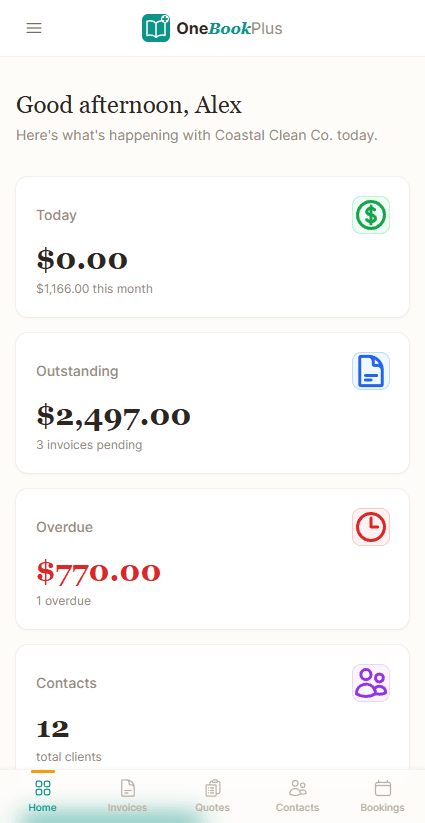
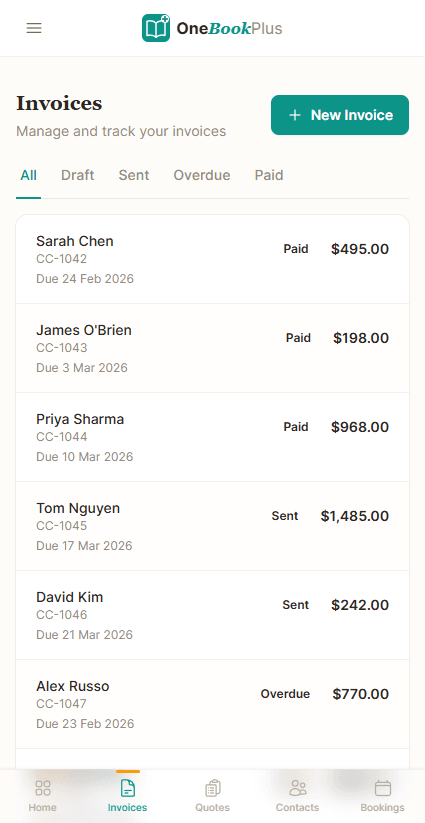
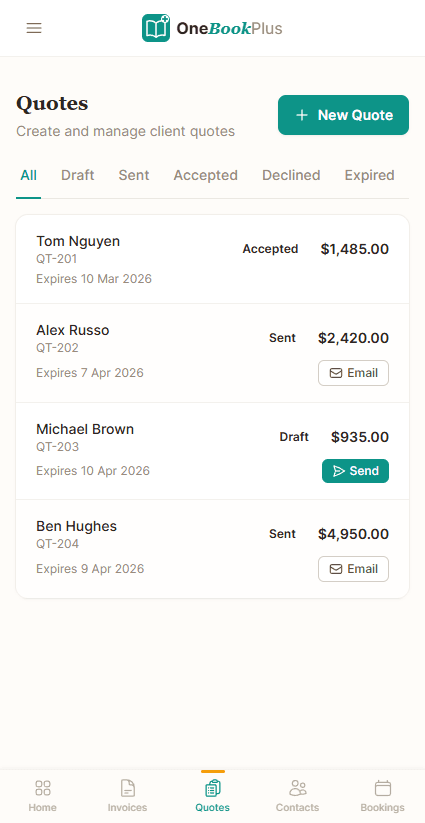
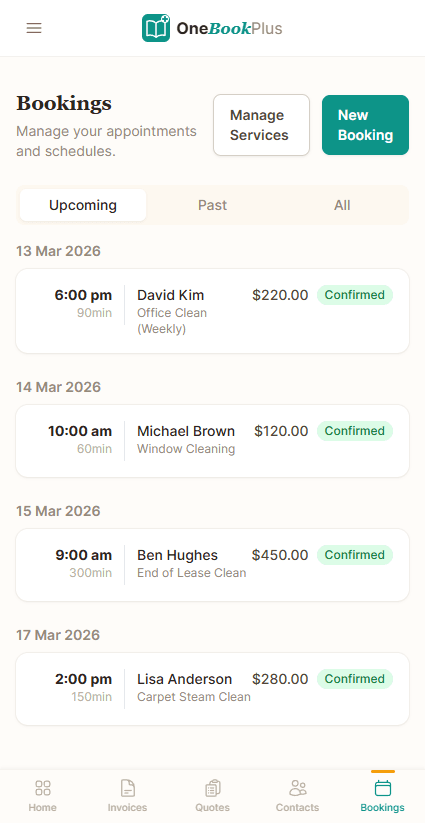
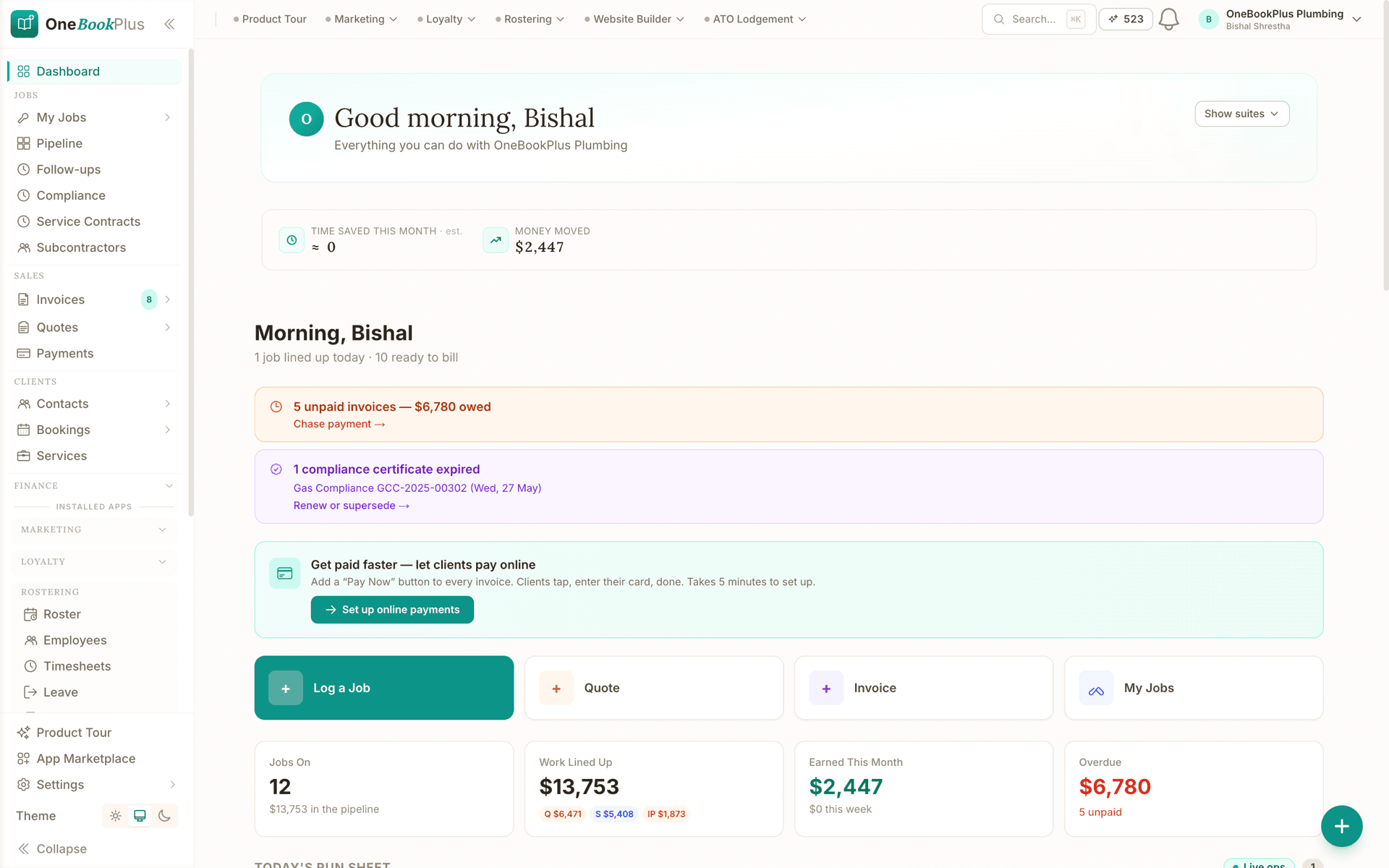
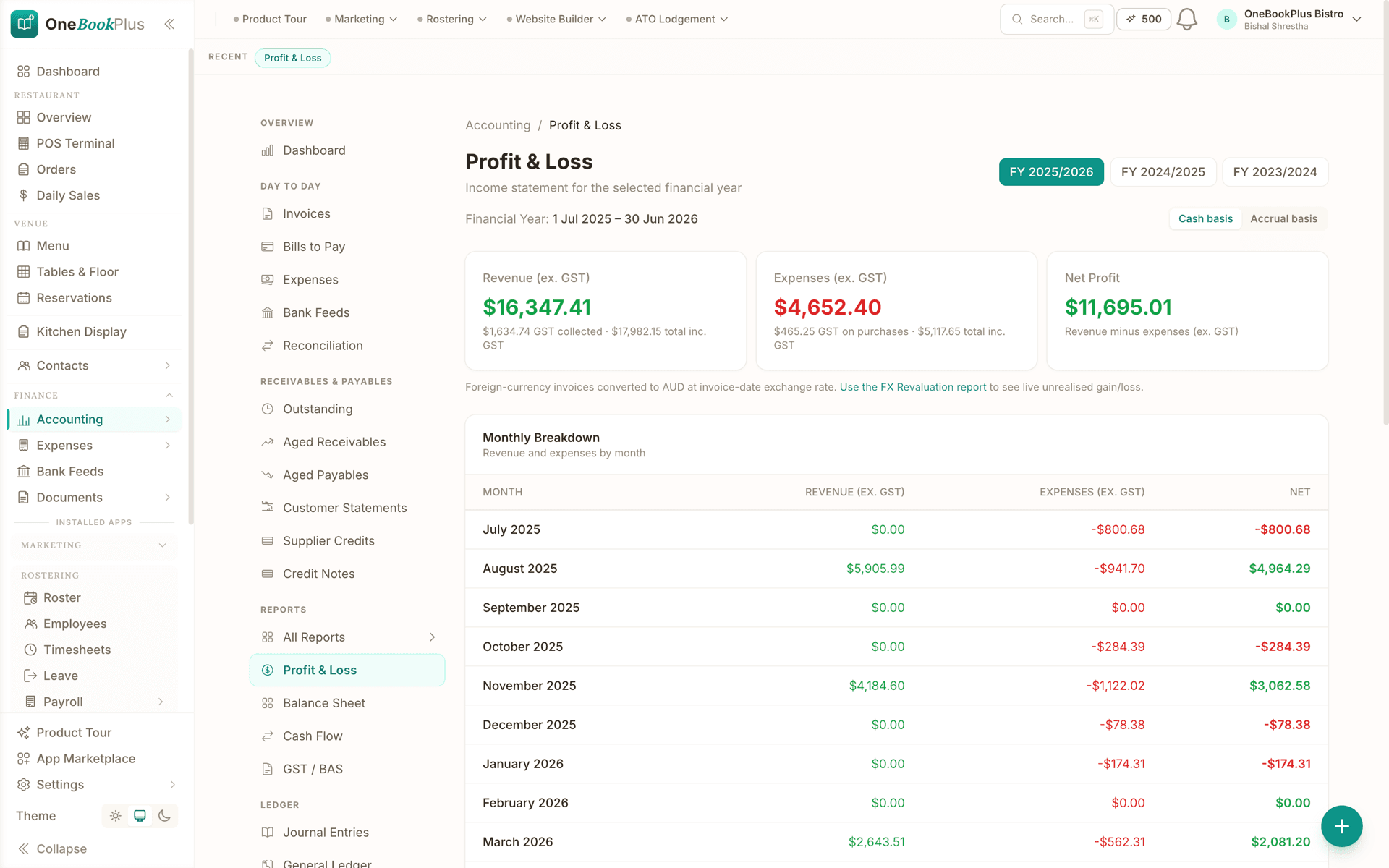
Not mockups, real product screens
The trade dashboard and BAS rows above, in pixels
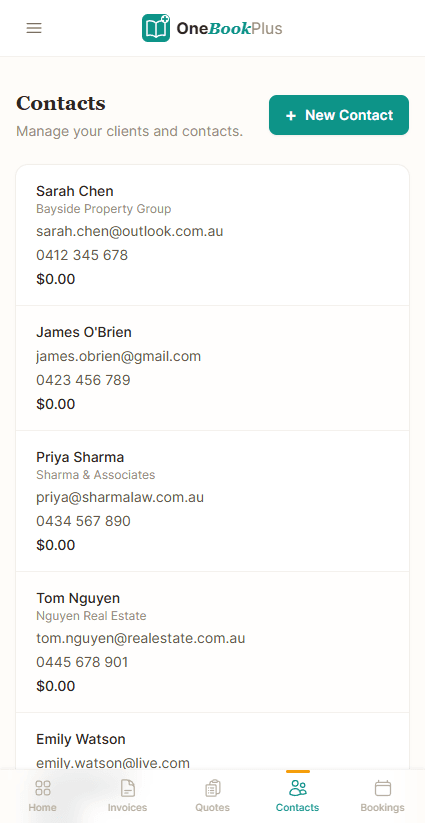
ServiceM8 runs its accounting through Xero or MYOB; the claim on this page is that OneBookPlus does jobs and books in one product. Here are the actual screens.
Where ServiceM8 wins
A decade of dispatch, and a bookkeeper network
ServiceM8 has been built in Australia since 2010 with one audience: field-service operators. That 15+ year focus shows. The dispatch engine handles multi-crew scheduling cleanly, the iOS field app is genuinely fast on a site with patchy reception, and the add-on marketplace is mature, with a deep network of bookkeepers who have spent years building Xero workflows around the platform. If you run a fleet of 15+ technicians, dispatch is the most-clicked screen of your day, and your bookkeeper is already a ServiceM8 specialist, the switch isn’t urgent. You’ve already paid for the specialism.
Where OneBookPlus wins
Books bundled, Android included, no per-job ceiling
Accounting is bundled, not a separate Xero bill. OneBookPlus ships full P&L, balance sheet, GST tracking and quarterly BAS reports inside the same subscription. Rostering and payroll is a separate $29/month add-on that covers pay runs, PAYG withholding, super and payslips, and it does not lodge Single Touch Payroll to the ATO yet. ServiceM8’s public features page has no accounting, so you run ServiceM8 + Xero: two subscriptions, two sync points, and a reconciliation tax at quarter-end.
Android & customer portal, not iOS-only. ServiceM8’s field app is iOS-only, so an Android-equipped subbie can’t use the native app. OneBookPlus ships a native iOS app plus the full product in any mobile browser on Android, and a customer portal where clients book, pay deposits, and accept quotes in one place. It carries OneBookPlus branding rather than your own. The ServiceM8 feature overview offers quote acceptance, statements, and booking forms, but not one portal that does all three.
AI Companion plus per-job tier ceiling removed. ServiceM8’s pricing page caps jobs per month at the tier you buy (30 on Free, 50 on Starter, 150 on Growing, 500 on Premium, 1,500+ on Premium Plus); a growth month pushes you up a tier. OneBookPlus has no per-job ceiling, plus an AI Companion that automates no-show follow-up, payment chase, predictive rebooking, winback, review harvesting, and end-of-day summary, capabilities ServiceM8 does not publicly document.
The case for leaving ServiceM8, stated plainly
More than just job management
ServiceM8 handles jobs and quoting well, but you still need Xero for accounting, a separate CRM, and another tool for marketing. OneBookPlus includes everything.
One subscription, not a stack
ServiceM8 costs $29 to $349/mo across its paid tiers for job management alone. Accounting, CRM, and email marketing are all separate subscriptions on top. OneBookPlus is $0 to $69/mo with all four included.
Built-in accounting & BAS
ServiceM8 has no accounting. You need Xero or MYOB on top. OneBookPlus includes P&L reports, expense tracking, BAS summaries, and GST compliance built in.
Bookings, money and marketing in one record
Both platforms offer online booking, but in OneBookPlus every booking, quote, invoice, payment, and review request lands on the same customer record and flows into your accounting, no exports, no sync.
OneBookPlus vs ServiceM8, your questions answered
How does OneBookPlus compare with ServiceM8 for tradies?
It comes down to how much of the business you want in one app. ServiceM8 is a solid job dispatch tool with online booking forms and a decade-plus of trade-specific work behind it. OneBookPlus adds built-in accounting, BAS reporting, email marketing, and review management in the same subscription. If you only need job dispatch and already have Xero for accounting, ServiceM8 does that job well. If you want one app for everything, OneBookPlus covers more of it.
Can OneBookPlus replace ServiceM8?
Yes. OneBookPlus handles quoting, invoicing, job scheduling, customer management, and expense tracking, the core features tradies use ServiceM8 for. Plus you get accounting, BAS reports, online bookings, and marketing tools included.
How much does ServiceM8 cost compared to OneBookPlus?
ServiceM8 prices per job volume rather than per user, from a free plan with a 30-job cap up to Premium Plus, and the full tier-by-tier figures are in the pricing table on this page, taken from servicem8.com/au/pricing. Accounting isn't included at any tier, so most tradies add a Xero or MYOB subscription on top of whichever plan they land on. OneBookPlus starts free with no job cap and tops out at $69/month with accounting, BAS, bookings, and marketing included.
Does OneBookPlus have job scheduling like ServiceM8?
Yes. OneBookPlus includes job scheduling with a calendar subscription link that Apple, Google and Outlook pick up (two-way Google sync is built but not yet open to customers), automated reminders, and a client-facing booking page. While ServiceM8's dispatch features are more field-service focused, OneBookPlus covers the scheduling needs of most tradies, plus adds accounting and marketing.
Is OneBookPlus or ServiceM8 the better job-management fit?
The ones who switch are usually paying for ServiceM8 and Xero side by side. ServiceM8 focuses on job management and has no native accounting, so OneBookPlus tends to suit tradies who want invoicing, CRM, bookings, accounting, marketing, and job management in one app with GST, ABN, and BAS compliance built in. The ones who should stay are larger field-service operations: if dispatch across 15 or more technicians is the most-clicked screen of your day, ServiceM8's dispatch engine and its mature add-on marketplace are deeper than ours, and its Capterra Australia rating (quoted with its sub-scores further down this page) reflects a decade-plus of trade-specific work we can't claim yet.
Is OneBookPlus a good ServiceM8 alternative for Australian electricians?
Yes, particularly if you do compliance-heavy electrical work. ServiceM8's electrical Certificate of Compliance is a paid form-template add-on per region; OneBookPlus structures the AS/NZS 3000 test readings (insulation resistance MΩ, earth continuity Ω, RCD trip time ms / trip current mA, polarity, visual) into the core CoC form and surfaces one-tap deep-links into each state regulator's lodgement portal (Energy Safe Victoria, Fair Trading NSW, Electrical Safety Office QLD, OTR SA, Building & Energy WA, CBOS TAS, Access Canberra, NT WorkSafe). On top of core, OneBookPlus offers six AS/NZS-aligned marketplace packs that ServiceM8 has no equivalent for: Test & Tag Register ($15/month, AS/NZS 3760), Switchboard Inspection Pack ($19/month, AS/NZS 3000 §8), EV Charger Install Pack ($19/month), Solar Install Pack ($29/month with CEC accreditation guidance and REC Registry STC creation), Heat Pump HWS Install Pack ($19/month with VEU / NSW PDRS / SA HEER rebate workflows), and Emergency Lighting Compliance ($15/month, AS/NZS 2293.2 discharge-test cadence).
Does ServiceM8 give me a BAS or just the job records?
A BAS (Business Activity Statement) is the form Australian businesses lodge with the ATO to report GST collected on sales, GST paid on purchases, and the net amount owed or refunded. OneBookPlus produces BAS-ready GST figures automatically from your invoices and expenses, so you can lodge or hand them to your accountant without a separate accounting subscription. ServiceM8 has no native accounting, so BAS reporting runs through Xero or MYOB on top of your ServiceM8 plan.
Does ServiceM8 work on Android?
ServiceM8's field app is built for iPhone and iPad only; its own feature overview describes the platform as Apple-focused, and no Android app is offered. Android users can reach the ServiceM8 web dashboard in a browser, but not the native field app your iPhone-carrying teammates use. OneBookPlus runs the full product in any modern mobile browser, on Android or anything else, and also ships a native iOS app.
What do ServiceM8 reviews say?
ServiceM8 holds a 4.5/5 rating from 311 reviews on Capterra Australia. Reviewers praise the ease of use and per-job pricing; recurring criticisms include payment processing fees and support responsiveness. Read the current reviews yourself before deciding, and note that ServiceM8 reviews consistently assume you run Xero or MYOB alongside it for accounting.
How OneBookPlus handles your trades business
Running a trades business with ServiceM8 usually means juggling at least two platforms: ServiceM8 for job management and Xero or MYOB for everything financial. OneBookPlus collapses that into a single workflow. When a new lead comes in, whether through your online booking page, a phone call, or a referral, you create the job in OneBookPlus, attach it to a contact record in your built-in CRM, and send a quote with one tap. The client receives a professional PDF with your ABN, GST breakdown, and a one-click accept button. Once they approve, the job moves into your scheduling pipeline automatically.
From there, you manage the job through to completion: schedule it on your calendar (subscribe to that calendar from Apple, Google or Outlook so nothing clashes with personal commitments), track time and expenses on site using the mobile app, snap photos of receipts for instant expense logging, and convert the completed job into a GST-compliant invoice. Payment reminders go out automatically if the client hasn't paid within your chosen timeframe, with no manual chasing required.
Where OneBookPlus really diverges from ServiceM8 is what happens after the job. Every dollar flows into your built-in accounting. Profit and loss reports update in real time, expenses go in by photographing the docket or dragging in the supplier PDF (the AI reads the supplier, date, GST and total, you confirm and code it), and when BAS time rolls around, OneBookPlus generates an ATO-ready summary showing GST collected, GST paid, and your net obligation. No exporting to Xero. No reconciliation between two systems. No paying your bookkeeper to fix sync errors between ServiceM8 and your accounting software.
After the job's done and paid, OneBookPlus can automatically send a Google review request to your client, helping you build the kind of online reputation that wins the next job. You can also add the client to an email marketing list and send seasonal reminders, maintenance check-up offers, or referral incentives. ServiceM8 has no marketing tools at all, so most tradies either skip this entirely or pay for yet another platform like Mailchimp.
Three features where OneBookPlus pulls ahead
Built-in accounting with BAS reporting
ServiceM8 has zero accounting capabilities, so you need Xero or MYOB bolted on. OneBookPlus includes a full double-entry accounting engine built for Australian tax law. Every invoice, expense, and payment automatically feeds into your profit and loss statement, balance sheet, and GST tracking. When it's time to lodge your BAS, you get a one-click summary showing GST collected on sales, GST credits on purchases, and your net position, ready for your accountant or the ATO portal. No CSV exports, no sync issues, no second subscription.
Bookings that flow into CRM, invoicing, and accounting
ServiceM8 does offer online booking forms, and they're good at what they do: customers get a quote, pick a slot, and a job lands in the schedule. The difference is what happens next. In OneBookPlus, the shareable booking URL you embed on your website, Google Business profile, or SMS creates a contact record in your CRM, syncs with Google Calendar availability, fires automated reminders to cut no-shows, and connects straight through to the invoice and your accounting ledger when the job is done. One record from first booking to BAS, instead of a booking form feeding a job system that then exports to Xero.
Automated Google review requests
For tradies, Google reviews are one of the most effective ways to win new work, yet ServiceM8 offers nothing to help you collect them. OneBookPlus can automatically send a review request to your client after a job is marked complete and paid. The message includes a direct link to your Google Business review page, making it effortless for happy clients to leave a 5-star review. Over time, this compounds into a competitive advantage that no amount of advertising can match.
ServiceM8 on Android: what are your options?
ServiceM8's field app runs on iPhone and iPad only. Its own feature overview describes the platform as Apple-focused, and there is no Android app in the Play Store. In practice that means an Android-carrying subbie or apprentice works from the web dashboard in a browser rather than the native field app the rest of the crew uses, or the business buys iPhones to standardise.
OneBookPlus takes a different approach. The full product (jobs, quotes, invoicing, bookings, expenses, accounting reports) runs in any modern mobile browser, on Android, iPhone, or a tablet, with no feature gap between devices. There's also a native iOS app for teams that want it. To be equally clear the other way: OneBookPlus does not have a native Android app either. The difference is that nothing in OneBookPlus is locked behind one, so a mixed iPhone-and-Android crew all work from the same live system on the tools they already carry.
ServiceM8 reviews: what tradies say
ServiceM8 rates well: 4.5/5 from 311 reviews on Capterra Australia's ServiceM8 review listing (verified 2 August 2026), with value for money at 4.6 and ease of use at 4.5. Reviewers consistently praise the intuitive interface and the per-job pricing model that avoids per-user fees. The recurring criticisms are payment processing costs, customer support responsiveness, and gaps in staff availability management. Read a page of current reviews before you commit either way, and notice how many of them mention Xero or MYOB in the same breath, because ServiceM8 reviews assume an accounting subscription running alongside it.
An honest note on our side: OneBookPlus is the newer product and has a smaller public review footprint than a platform that has been in market since 2010. That is exactly why every competitor claim on this page links to the ServiceM8 page that substantiates it, and why the live demo below is a working account rather than screenshots. Check the claims yourself instead of taking either vendor's word for it.
Who should switch from ServiceM8 to OneBookPlus
Solo tradies tired of paying for two platforms.
If you're a one-person operation paying $29+/month for ServiceM8 and another $35+/month for Xero just to do your invoicing and BAS, OneBookPlus replaces both for $0 to $69/month. That's real money back in your pocket every quarter.
Growing businesses that want to win more work.
ServiceM8 helps you manage jobs you already have, but does nothing to help you get new ones. If you want online bookings, automated Google review collection, and email marketing to stay top-of-mind with past clients, OneBookPlus fills those gaps without extra tools.
Tradies who hate reconciling ServiceM8 with Xero.
If you spend hours each month making sure invoices in ServiceM8 match up with Xero, or your bookkeeper charges extra to fix sync issues, OneBookPlus eliminates the problem entirely. One system means one source of truth, with no reconciliation needed.
When ServiceM8 might still be the better fit:
If you run a large field-service operation with multiple crews that need advanced dispatch features, real-time GPS tracking, and complex job queuing across dozens of technicians, ServiceM8's dedicated dispatch engine is deeper than OneBookPlus's scheduling. For teams of 15+ field workers doing high-volume dispatch, ServiceM8's specialism in that area is genuine.
How to switch from ServiceM8 to OneBookPlus
Export your contacts and client data
In ServiceM8, go to Contacts and export your client list as a CSV file. Import this directly into OneBookPlus. Names, emails, phone numbers, and addresses all map across. Your full client history stays in ServiceM8 for reference if you ever need to look back.
Set up your services, pricing, and branding
Configure your service list, hourly rates or fixed prices, and upload your logo in OneBookPlus. Set your ABN, GST preferences, and payment terms. This takes about 15 minutes and means every quote and invoice you send going forward is fully branded and ATO-compliant.
Start new jobs in OneBookPlus, wind down ServiceM8
There's no need to migrate historical jobs. Keep ServiceM8 active (or on a lower plan) as a read-only archive while you start all new quotes and jobs in OneBookPlus. Most tradies run both for a month, then cancel ServiceM8 once they're comfortable with the new workflow.
From the blog
Related reading: switching from servicem8
Practical guides and explainers from the OneBookPlus blog, grouped by topic.
Best Job Management Software in Australia (2026): 7 Options Compared
An honest seven-way comparison for 2026: OneBookPlus, ServiceM8, Tradify, Fergus, simPRO, AroFlo and MeMate, with cited pricing and a verdict on each.
10 min readRead articleFrom Quote to Paid in One App: The Australian Job Workflow
One landscaping job followed from quote to money in the bank, with the customer, quote, job, invoice, payment and BAS all staying linked.
24 min readRead articleBest Plumbing Software in Australia (2026): Quoting, Invoicing & Job Management Compared
Choosing plumbing software in Australia for 2026: which features matter on the tools, how the main options compare, and quoting to paid in one app.
9 min readRead articleBest Invoicing Software Australia (2026): Top 9 Compared
The nine invoicing apps Australian small businesses actually shortlist in 2026, with cited pricing, GST and BAS notes, and which are genuinely free.
10 min readRead article
Poke around the real product first
The live demo is a working OneBookPlus account with jobs, quotes, invoices and accounting reports already in it, check the job pipeline and BAS figures yourself.
Jobs, invoices and the BAS
in one app
Start free, bring your ServiceM8 client list across by CSV, and check every pricing claim on this page against ServiceM8's own cited pages. If you would rather be walked through it, book a 20-minute switching call for trades.
Free plan available, no card needed.
About this comparison
How we compared OneBookPlus to ServiceM8
Feature claims about OneBookPlus reflect what is shipping today on onebookplus.com.au. ServiceM8 pricing and feature claims were read off ServiceM8’s public Australian product pages on . Vendor pricing changes frequently, so check the ServiceM8 website for your specific situation before making a decision.
Disclosure: OneBookPlus publishes this comparison and stands to benefit if you switch. We aim to compare like-for-like on capability and Australian tax compliance, if you spot something out of date, email hello@onebookplus.com.au and we’ll review it.
About the author

Bishal Shrestha
Founder & CEO, OneBookPlus
Bishal spent a decade running digital projects for Australian small businesses before founding OneBookPlus. He writes and maintains these pages, and publishes what OneBookPlus does not do alongside what it does.
Read the founder bioHow this page was researched
Every ServiceM8 price and capability claim on this page was read off ServiceM8's own published Australian pages on the date printed above, and recorded with that date in the register we keep for every vendor on these pages. Claims about OneBookPlus describe what ships today, and the page names what we do not do.
Last reviewed and updated: by Bishal Shrestha