Booking software that turns
enquiries into paid jobs
A 24/7 online booking page that shows your real availability, sends automatic reminders, and converts every booking into an ABN-compliant invoice. Booking management software built in Melbourne for Australian service businesses.
Free plan available, no card needed.
What online booking software should do
A diary records appointments after the fact. Booking software earns them, taking the booking, holding the slot, and carrying the customer through to a paid job.
24/7 online booking page
A self-service page that shows your real-time availability and takes bookings around the clock, even while you're on a job or asleep.
Card payment on the invoice
Every booking becomes an invoice with a Stripe Pay Now link, so the customer pays by card and it reconciles automatically.
Automated email reminders
Pre-appointment email reminders go out automatically from the OneBookPlus sender, with no manual chasing.
Booking becomes a paid invoice
Every booking creates a CRM contact and converts to an ABN-compliant, GST-ready invoice in one click, no re-typing details.
No double-bookings
Confirmed slots block instantly across staff and services, so two customers can never book the same time.
Deposits or payment at booking
With Stripe connected, choose per service whether customers pay in full, pay a deposit, or book now and settle later. The slot is only confirmed once the card payment goes through.
Prepaid packages on the booking page
Offer lesson or session packs alongside your services, or on a packages-only page at its own link.
Serve the suburbs you choose
Restrict your booking page to the areas you actually cover and filter staff by pickup suburb, with the option to show out-of-area visitors a contact card instead of the calendar.
Built for Australia
10% GST, AUD payments via Stripe, Australian timezones and English throughout, not a US tool retrofitted for AU.
This is the booking software overview. For availability rules, staff calendars, service catalogues, and the full reminder configuration, open the OneBookPlus Booking feature page. If you also bill off the back of bookings, the OneBookPlus Invoicing feature page covers the billing side of the same workflow.
What the booking software looks like
Screenshots captured from the OneBookPlus app itself, the calendar your team works from, the booking list, and the invoice a completed booking becomes.
The appointment calendar
Day and week views with a column per staff member and colour-coded services. Drag an appointment to reschedule it; confirmed slots block instantly so nobody double-books.
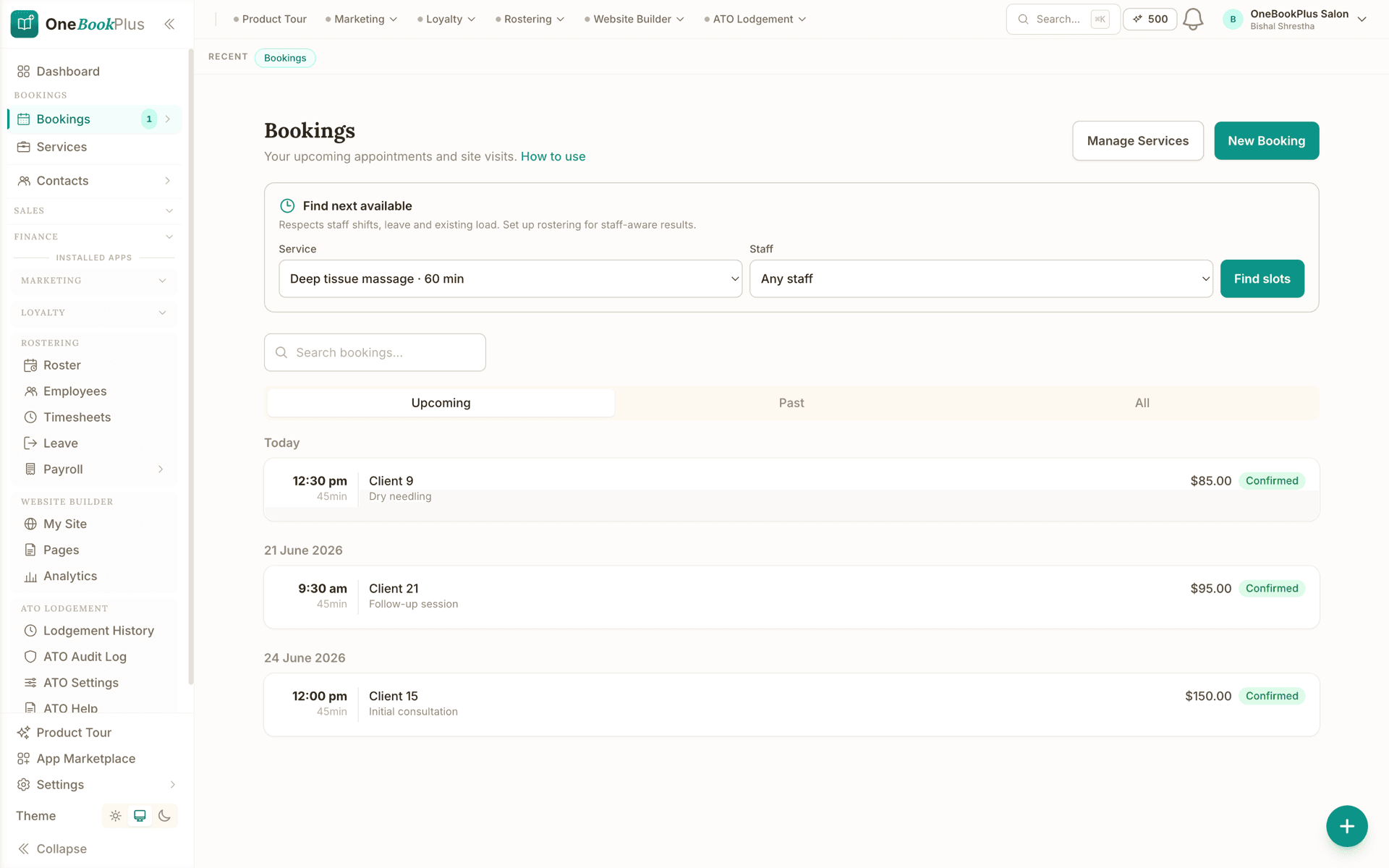
Every booking in one list
The bookings view across day and week ranges, who's booked, for what service, and what's still unconfirmed. Recurring bookings repeat on the schedule you set.
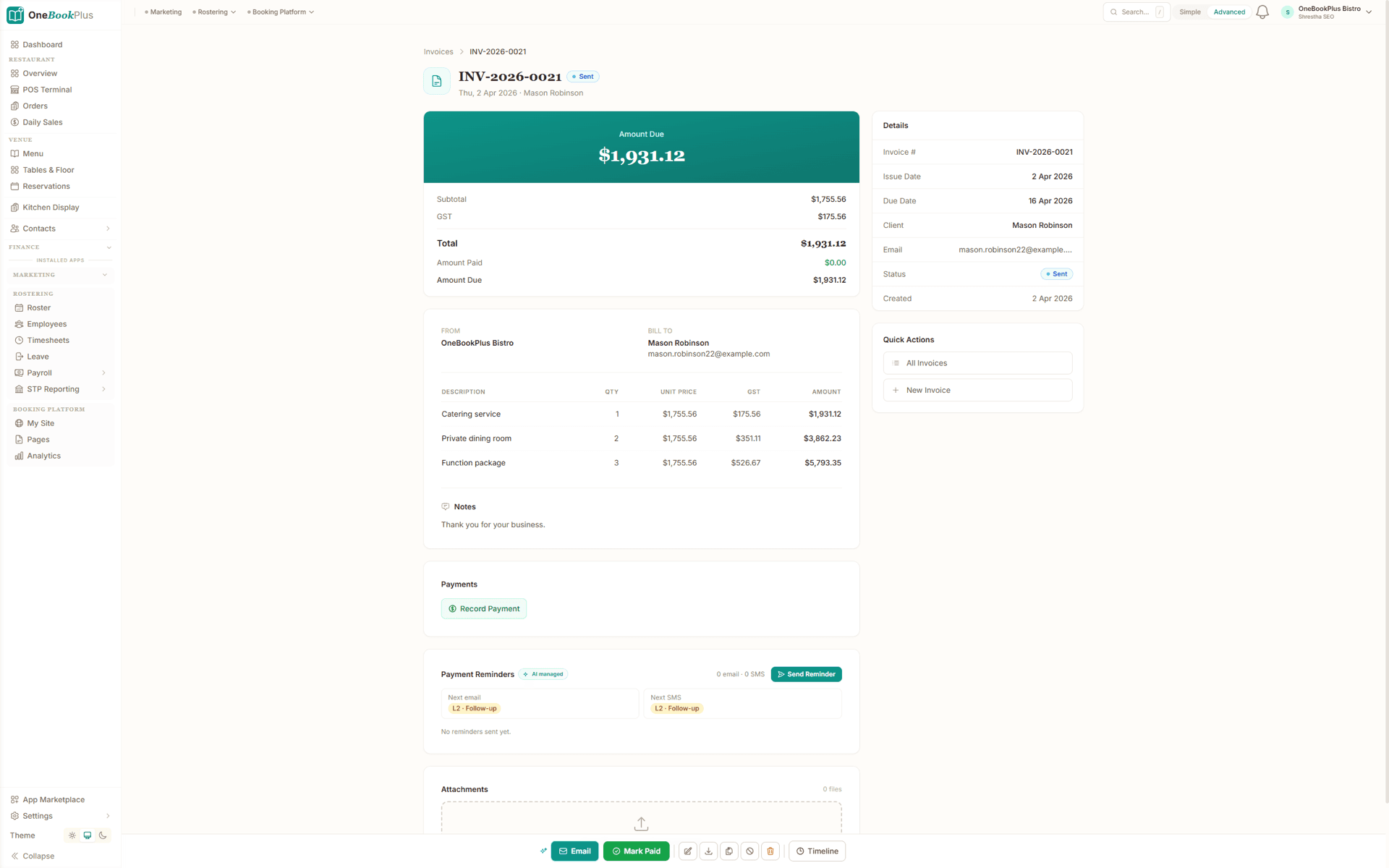
The invoice a booking becomes
A completed booking converts to this in one click: an ABN tax invoice with 10% GST calculated and a Stripe Pay Now link for payment.
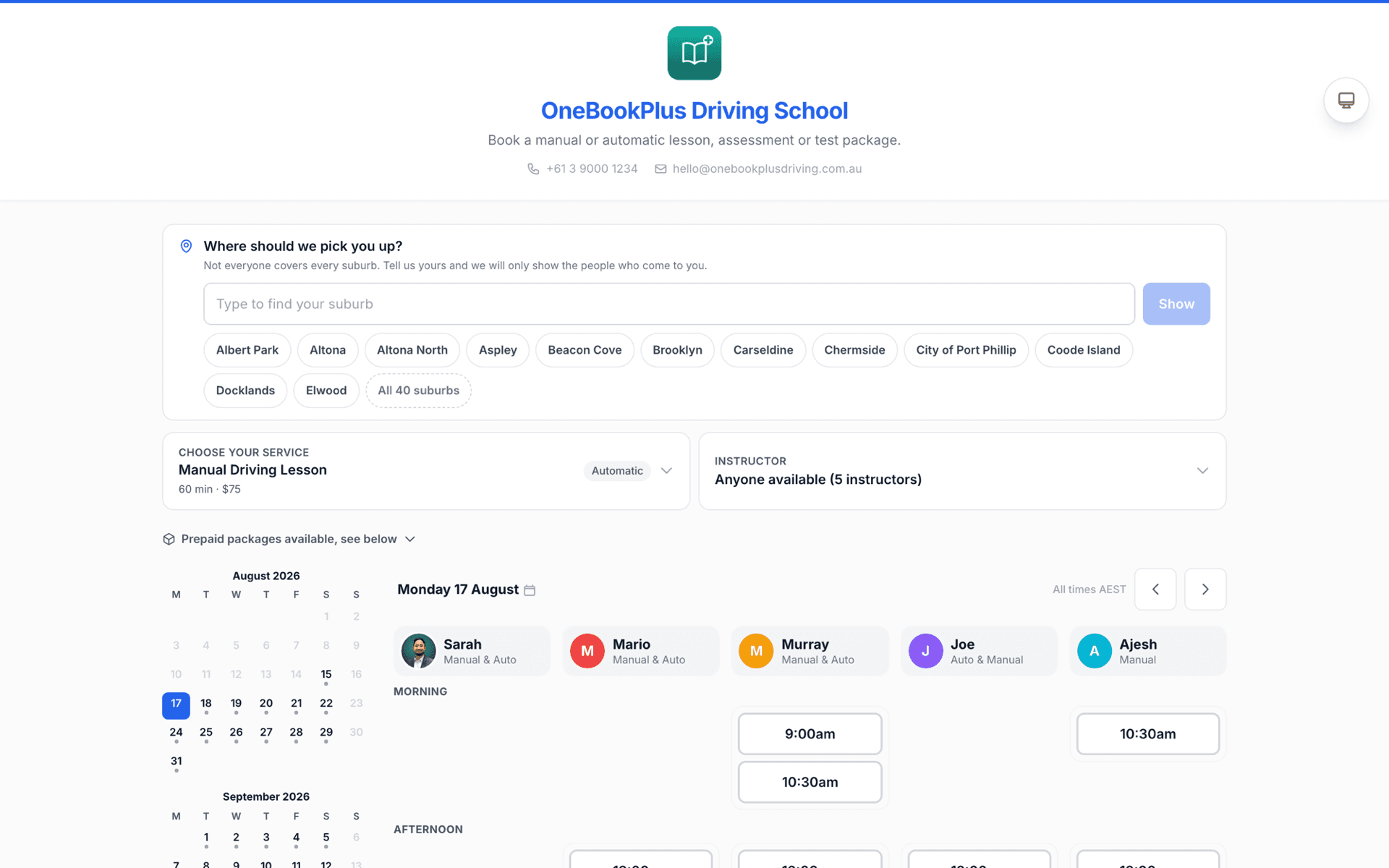
The booking page your customers see
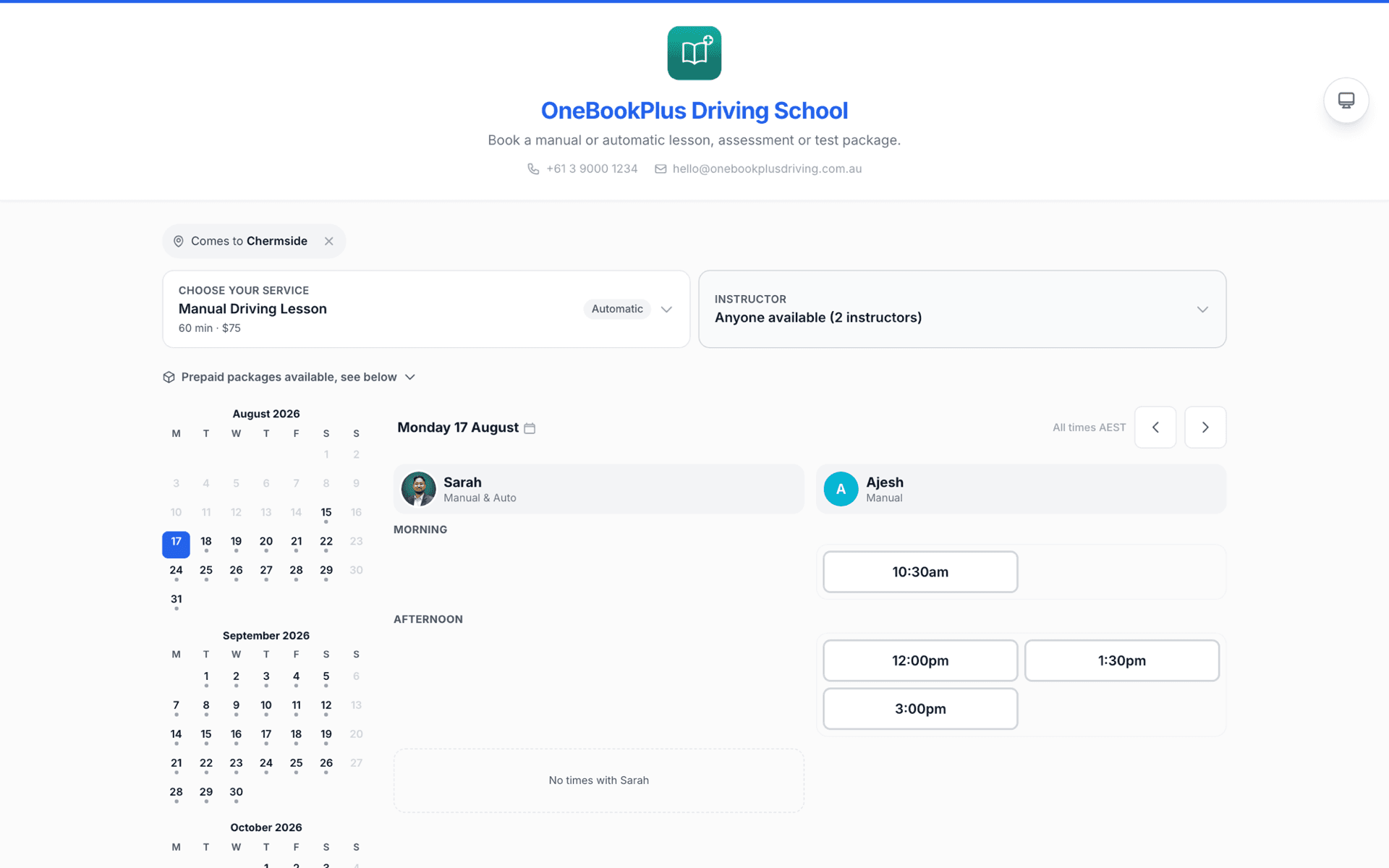
A live availability board with a column per staff member, a service menu with prices, and prepaid packages sold beneath the calendar. This is a real OneBookPlus booking page, not a mockup.
Serve the suburbs you choose
The customer types their suburb and the page narrows to the staff who actually cover it. Here the visitor picked one suburb and the page went from five staff to the two who travel there.
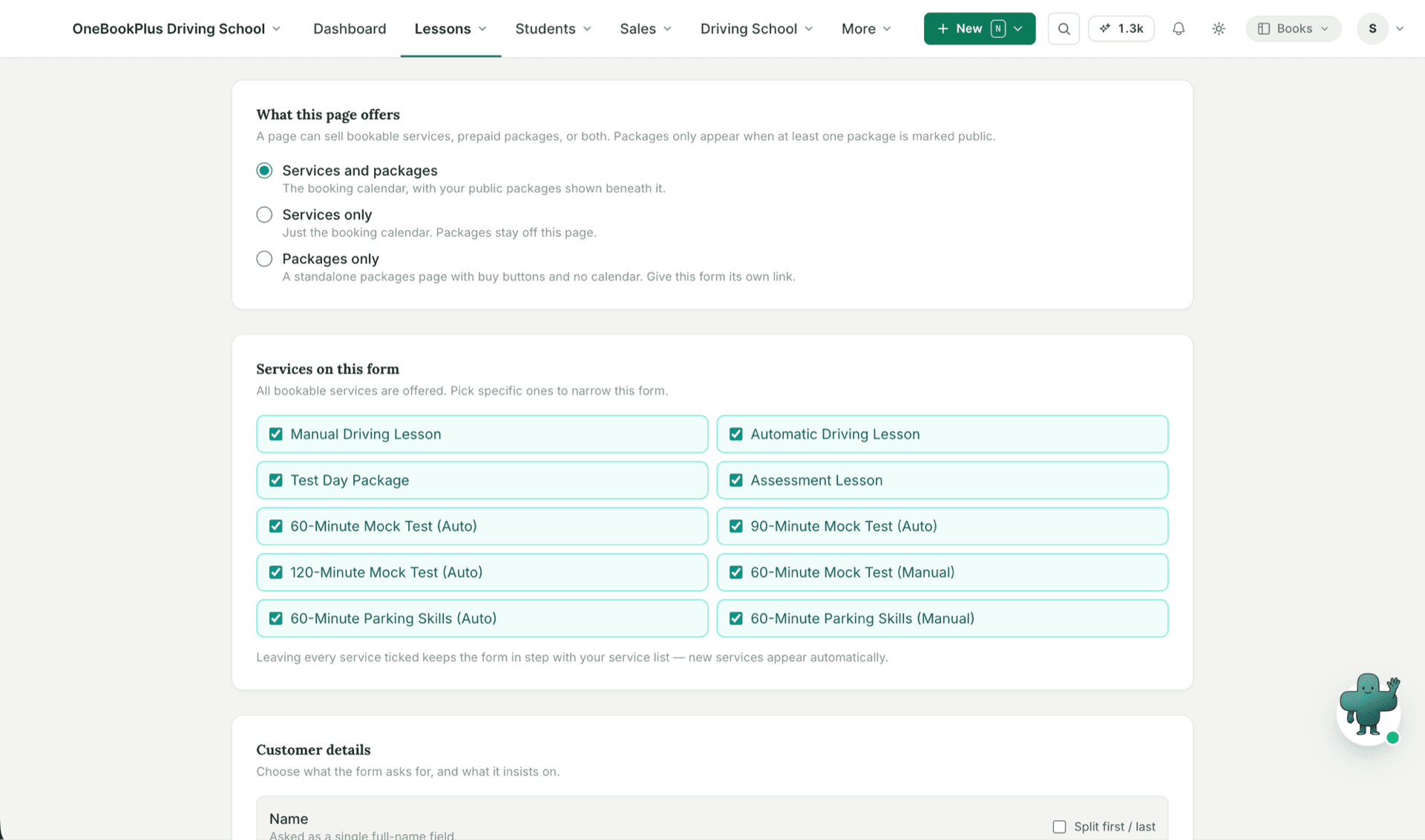
Choose what each page offers
Every booking page decides what it sells: bookable services, prepaid packages, or both. Set a page to packages only and it becomes a standalone packages page at its own link.
How we compare
Booking software compared: OneBookPlus vs Fresha, Calendly, and Mindbody
Standalone booking tools schedule the appointment, then stop. OneBookPlus carries the booking through to a paid, GST-ready invoice and keeps the customer in one CRM, so nothing is copy-pasted between systems.
| Feature | OneBookPlus | Fresha | Calendly | Mindbody |
|---|---|---|---|---|
| 24/7 self-service booking page | Yes | Yes | Yes | Yes |
| Pay by card on the invoice (Stripe) | Yes | Yes | No | Yes |
| Automated email reminders | Yes | Yes | Yes | Yes |
| Booking converts to an invoice in one click | Yes | No | No | No |
| Australian GST & ABN tax invoices | Yes | No | No | No |
| Built-in CRM (shared customer record) | Yes | No | No | Yes |
| Accounting & BAS in the same app | Yes | No | No | No |
| No marketplace / payment-processing margin | Yes | No | Yes | Yes |
| Price | Free, then from $29/mo | From $29.95/mo per bookable team member, plus fees | From US$10/mo per seat | From $89/mo per location |
Competitor prices verified 2 August 2026, each read from the vendor’s own pricing page. Fresha no longer has a free plan, only a 7-day trial. Calendly publishes in US dollars and is shown that way rather than converted. Mindbody charges per location, not per staff member.
Want the line-by-line detail? Read the OneBookPlus vs Fresha comparison for salons and studios, or the OneBookPlus vs Calendly comparison for appointment scheduling.
Example walkthrough
From booking to invoice to review, one unbroken thread
An illustrative walkthrough of a Tuesday at a two-chair salon
9:40pm, and the salon is closed. A new client opens your booking page, picks a balayage with the stylist she wants, sees the only free slot on Thursday at 11am, and confirms it herself. No phone call, no DM, no back-and-forth in the morning. The slot blocks instantly so nobody else can take it, and a contact for her is created in the CRM on the way through.
Thursday morning she gets an email reminder from the OneBookPlus sender, and she turns up. Your stylist adds a toner to the service on the day, and the booking converts to a tax invoice in one click: 10% GST calculated, your ABN on the document, and payment taken on card through Stripe.
That evening an automated review request goes out while the visit is still fresh. Because every booking, payment and contact sits in the one platform, the day's takings are already in your BAS-ready summary, with no export, no copy-paste and no second tool. The enquiry that arrived at 9:40pm is closed, paid, and now has a history you can rebook from.
Who it's for
Who is OneBookPlus booking software for?
Any Australian service business that lives and dies by the calendar, where a missed booking or a no-show is lost revenue you can't get back.
Salons & beauty
Per-stylist availability, service durations, and automatic reminders that cut no-shows. See the dedicated salon booking and invoicing setup.
Clinics & practitioners
Physio, allied health, and wellness bookings with reminders and intake, flowing straight into GST-ready invoices and the client record.
Trades & home services
Let customers book a quote visit or a service slot 24/7, and convert the booking to an invoice on completion.
Accommodation & venues
Take reservations and event bookings with instant confirmations, all reconciled into AUD invoicing and reporting.
Example walkthrough
And for trades: booking to paid invoice, no double-entry
The same thread on a job site, a single Thursday callout from booking page to reconciled payment.
9:14am. A new customer finds your booking page and reserves a Thursday 2pm slot. The booking lands on your calendar with their name, contact details, and the service already attached. No email tag, no double-entry.
Thursday 2pm. You do the work. From the booking, you tap "Create invoice". The customer, the service, and the price are pre-filled; 10% GST is added automatically and the document is a compliant ABN tax invoice. You adjust the line items if the job grew, then send.
Thursday 2:41pm. The invoice goes out with a Stripe payment link. The customer pays from their phone. The payment reconciles against the invoice, the contact's history updates, and the amount flows into your BAS-ready totals, all without you opening a second app or exporting a single CSV.
Setting up a booking page that fills the calendar
A booking page is only as good as the availability behind it. Before it goes live, three decisions do most of the work: which services you list (with a realistic duration for each, including the clean-up or travel time between appointments), whose calendar each service draws on, and which hours you genuinely want bookable. A page that shows every hour you are awake fills your week with awkward gaps; one that shows honest windows books back to back. Because OneBookPlus publishes your real-time availability, whatever you block out stays blocked, and a confirmed booking removes the slot for everyone else instantly.
No-shows are the other half of the setup. Automated reminders catch the honest forgetters, which in most service businesses is the bulk of them, and every booking arriving with a name, phone number, and email means the ones who do miss are contactable rather than anonymous. If a no-show costs you an hour you cannot resell, that alone decides whether a booking page pays for itself; the free hourly rate calculator puts a number on what that unsold hour should have earned.
The setup detail differs by trade. See how a hair and beauty salon runs per-stylist bookings, how driving schools manage lesson bookings and instructor calendars, or how massage therapists handle appointment admin. If you are weighing up a studio-focused tool, the OneBookPlus vs Mindbody comparison covers where each fits.
Australian Owned
Built in Melbourne, AU
GST Compliant
ATO-ready from day one
Encrypted & Isolated
TLS in transit, AES-256 at rest, tenant isolation at the database layer, read the security page
Free Plan Available
No credit card needed
Put your booking page to work.
Take bookings 24/7, cut no-shows with automatic reminders, and turn every booking into a paid invoice. Start free, no credit card required.
Last reviewed and updated: by Bishal Shrestha
About OneBookPlus booking software
What is booking software and how is it different from a calendar?
Booking software gives your customers a self-service page where they pick a service, choose an available time, and confirm, without you answering the phone. A calendar only records appointments after you've typed them in. OneBookPlus booking software shows your real-time availability publicly, takes the booking 24/7, blocks the slot instantly so there's no double-booking, and then carries that customer record through to invoicing and follow-up.
How do customers pay for a booking?
Every booking converts to an ABN-compliant tax invoice in one click, with a Stripe Pay Now link so the customer can pay by card. The payment reconciles against the invoice automatically and flows into your BAS-ready totals, without re-typing anything into a separate accounting tool.
Can I take a deposit at the time of booking, or sell prepaid packages?
Both. With card payments turned on and Stripe connected, each service can require full payment, a deposit, or nothing at booking, and the slot is only confirmed once the payment goes through, so an empty chair still earns you something if a paid booking is missed. Booking pages can also offer prepaid packages, either alongside your services or on a packages-only page at its own link. The customer reserves the pack online, choosing their preferred staff member at purchase or at each booking depending on how you set the pack up, and you confirm it and take payment the way you normally would.
Does it send appointment reminders?
Yes. Automated email reminders go out ahead of each appointment, sent from the "OneBookPlus" sender. They catch the honest forgetters and remove the manual confirmation calls from your day.
Is this online booking software suitable for Australian businesses?
Yes, it's built in Melbourne for the Australian market. Bookings flow into ABN-compliant tax invoices with 10% GST, payments settle in AUD via Stripe, times default to Australian timezones, and the customer-facing pages use Australian English. The same platform handles your accounting and CRM, so a booking isn't a dead end, it becomes a customer record, an invoice, and a review request.
How does booking software turn a booking into a paid job?
When a booking is confirmed it creates a customer in your CRM and, on completion, converts to an invoice in one click, without re-typing the customer's details into a separate accounting tool. After payment you can trigger an automated review request. That loop from booking to invoice to review request is the whole point: enquiries become paid jobs and repeat customers, not just diary entries.
How does OneBookPlus booking software compare to Fresha, Calendly, or Mindbody?
Calendly schedules meetings but has no invoicing as part of an Australian tax workflow, and no CRM. Fresha and Mindbody are strong booking tools for salons and studios but are standalone, your accounting still lives elsewhere, and Fresha monetises through payment processing and marketplace fees. OneBookPlus is one platform where booking, invoicing, GST/BAS, and CRM share a single customer database, so nothing is copy-pasted between systems. See the OneBookPlus vs Fresha and vs Calendly comparisons for the line-by-line breakdown.
What does the free plan include for bookings?
The Free plan is permanent rather than a trial: one booking page, 250 contacts, 10 invoices and 5 quotes a month, and one team member. That is enough to publish a booking page against your real availability and invoice the work that comes out of it. Paid tiers are Starter at $29 a month, Plus at $49 and Growth at $69, in AUD including GST, and each carries a 14-day trial with no credit card. If you do not continue, the account drops back to the Free plan rather than locking you out of your bookings.
Can I bring my existing customer list and bookings across?
Your customer list comes across as a CSV import, with column mapping and a duplicate check on the way in, so the contacts your bookings attach to are there on day one. Appointments already in another diary are best handled by overlapping: point your booking link at the new page for new bookings and let the old tool run out the ones it is already holding. There is no calendar import from another booking tool, so plan for a few weeks of overlap rather than a cutover on a Friday.
Where do I find the full booking feature detail?
This page is the overview of booking software as a category. For the complete product detail (availability rules, staff calendars, service catalogues, and reminders), open the OneBookPlus Booking feature page. If you also invoice off the back of bookings, the OneBookPlus Invoicing feature page covers the billing side of the same workflow.
About the author

Bishal Shrestha
Founder & CEO, OneBookPlus
Bishal spent a decade running digital projects for Australian small businesses before founding OneBookPlus. OneBookPlus is built and supported from Melbourne for Australian service businesses. This page covers booking software as a category; the OneBookPlus Booking feature page documents the product itself, availability, reminders, and the booking-to-invoice workflow.
Read the founder bio