Skip to content
Pricing
Try a live demo, it's freeBook a DemoSign InStart free

OneBookPlusAI Companion

An AI companion that runs the boring half of your business

AI Companion is a layer that sits over your OneBookPlus and acts on the follow-ups, nudges, and recaps you keep forgetting. It chases the overdue invoice, drafts the rebook SMS, asks the happy client for a review, and sends you a single 5pm recap so you can switch off. It is not a chatbot, there is nothing to type at.

$25/mo, 14-day free trial, included on Growth

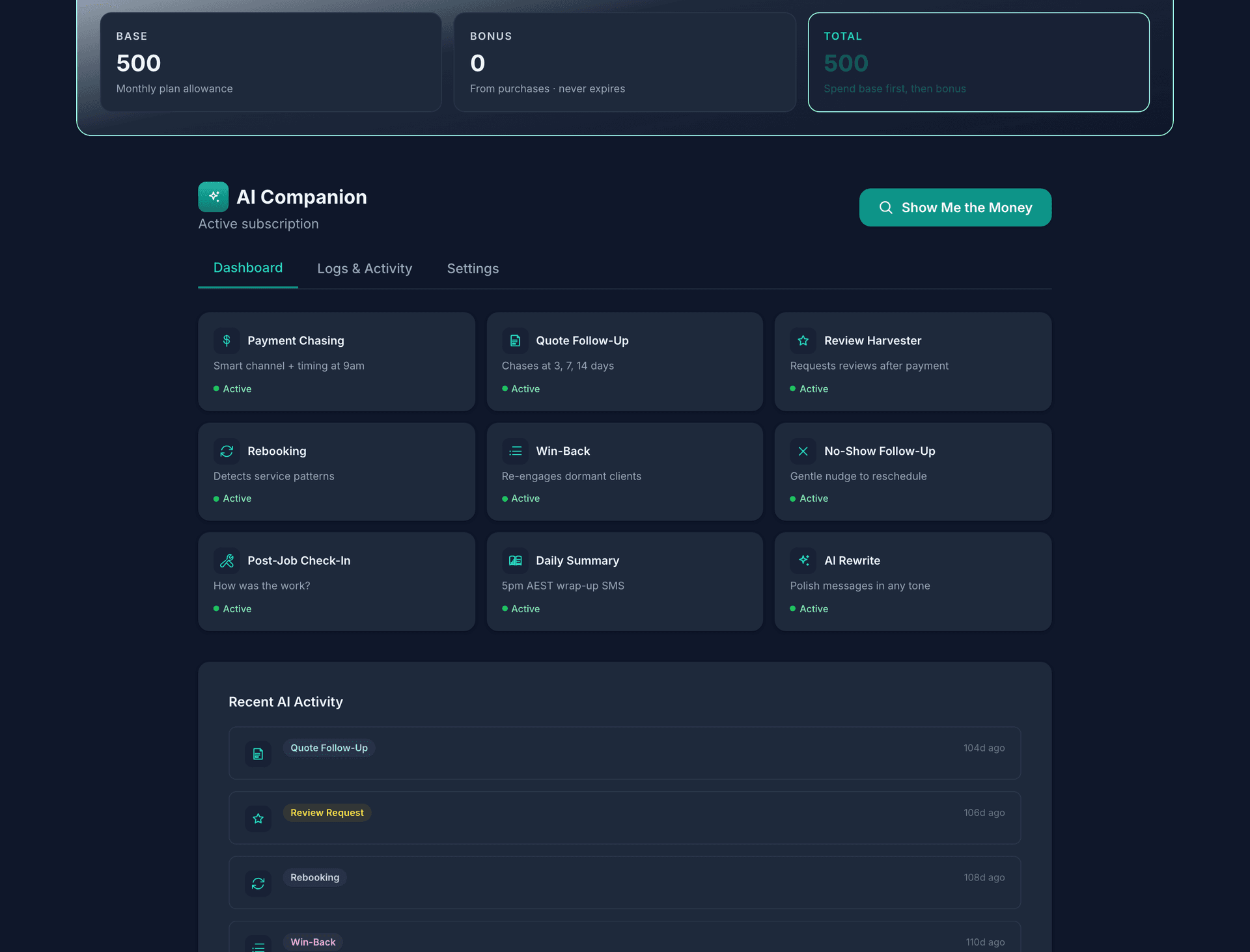
The AI Companion screen for OneBookPlus Bistro: the Base, Bonus and Total credit tiles along the top, the AI Companion heading with Active subscription and the Show Me the Money button, the Dashboard, Logs and Activity and Settings tabs, nine automation cards each marked Active from Payment Chasing to AI Rewrite, and the Recent AI Activity list underneath.
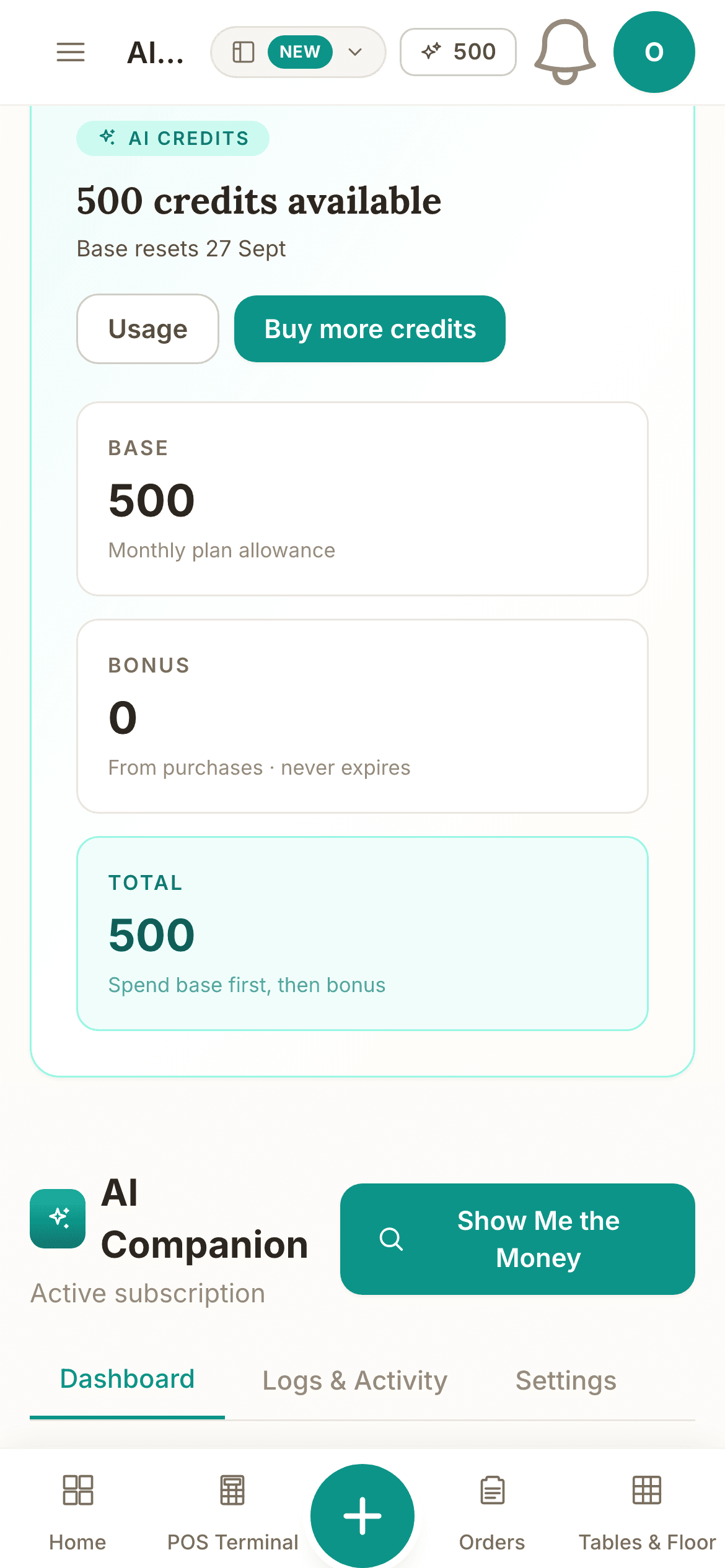
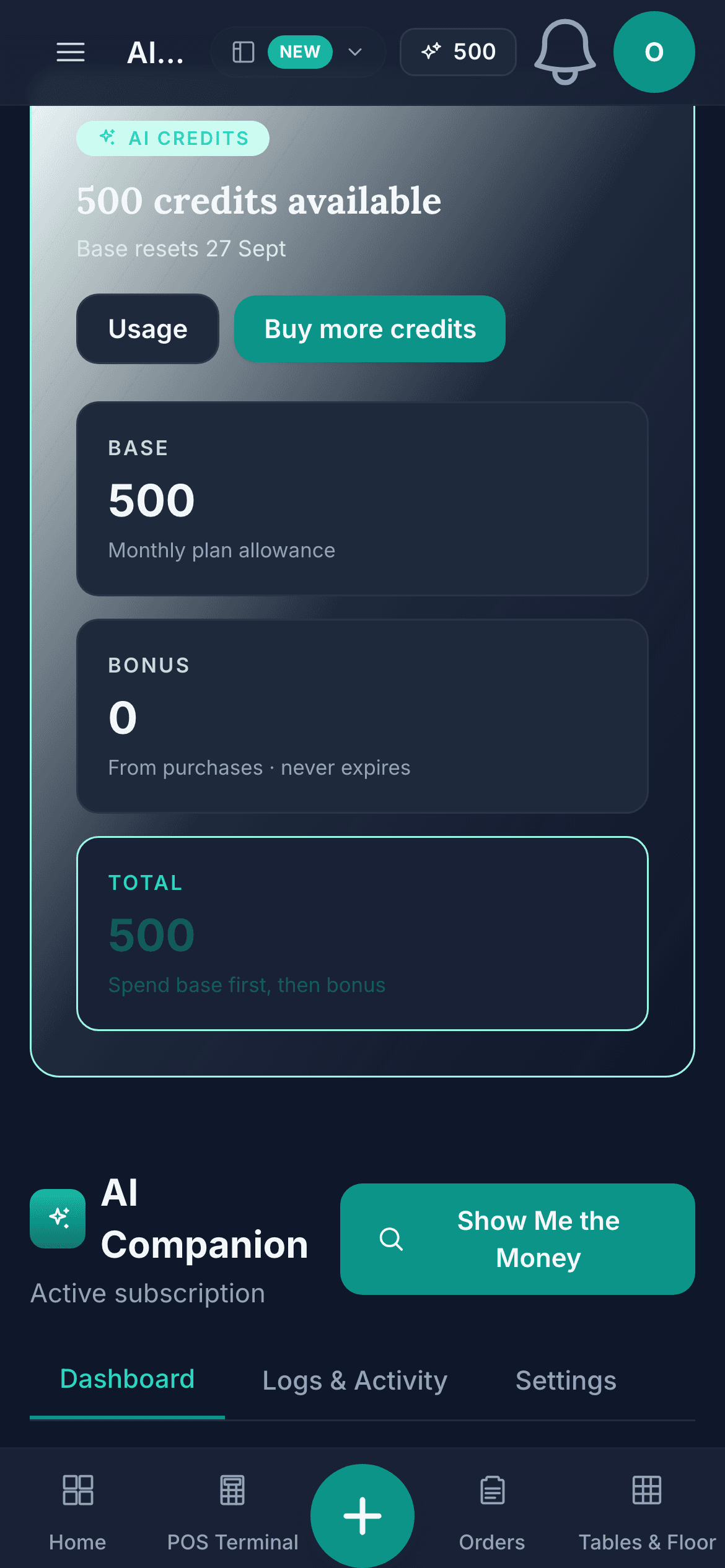
The AI Companion credits screen on a phone: the AI credits chip, 500 credits available with the date the base resets, the Usage and Buy more credits buttons, the Base, Bonus and Total tiles, then the AI Companion heading with the Show Me the Money button and the Dashboard, Logs and Activity and Settings tabs.

Demo account. OneBookPlus Bistro is a business we seeded to run like a working business; the screens are the product, the figures are sample data.

The tour

AI Companion, screen by screen

Nine automations, switched on once, working your book in the background.

Each one writes its own message from the record it is acting on and sends it on the channel that client answers. A payment chase reads: SMS to Karen at Brightwater Cafe: "Hi Karen, friendly reminder invoice #1042 ($840.00) was due Tue. Pay here: obp.au/p/x3k9, Casey"

  • Payment Chasing, Quote Follow-Up, Review Harvester, Rebooking, Win-Back, No-Show Follow-Up, Post-Job Check-In, Daily Summary and AI Rewrite, each marked Active
  • Quote Follow-Up chases at 3, 7 and 14 days; the Daily Summary is the 5pm AEST wrap-up SMS

    The line under each automation says when it runs.

  • Show Me the Money, the one-tap scan of the whole book, beside the AI Companion heading
  • Recent AI Activity lists every action with how long ago it ran, under the Dashboard, Logs & Activity and Settings tabs
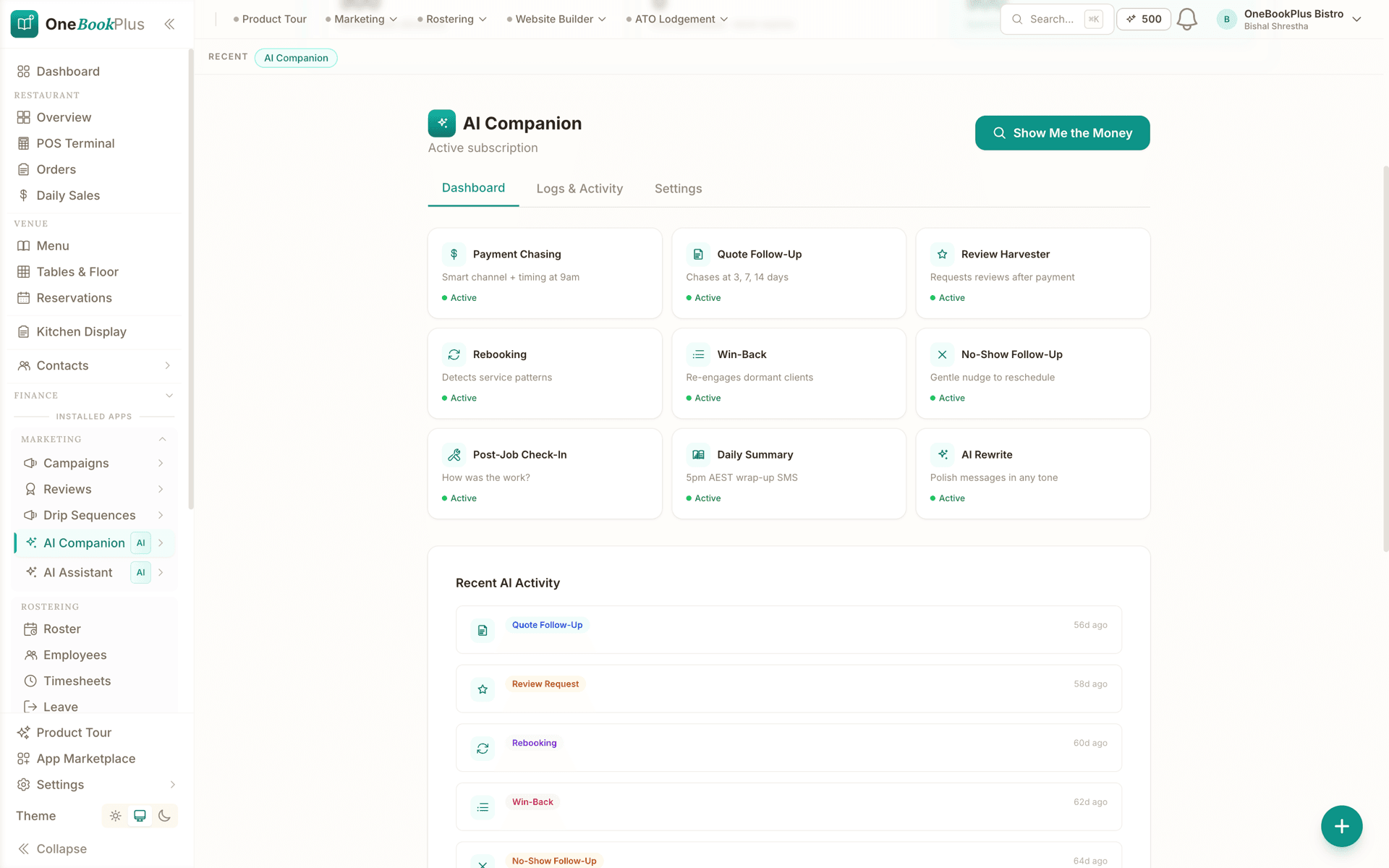
The AI Companion screen for OneBookPlus Bistro: the Base, Bonus and Total credit tiles along the top, the AI Companion heading with Active subscription and the Show Me the Money button, the Dashboard, Logs and Activity and Settings tabs, nine automation cards each marked Active from Payment Chasing to AI Rewrite, and the Recent AI Activity list underneath.
  1. Payment Chasing, Quote Follow-Up, Review Harvester, Rebooking, Win-Back, No-Show Follow-Up, Post-Job Check-In, Daily Summary and AI Rewrite, each marked Active
  2. Quote Follow-Up chases at 3, 7 and 14 days; the Daily Summary is the 5pm AEST wrap-up SMS
  3. Show Me the Money, the one-tap scan of the whole book, beside the AI Companion heading
  4. Recent AI Activity lists every action with how long ago it ran, under the Dashboard, Logs & Activity and Settings tabs

One tap scans the whole book for money on the table, and the everyday work draws no credits.

The scan reads: Found $4,820 in unbilled work (3 completed jobs without invoices). 2 quotes have been sitting >14 days ($6,150). Avg payment time 23 days, top quartile is 12.

  • Show Me the Money, the one-tap scan, at the top of the AI Companion screen
  • 500 credits available, split into Base, Bonus and Total, with the date the base resets

    Base is the monthly plan allowance; Bonus comes from purchases and never expires.

  • Usage and Buy more credits, one tap each
The AI Companion credits screen on a phone: the AI credits chip, 500 credits available with the date the base resets, the Usage and Buy more credits buttons, the Base, Bonus and Total tiles, then the AI Companion heading with the Show Me the Money button and the Dashboard, Logs and Activity and Settings tabs.

What it actually does

Eleven things it does for you today.

Every card below is something AI Companion does in your account now, not a plan for later.

End-of-day summary

Every weekday at 5pm AEST, an SMS recap of what your business actually did today and what's coming tomorrow, so you can stop scrolling the app at night.

Example

G'day Jaz. Today: $1,840 paid (3 invoices), 2 jobs completed, 1 new booking. Tomorrow: 4 jobs (first 8am, Smith, Mt Lawley). 2 invoices overdue $620, AI sent reminders.

TradiesCleanersSalonsHealth & WellnessAll SMBs

Smart payment chasing

Picks the right channel and tone for each overdue invoice, email first, SMS if ignored, both when it's late, using the escalation templates already in your account.

Example

SMS to Karen at Brightwater Cafe: "Hi Karen, friendly reminder invoice #1042 ($840.00) was due Tue. Pay here: obp.au/p/x3k9, Casey"

TradiesFreelancersProfessional ServicesAll SMBs

Quote follow-up

Unaccepted quotes get a personalised nudge at 3, 7, and 14 days, progressively more direct, never spammy, always referencing the actual quote.

Example

Hi Tom, checking in on quote Q-218 ($2,640) for the bathroom regrout. Happy to walk through anything or tweak the scope. Cheers, Nick.

TradiesCleanersProfessional Services

No-show follow-up

When a booking is marked no-show, a gentle reschedule message goes out within 24 hours, no awkward phone call, no lost client.

Example

Hi Mel, we missed you at your 2:30 appointment yesterday. No worries, here's a link to rebook a time that suits: obp.au/book/luxe-hair

SalonsHealth & WellnessFitnessEducation

Post-job follow-up

24-48 hours after a job is marked complete, a short "how'd we do?" message goes to the client, primes them for the review request that follows.

Example

Hi Priya, hope the kitchen's been working a treat since Tuesday. Anything we should come back and tighten up?, Dan, Coastline Plumbing

TradiesCleanersHome Services

Google review harvester

Two hours after an invoice clears, asks happy clients for a Google review, only if Google Business is connected, and only once per client every 90 days.

Example

Hi Sam, glad we got that sorted today. If you've got 30 seconds, a Google review really helps a small Aussie business: g.page/r/CXt..., Aaron

TradiesSalonsCleanersRestaurantsHealth & Wellness

Predictive rebooking

Detects each client's natural service interval from booking history and nudges them back through the door before they think to call.

Example

Hey Jess, it's been 5 weeks since your last colour and you're usually in every 6. Want me to lock in a Saturday? Tap: obp.au/book/luxe-hair

SalonsHealth & WellnessFitnessCleaners

Win-back

Spots clients who've gone quiet for 60+ days and sends a single, personalised re-engagement message, with a 90-day cooldown so nobody gets pestered.

Example

Hi Liam, haven't seen you at the studio since March, we've added Saturday morning Pilates if that suits better. First class on us: obp.au/book/...

SalonsFitnessHealth & WellnessRestaurants

Insight scan

A one-tap scan of your whole book that surfaces the money on the table: unbilled jobs, overdue revenue, dormant clients, aging quotes, and where you can speed up payment.

Example

Found $4,820 in unbilled work (3 completed jobs without invoices). 2 quotes have been sitting >14 days ($6,150). Avg payment time 23 days, top quartile is 12.

All SMBs

Communication assistant

Rewrites client messages in the tone you choose, professional, friendly, firm, casual, or apologetic, without changing what you meant.

Example

You wrote: "need invoice paid asap" → Polished: "Hi Karen, just a quick nudge on invoice #1042, would really appreciate getting that across the line this week."

All SMBs

Per-tenant learnings

Quietly records which channels, timings, and tones actually work for your business and feeds that back into every other AI action, so it gets smarter the more you use it.

Example

Learning recorded: Brightwater Cafe pays 70% faster on Monday SMS than Friday email. Future chases will prefer Monday SMS for this client.

All SMBs
How it's different from a chatbot

Task-driven, not Q&A

A chatbot

Waits for you to type

You open a window, ask it a question, copy the answer somewhere else, and act on it yourself. If you forget to ask, nothing happens. The work still lives on your shoulders.

AI Companion

Watches your book and acts

It already knows there's an overdue invoice on Karen, a no-show on Mel, an unaccepted quote on Tom, and a completed job on Priya. It drafts the right message for each, picks the right channel, sends it, logs it, and tells you what it did.

You don't prompt AI Companion. You install it, give it permission to send on your behalf, and it works the same hours your business does. Every message it sends is logged in the AI activity feed in your dashboard, nothing goes out invisibly.

Privacy & data

We're upfront about how this works

Model used

Message drafting and recaps call Claude Haiku 4.5 (Anthropic) via the generateAiText helper in our AI Companion engine, with prompt caching on the system prompt so repeated calls within the same action stay fast and cheap.

Data residency

Your OneBookPlus tenant data, bookings, invoices, quotes, contacts, jobs, is stored in AWS Sydney (ap-southeast-2) via Supabase. AI calls are sent over TLS to the model provider and are not used to train the model.

Audit trail

Every action AI Companion takes is logged to your AI activity log with the recipient, channel, and a preview of what was sent. Nothing is invisible.

Opt-out

AI Companion is opt-in: it only runs once you install it from the App Marketplace. A per-feature toggle UI (e.g. switch off the review harvester but keep payment chasing) is on the roadmap. Today you can uninstall the app to switch everything off.

What's on which plan

AI Companion on each plan

  • Free

    $0/mo

    AI Companion
    $25/mo app
    Payment chases, follow-ups, review requests, the daily summary and the AI assistant
    Included, no credits counted
    Credits for Website Builder images, site plans and themes
    500 a month
  • Starter

    $29/mo

    AI Companion
    $25/mo app
    Payment chases, follow-ups, review requests, the daily summary and the AI assistant
    Included, no credits counted
    Credits for Website Builder images, site plans and themes
    500 a month
  • Plus

    $49/mo

    AI Companion
    $25/mo app
    Payment chases, follow-ups, review requests, the daily summary and the AI assistant
    Included, no credits counted
    Credits for Website Builder images, site plans and themes
    500 a month
  • Growth

    $69/mo

    AI Companion
    Included
    Payment chases, follow-ups, review requests, the daily summary and the AI assistant
    Included, no credits counted
    Credits for Website Builder images, site plans and themes
    500 a month

$25/mo, everyday AI included

The everyday work, chasing payments, following up quotes, harvesting reviews, win-back, your daily summary, and the in-app AI assistant, is included and unlimited. No credits counted. Credits only apply to heavy creative generation in the Website Builder, and the $25/mo plan includes 500 of them each month. A 14-day free trial, then $25/mo, cancel anytime.

Included, unlimited

0 credits

Payment chases, quote follow-ups, review requests, win-back, no-show + post-job follow-ups, daily summary, and the AI assistant.

Lighter creative

1 to 8 credits

Website Builder block rewrite, SEO suggestions, alt text, receipt scan, page translation per locale.

Heavy creative

10 to 40 credits

Image generation, branded share-card, a full AI-built website plan, a complete theme from a prompt.

Run out before the month resets? Top up any time with bonus credit packs from $5 / 100 credits up to $300 / 10,000 credits. Bonus credits never expire and stack on top of your monthly allowance.

AI Companion is included free on the Growth plan. On the Free, Starter and Plus plans it's a $25/mo App Marketplace add-on. New tenants get a 100-credit bonus on first install in addition to the $25/mo plan allowance.

See the full pricing page

FAQ

About AI Companion

Is this just a chatbot?

No. AI Companion is task-driven, not Q&A. It watches the bookings, invoices, quotes and jobs already moving through your OneBookPlus and acts on them, chasing payment, asking for a review, recapping the day. You don't type prompts at it; it just does the boring half of the job.

What data does the AI see?

Only the data inside your OneBookPlus tenant, bookings, invoices, quotes, jobs, contacts, and the message history those generate. It doesn't see other tenants' data, and it doesn't see anything from outside your account. Tenant data is hosted in AWS Sydney (ap-southeast-2) via Supabase.

Which AI model is used?

AI Companion calls Claude Haiku 4.5 (Anthropic) for message drafting and recap generation. Prompts are sent over TLS, not used to train the model, and your tenant data lives in AWS Sydney.

What's the difference between this and templated automation in MeMate?

Templated automation sends the same message every time. AI Companion writes the message for the specific client, references the specific invoice or quote, picks the channel based on what's worked before for that client, and learns which timings actually get paid faster. Same intent, different ceiling.

Can I turn individual features off?

Each feature is opt-in per cron job. A full per-feature toggle UI under Settings is on the roadmap, for now, contact support to disable specific features if needed.

How much does AI Companion cost?

AI Companion is included free on the Growth plan. On the Free, Starter and Plus plans it is a $25/mo App Marketplace add-on with a 14-day free trial. It includes 500 AI credits for Website Builder image, site-plan and theme generation, everyday automations, daily summaries and the AI assistant are unlimited and don't draw credits. Run out and you can top up from $5 per 100 credits; bonus credits never expire.

Hand the boring half over.

Install AI Companion from the App Marketplace inside your OneBookPlus dashboard. 14 days free, then $25/mo a month, and it is included on the Growth plan.