Job management software for Australian trades and service businesses
Quote on site, schedule the week, track every job with photos and checklists, then batch-invoice with GST handled. One system instead of a whiteboard, a diary and a separate accounting subscription.
Free plan, not a trial. No per-job caps on any plan. Built in Melbourne.
Watch it done
Watch a job run, start to finish
The film follows one job from the enquiry to the payment. The how-to shows the job day on its own: the schedule, the text to the customer and the timer.
What is job management software?
Job management software runs a trade or service business's work from first enquiry to final payment. It builds the quote, turns the accepted quote into a scheduled job, assigns that job to someone, holds the photos, notes, checklist and variations from site, then turns the finished work into a GST tax invoice and chases the payment. Australian businesses use it to replace the whiteboard, the paper job card and the spreadsheet only one person understands.
The category is sold under several names. Some vendors say job management system, some say job management app, some say job management platform, and the roundups comparing job management systems and job management apps mostly list the same products. The distinction that matters is not the noun: it is whether the tool stops at the job. Most do, and hand your books to Xero or MYOB. OneBookPlus keeps going, so a paid job flows straight into BAS-ready accounting, alongside your online bookings and customer marketing. That is the practical difference between a job tracker and all-in-one business software.
What to look for in a job management system
Six checks that separate a job management tool you will still be using in a year from one you will quietly stop opening. Apply them to us as hard as to anyone else.
One record from quote to invoice
The quote you sent should become the job you schedule and the invoice you send, carrying its line items, quantities and GST the whole way. If the tool makes you re-key the scope at every stage, it is three tools wearing a trench coat.
It has to work from the ute
Most job admin dies in the gap between finishing on site and sitting at a desk. Check that the job card, the photos, the checklist and the invoice all work on a phone, not just the quoting screen.
GST invoicing built in, not bolted on
An Australian job ends in a tax invoice with 10% GST and your ABN on it. Tools that hand invoicing and the books to Xero or MYOB are asking you to run and reconcile a second subscription forever.
Repeat work that repeats itself
Service rounds, maintenance contracts and fortnightly visits are most of the revenue in a lot of trades. Recurring jobs should create themselves, assign themselves and stop when the contract does.
Pricing that survives a busy month
Several job management tools meter you by job or by user, so the better your quarter goes the more you pay. Read the caps before the feature list, because that is the number that changes.
Costing at the job, not just the business
A profit and loss tells you the year was fine. Job costing tells you which work was worth doing. Look for labour and materials recorded against the job so margin is a number, not a hunch.
If you would rather read a shortlist than a checklist, the roundup of the best job management software in Australia compares the main options side by side.
How it works end to end: quote, schedule, job, invoice, paid
One record moves through the whole lifecycle. The quote becomes the job, the job becomes the invoice, and nothing gets re-typed on the way through.
1. Quote the work
Build an itemised quote with GST calculated as you go, from the office or from the driveway on the quick-quote form. Send it with an online accept button and watch it move through Sent, Viewed and Accepted instead of guessing.
2. Schedule it into the week
Acceptance drafts a job linked to the quote, with the customer and the priced scope already on it. Drop the job onto the calendar in month, week or day view, assign it, and each person gets their daily run sheet.
3. Run the job from your phone
On site the job card carries the customer, the site details, the notes and the checklist. Attach before-and-after photos and record variations while you are standing there, not from memory at 9pm.
4. Invoice one job or a whole day
Turn a completed job into a GST tax invoice in one click, or select the day's finished jobs and batch-invoice them together. Every invoice carries your ABN, your numbering format and a pay-online link.
5. Get paid, then check the margin
Payments land against the invoice and automated reminders chase what is overdue. The job costing report then puts labour and materials cost against billed revenue, with the margin colour-coded per job.
What's in the job management app
Everything below is shipped and in the product today, on the web app and in the field.
Job pipeline board
Every job on one drag-and-drop board, moving from quote to scheduled to invoiced to paid. Move a card and the status updates for the team, the invoice and the customer's history at once.
Quotes that become jobs
Send a quote for one-click online acceptance and get an in-app and SMS alert the moment it lands. Acceptance drafts the linked job automatically, with the priced scope carried across.
The week's calendar and run sheets
Month, week and day views with drag-to-reschedule at 15-minute precision, colour-coded statuses and priority markers. Today and tomorrow views plus daily run sheets keep the field crew pointed at the right address.
Recurring jobs
Set work to repeat weekly, fortnightly or monthly and the next job creates itself ahead of time, auto-assigns to the right person, and stops after a set number of runs when the contract ends.
Photos, checklists and variations
Attach before-and-after photos to the job card, work through the per-job checklist, and log variations on site so the final invoice matches what was actually done rather than what was originally quoted.
Batch invoicing with GST
Select every completed job for a day, a week or a customer and invoice them in one pass. Each one is a GST-compliant tax invoice with your ABN and a pay-online link, and overdue ones chase themselves.
Job costing and margin
The job costing report puts labour and materials cost against billed revenue for each job, with margin colour-coded red, amber or green, so the work that quietly loses money stops being invisible.
The job management app on your phone
A native iOS app for iPhone and iPad, and the web app in any mobile browser on Android. Run sheet, job card, photos, checklist and invoice all work from site. There is no native Android app yet.
The screens a job moves through
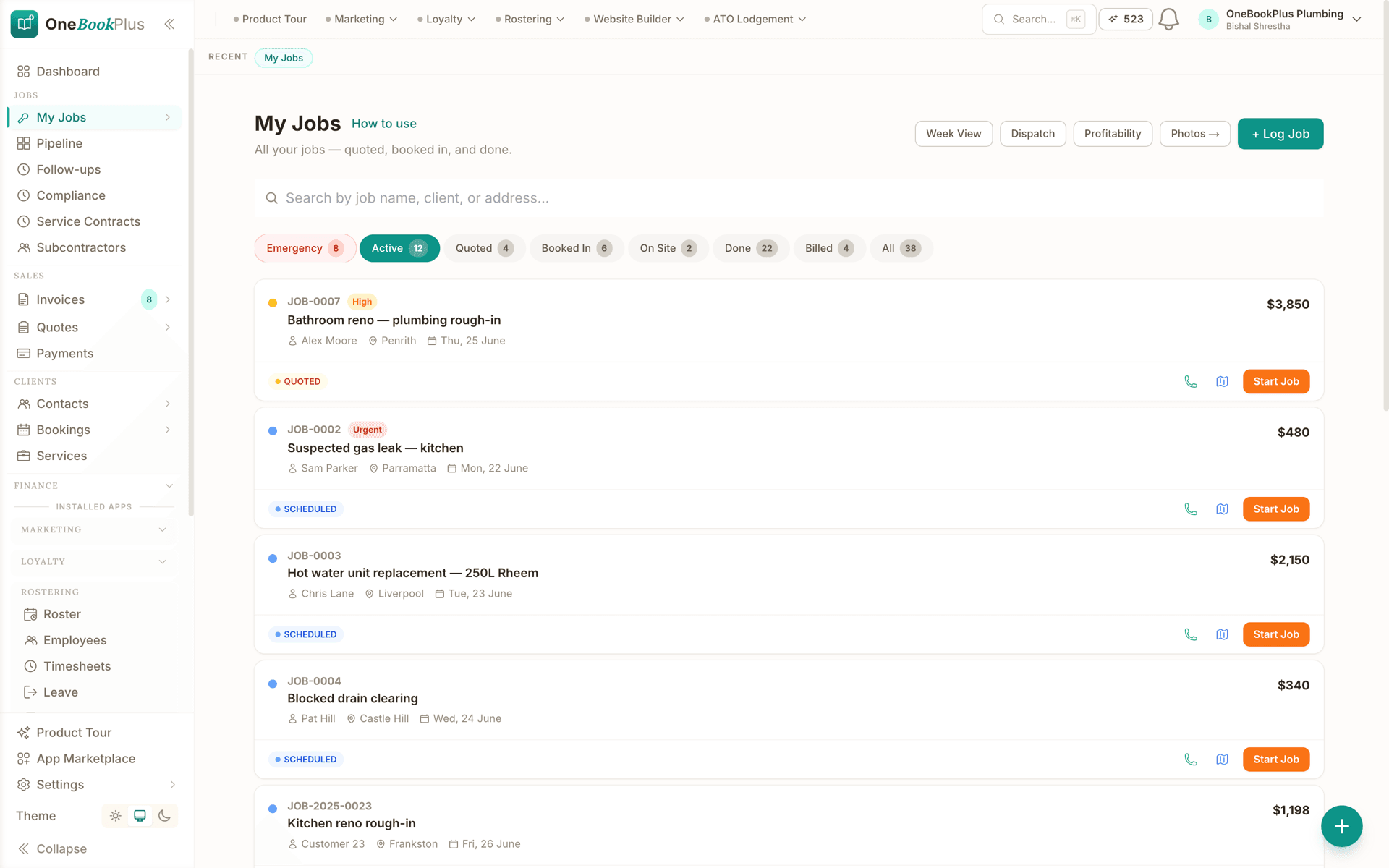
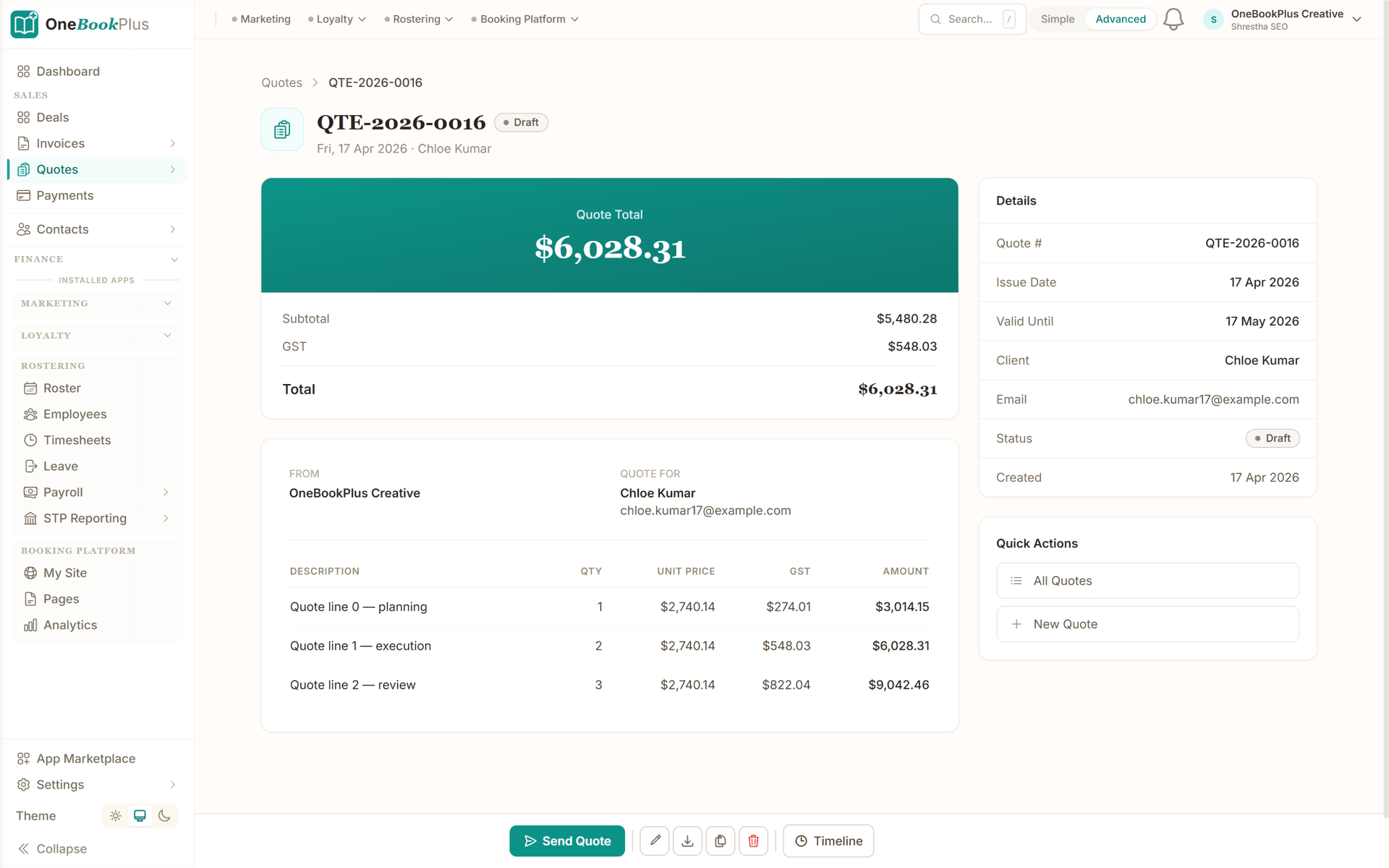
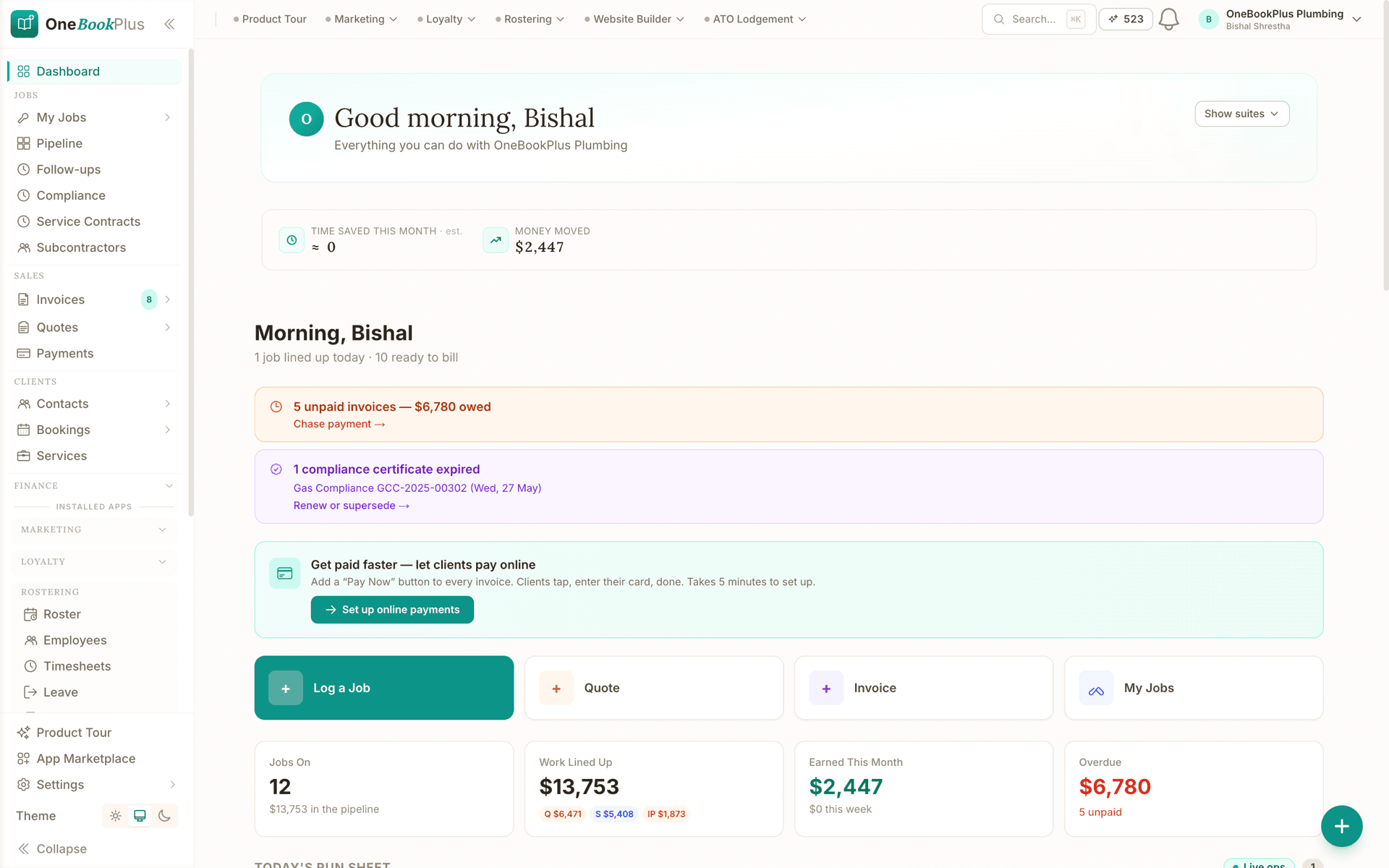
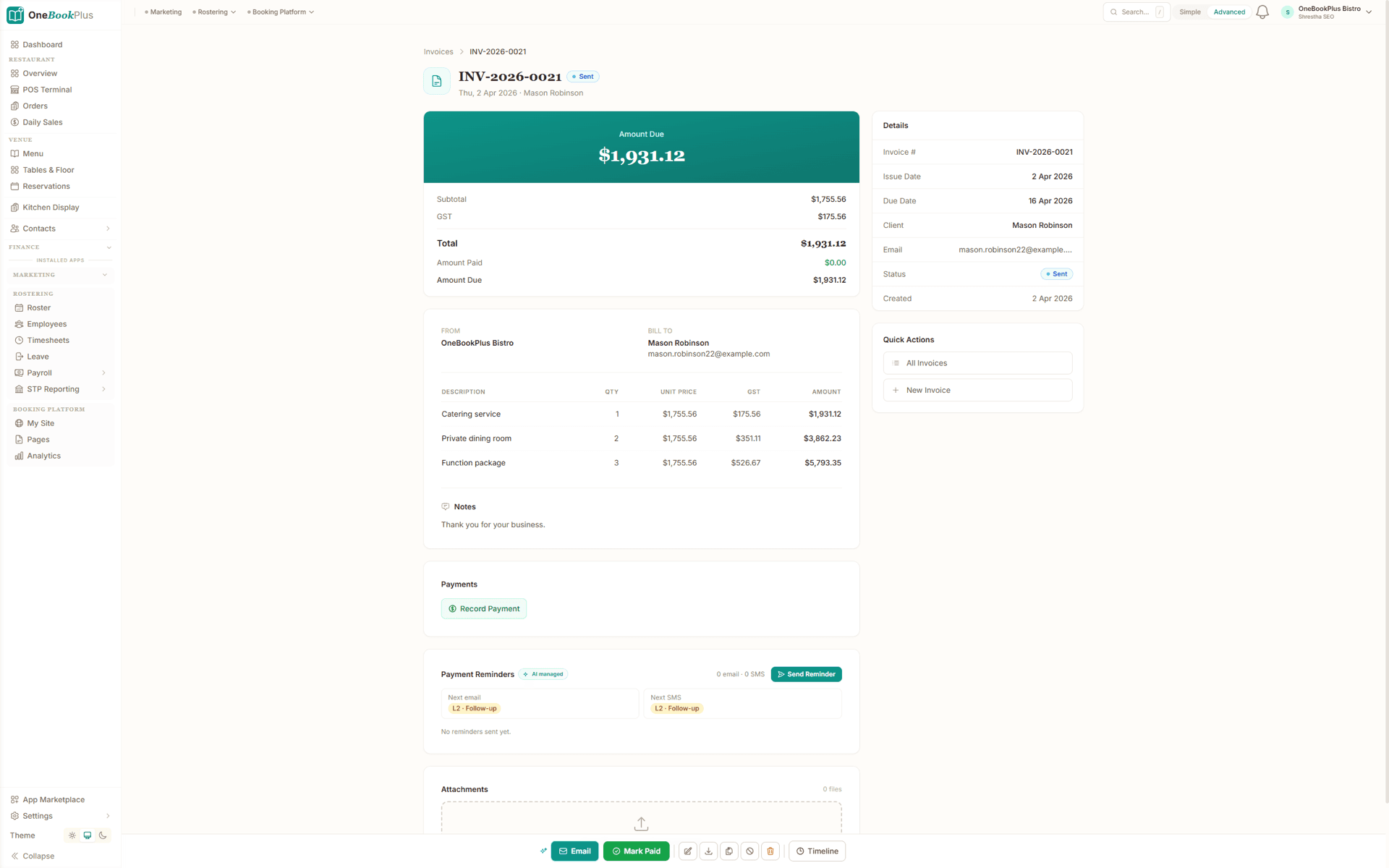
Screenshots captured from OneBookPlus itself: the job pipeline, the quote that starts it, the day's jobs on a trades dashboard, and the tax invoice it ends as.
Jobs on a drag-and-drop pipeline
Every job from quote to paid on one board. Drag a card between lanes and the status updates for the whole team, the invoice and the customer's history.
A quote ready for online acceptance
Line items, GST and an accept button the client can hit from their phone. Acceptance drafts the linked job with the priced scope already carried across.
Today's jobs on a trades dashboard
The trades layout leads with today's scheduled jobs and any variations still waiting on approval, plus revenue in and what is outstanding.
A GST tax invoice with a pay-online link
The finished job becomes a branded tax invoice with your ABN, 10% GST and a payment link, raised one at a time or batched at the end of the day.
Knowing where every job is, without ringing around
Most businesses do not lose jobs, they lose track of them. The quote went out three weeks ago and nobody knows if it was read. The job was finished on Thursday and nobody has invoiced it. Job tracking software fixes that by making status a property of the record rather than something someone has to remember and repeat on the phone.
In OneBookPlus every job sits on a drag-and-drop board with its current lane visible at a glance, from quoted through scheduled and in progress to invoiced and paid. The same statuses colour-code the calendar, with priority markers so urgent work stands out, and the crew's on-the-way and arrived check-ins move the job along as the day runs. Quotes carry their own status trail as well, from Sent to Viewed to Accepted, so following up is reading a list instead of scrolling your sent mail.
Because a job always belongs to a contact, tracking works from the customer's side too. Open the client in the OneBookPlus CRM and every quote, job, invoice and payment for them reads as one timeline, with total invoiced, amount paid and outstanding balance on the same screen. That is the question a job tracker has to answer when the phone rings: what have we done for these people, and do they still owe us for it?
The job card replaces the paper job sheet
A paper job sheet has one job: get the details to site and the record back to the office. It usually fails at the second half. It lives on the dash, gets rained on, comes back on Friday, and someone types it up on Sunday from handwriting nobody can read. The digital job card is the same document with the return trip removed.
Open a job in OneBookPlus and it carries the customer and site details, the priced scope brought across from the quote, your private notes, the checklist for that type of work, before-and-after photos, and any variations logged while you were standing there. It is linked backwards to the quote it came from and forwards to the invoice it becomes, so nothing has to be re-entered to close the loop.
Allocating the work is the other half. Every job can be assigned to a team member, so each person sees only their own day and gets a daily run sheet for it, and unassigned work is visible rather than sitting in someone's inbox. When somebody calls in sick or the weather moves a site, jobs can be reassigned and rescheduled in bulk instead of one phone call at a time, and OneBookPlus warns you when the same person has been double-booked before the day breaks.
Recurring work is where the system earns its keep
A one-off job forgives loose admin, because you only have to remember it once. Maintenance rounds do not. A fortnightly commercial clean, a quarterly filter service or an annual test-and-tag round is the same job repeated until the contract ends, and every repeat is another chance to miss the visit, skip the invoice, or let the price sit below what the work now costs. In OneBookPlus, recurring jobs create themselves ahead of time on the schedule you set, assign themselves to the right person, and stop after a set number of runs when the contract does, so the round lives on the calendar rather than in someone's memory.
The billing side compounds the same way. Batch invoicing turns a week of completed rounds into GST tax invoices in one pass, and automated reminders chase the stragglers, which matters on contract work where the same customer paying a fortnight late every cycle is quietly using you as a line of credit. The free late payment interest calculator shows what that habit costs across a year.
Repeat work also deserves a re-price more often than it gets one. Because the job costing report puts labour and materials against billed revenue for every visit, a round quoted two years ago shows its real margin today instead of the margin you remember agreeing to. When it is time to re-quote, the free tradie quote calculator builds the price up from labour, materials and margin, the markup and margin calculator keeps those two figures from being confused, and the hourly rate calculator checks what an hour of your time has to earn before any of it is profit.
OneBookPlus vs ServiceM8, Tradify and MeMate
The three names Australian trade businesses shortlist most often, against the checks that decide the monthly bill.
| Feature | OneBookPlus | ServiceM8 | Tradify | MeMate |
|---|---|---|---|---|
| Quote to job to invoice pipeline | ||||
| Ongoing free plan | Yes, permanent, unlimited jobs | Yes, 30 jobs/mo | Trial only | Trial only |
| No per-job caps on any plan | ||||
| Accounting and BAS reports built in | Via Xero/MYOB | Via Xero/MYOB | Not documented | |
| Customer-facing online booking page | Booking forms | Not documented | ||
| Australian bank feeds and reconciliation | Withdrawn while we replace the provider | Not documented | ||
| Email and SMS marketing in the same app | Not documented | Not documented | ||
| Native mobile app | iOS + mobile web | iOS + Android | iOS + Android | Not documented |
| Pricing | $0 free, $29-$69/mo | Free-$349/mo, job-capped | $48 to $62/user/mo | From A$99.85/mo |
Sources, ServiceM8 checked 2 August 2026 and Tradify 2 August 2026, MeMate July 2026: servicem8.com/au/pricing, tradifyhq.com/au/pricing, memate.com.au/pricing. OneBookPlus prices are AUD and include GST. "Not documented" means the capability is not described on the vendor's public pages, not that it is absent. Row-by-row cited breakdowns are on the ServiceM8 comparison, Tradify comparison and MeMate comparison.
What job management software costs in Australia
The headline price is rarely the price. Two things move it: whether the tool meters you by job or by user, and whether you still need a separate accounting subscription behind it. A job app from $29/mo plus Xero from $37/mo is a $66/mo month, and it is two systems to keep agreeing with each other.
OneBookPlus is $0 on the Free plan, $29/month on Starter, $49/month on Plus and $69/month on Growth, in AUD including GST, with a 14-day trial on the paid tiers and no credit card needed to start. The accounting, BAS reporting, booking page and customer marketing are in the same subscription, so there is no second bill and no sync to babysit. No plan carries a per-job cap, which matters most in the quarter you were hoping to have.
The Free plan is a permanent plan rather than a trial. Jobs and one-off bookings are not capped, and the limits that do apply are on volume rather than on which modules you are allowed to open: 10 invoices and 5 quotes a month, 250 contacts, one booking page and one team member. It is enough to run a small week end to end and decide honestly. For comparison, ServiceM8's free tier caps you at 30 jobs a month and accounting still needs a paid Xero or MYOB subscription beside it; Tradify and MeMate list trials rather than an ongoing free plan.
Tier by tier detail is on the OneBookPlus pricing page, or you can create a free account and run your first job through it today.
Trade job management software, by trade
The lifecycle is the same everywhere. The certificates, the pricing habits and the job types are not. Each page below covers one trade's actual week.
Longer contract work is a different shape: stages, a schedule of values, variations, retention and progress claims rather than a job that starts and finishes in a day. That has its own page on construction project management software.
If the part you are really shopping for is the pricing, not the scheduling, see estimating software for trades and contractors. If you dispatch a mobile workforce to service calls all day, see field service management software.
Does job management software handle scheduling too?
It has to, but they are worth separating when you are shopping. Job management is the whole lifecycle: quote, job, invoice, payment, margin. Scheduling is one stage inside it, the part where the work meets a day and a person. Plenty of businesses arrive looking for one and need the other, which is why so many searches for a diary replacement end up on pages like this one.
In OneBookPlus the two are the same calendar. Accepted quotes drop in as jobs, recurring work creates itself, and bookings taken through your public booking page land alongside scheduled jobs with conflict detection across both, so a job booking system and a job calendar are not two subscriptions. The full detail of the calendar, the team dispatch board, run sheets and the booking page lives on the OneBookPlus bookings and scheduling module page.
Moving from another job management system
Import your contact list from CSV, start new work here, and let the old system finish the jobs already in it. These comparison pages map each tool to OneBookPlus, feature by feature, with sources cited.
Example walkthrough
A Tuesday on job management software: two-person electrical business
An illustrative walkthrough of how the lifecycle plays out on a normal working day
7:05am. You open the today view: three jobs, with addresses and site notes attached, and your apprentice has the same run sheet on their phone. First stop is a switchboard upgrade you quoted last week. The customer accepted the quote online on Sunday night, which drafted the job with the priced scope already on it, so it landed in Tuesday without anyone touching a keyboard.
11:30am. On site, the homeowner asks for two extra outdoor points. You log it as a variation on the job card, snap the before photos, and keep working. The variation is on the job when it comes time to invoice, so nothing depends on a note written on the back of a receipt.
4:45pm. Back at the ute you open the completed jobs list and batch-invoice the day: three GST tax invoices, each with your ABN and a pay-online link. One customer pays by card on the spot. The payment lands against the invoice, the books update themselves, and the job costing report puts labour and materials against billed revenue, so you can see which of the three was worth doing before you get home.
Australian Owned
Built in Melbourne, AU
GST Compliant
ATO-ready from day one
Encrypted & Isolated
TLS in transit, AES-256 at rest, tenant isolation at the database layer, read the security page
Free Plan Available
No credit card needed
Put the paper job sheets away for good
Start on the free plan and run your first job end to end today. No credit card required.
Last reviewed and updated: by Bishal Shrestha
Job management software questions
What is job management software?
Job management software runs a trade or service business's work from first enquiry to final payment. It builds the quote, turns the accepted quote into a scheduled job, assigns that job to someone, holds the photos, notes, checklist and variations from site, then turns the finished work into a GST tax invoice and chases the payment. Australian businesses use it to replace the whiteboard, the paper job card and the spreadsheet only one person understands.
What is the difference between a job management system and a job management app?
In practice they describe the same product from two ends. The system is the shared database the whole business works off: jobs, quotes, invoices, customers and staff in one place, on the web. The app is how that system reaches the person on site, so they can open the job card, tick the checklist, attach photos and raise the invoice without driving back to the office. A job management platform that only exists on a desktop leaves the field crew filling in paperwork twice, which is where the time goes.
How much does job management software cost in Australia?
OneBookPlus is $0 on the Free plan, $29/month on Starter, $49/month on Plus and $69/month on Growth, in AUD including GST, with a 14-day trial on the paid tiers and no credit card to start. For comparison, ServiceM8 runs from a free tier capped at 30 jobs a month up to $349/mo on its top plan and still needs Xero or MYOB alongside it (servicem8.com/au/pricing, checked 2 August 2026). Tradify charges per user at $48 to $62 per user per month ex GST (tradifyhq.com/au/pricing, checked 2 August 2026). MeMate starts at A$99.85/month with no free plan (memate.com.au/pricing, checked July 2026). The number that usually decides it is not the headline price but whether you also need a separate accounting subscription.
Is there free job management software in Australia?
Yes, with limits worth reading. The OneBookPlus Free plan is permanent rather than a trial, runs unlimited jobs and one-off bookings, and includes job management, quoting, GST invoicing and the customer database. The limits that do apply are 10 invoices and 5 quotes a month, 250 contacts, one booking page and one team member. Starter at $29/month lifts the invoice and quote limits and adds the drag-and-drop job pipeline. ServiceM8 also has a free tier but caps it at 30 jobs a month and leaves accounting to a paid Xero or MYOB subscription; Tradify and MeMate list trials rather than an ongoing free plan.
How does job tracking work once a job is under way?
Every job sits on a drag-and-drop board with a status you can see at a glance, so job tracking is a board you read rather than a round of phone calls. Statuses are colour-coded on the calendar too, with priority markers for urgent work, and the field crew's on-the-way and arrived check-ins update the job as the day goes. Each job also stays attached to its customer, so the contact record shows every quote, job, invoice and payment for that client as one timeline.
Can I use it as a job card and job sheet system?
Yes. The job record is the job card: customer, site details, the priced scope carried over from the quote, private notes, the checklist for that type of work, before-and-after photos and any variations logged on site. It is linked to the quote it came from and the invoice it becomes, so the paper job sheet that used to live on the dash and get typed up later stops existing. It opens on a phone, which is the only version of a job sheet system that gets filled in.
Does it show job costing and profit per job?
Yes. The job costing report puts labour and materials cost against billed revenue for each job and shows the margin percentage colour-coded red, amber or green. Because purchases and expenses are recorded against the job rather than just against the business, the quoted-versus-actual gap is visible while you can still do something about it, instead of arriving as a surprise in the annual profit and loss.
How are job variations recorded and billed?
Log the variation against the job while you are on site, with a photo and a price, so it is on the record before the work is done rather than remembered afterwards. It then flows into the invoice for that job, and on contract work an approved variation lifts the contract value and becomes claimable on the next progress claim. A trades dashboard leads with today's scheduled jobs and any variations still waiting on approval, so nothing sits unapproved for a fortnight.
Does it work for electricians, plumbers and other trades?
The lifecycle is the same across trades; the paperwork around it is not. Each trade has its own page covering the certificates, pricing habits and job types it deals with, including plumbing job management software, job management software for electricians, HVAC job management software and construction software for builders. Start on whichever page matches your trade and the setup detail will be closer to your week.
Can the crew run jobs from their phones in the field?
Yes. There is a native OneBookPlus iOS app for iPhone and iPad, and the web app runs in any mobile browser on Android. From site your team can open their run sheet, work the job card, tick the checklist, attach photos, log a variation and raise the invoice before they leave the kerb. We do not ship a native Android app yet, so if that is a hard requirement, compare carefully before switching.
Can I invoice multiple jobs at once?
Yes. Batch invoicing lets you select every completed job for a day, a week or a customer and generate the invoices in one pass. Each one is a GST-compliant tax invoice with your ABN, your own numbering format and a pay-online link, and anything unpaid rolls into automated reminders rather than a follow-up list you keep in your head.
Can I switch from another job management system?
Yes, and the sensible way is to overlap. Import your contact list as a CSV, map the columns and run the built-in duplicate check, then start quoting and invoicing new work in OneBookPlus while the old system finishes the jobs already in it. Nothing forces a big-bang cutover. The comparison pages for ServiceM8, Tradify, simPRO, Fergus and AroFlo map each tool against OneBookPlus, feature by feature, before you commit.
How is OneBookPlus different from ServiceM8 or Tradify?
Both are capable job tools that hand accounting to Xero or MYOB, which means a second subscription and a sync to keep honest. ServiceM8 also meters by job, from a free tier capped at 30 jobs a month up to $349/mo on its top plan, so a good quarter costs you more (servicem8.com/au/pricing, checked 2 August 2026). Tradify meters by user at $48 to $62 per user per month ex GST (tradifyhq.com/au/pricing, checked 2 August 2026). OneBookPlus puts the accounting, a customer-facing booking page and marketing in the same app, from $0 on the Free plan and $29/month on Starter, with no per-job caps on any plan. A double-entry ledger with profit and loss, balance sheet and BAS-ready GST summaries, built for the bookkeeping a small business does day to day. Automatic bank feeds are not available today, and there are fewer report variants than Xero or MYOB.
About the author

Bishal Shrestha
Founder & CEO, OneBookPlus
Bishal spent a decade running digital projects for Australian small businesses before founding OneBookPlus. OneBookPlus is built and supported from Melbourne. Its job management runs on the same shared database as its quotes, invoicing, accounting and CRM, so an Australian trade or service business can run every job from first quote to paid invoice without syncing between separate tools.
Read the founder bioIndustries
Comparisons