Never miss a call again. An AI receptionist built for Australian small businesses that answers every call, 24/7, asks the questions your booking page asks, books the job straight into your calendar, captures the lead, takes the message, and puts the caller through to your mobile when they need a person. A free Australian number is included, on a flat monthly price.
$79/mo inc. GST · Requires AI Companion ($25/mo) · Free AU number · 14-day trial · Cancel anytime
Open the full screen
Demo account. OneBookPlus Automotive is a workshop we seeded with sample calls; the screens are the product, the callers and figures are sample data.
Watch a call land
Ring, answer, book, confirm: one call, start to finish
AI Receptionist00:14
AI receptionist
G'day, you've reached Apex Plumbing. How can I help?
Caller
Can I get someone out Thursday morning?
AI receptionist
Thursday 9:30 works. I'll book you in and text a confirmation.
Booked · Thu 9:30 am
Confirmation SMS sent
Saved to contacts
+0342 · written to the book
1
A customer rings your number and the AI answers on the first ring, day or night
Divert your existing line to it and nothing changes for your customers; the greeting says it's an automated assistant.
2
The call runs as a transcript, the AI's lines on the left, the caller's on the right, with the call timer at the top
Every call is transcribed as it happens, so what was said is on the record before it ends.
3
The wrap-up card: Booked with the day and time, confirmation SMS sent, saved to contacts
The booking lands in your calendar and the caller has the confirmation before they hang up.
An illustration of a call from ring to booking, not a recording of a customer; the business and the caller in it are made up.
24/7
Answers every call
day, night, weekends, holidays
100
Calls included each month
a call up to 4 minutes counts once
$79
Per month inc. GST, plus AI Companion $25
$104/mo total unless you are on Growth, where Companion is included
Free
Australian number
included with your subscription
Key takeaways
5
Answers every call 24/7 in a natural voice on a free Australian local number; add a mobile number and it answers texts too.
Asks your own booking-page questions (address, rego, make and model) inside a time limit you set, then books and reschedules straight into your OneBookPlus calendar and texts the caller a confirmation.
Show 3 moreShow less
Puts a caller through to your mobile when they ask for a person; if you can't pick up, the caller is told you'll ring back and the call is flagged for you.
Counts calls, not minutes: 100 a month included, a call up to 4 minutes counts once, and every call gets a plain summary, a transcript, sentiment and the campaign that drove it.
$79/mo inc. GST (requires AI Companion $25/mo, so $104/mo in total off Growth), a free Australian number included, call records kept in Australia, a greeting that says it is AI and that the call is transcribed, nothing billed by the minute.
The problem
Every missed call is a booking your competitor takes
Without an AI receptionist
Calls go to voicemail after hours, on the tools, or when you’re with a client, and most callers don’t leave one.
The caller rings the next business on Google before you ever hear the voicemail.
You play phone tag the next morning, and you have no idea which ad drove the call.
A part-time receptionist costs hundreds a week and still clocks off at five.
With the OneBookPlus AI Receptionist
Every call is answered on the first ring, 24/7, from your own prices, hours and answers.
The booking lands in your calendar and the caller gets a confirmation before they hang up.
A caller who needs you is put through to your mobile; everything else waits as a plain summary in Today.
Every call is attributed to its campaign, scored for sentiment, and is covered by the flat $79/mo.
The caller experience
What callers actually hear
The greeting discloses up front that it’s an automated assistant, on every call, then the call runs like a good front desk: one question at a time, short natural replies, and booking details read back before they’re confirmed. Every word comes from what you set up: your greeting, your services and prices, your FAQs and your booking windows.
Setup is the four steps below, and most owners finish them in one sitting: pick the starter template for your industry, connect the free number, write the greeting in your own words, and set what the AI is allowed to handle. No developer, no phone-system project. From the first call, every conversation is transcribed, so you can read exactly what was said and tighten the answers any time.
Example call · 9:12pm
Thanks for calling. You’re speaking with an automated assistant. This call is transcribed. How can I help you today?
My hot water’s gone. Can someone come tomorrow morning?
Sorry to hear that. I have 8:30 or 10:00 tomorrow morning. Which suits?
8:30, thanks.
Done. You’re booked for 8:30am tomorrow, and I’ve texted you a confirmation with a reschedule link. Anything else?
Booking createdLead saved to CRMTranscript + sentiment logged
Illustrative of the call format, not a real customer transcript.
What it actually does
A receptionist that does the work
Not an answering machine, it books, answers, captures, takes messages and escalates, then logs every conversation with its outcome.
Answers 24/7
Picks up every call, day or night, no missed enquiries, no voicemail dead-ends, no after-hours gap your competitor fills. On a mobile number it answers texts too.
Example call
Caller (9:48pm): "Are you open Saturday?"
AI: "We're open 8 to 4 Saturday. Want me to book you in?"
TradesClinicsSalonsAll SMBs
Books & reschedules
Turns calls into confirmed appointments straight in your calendar, then texts the caller a confirmation and a self-service reschedule link.
Example call
AI: "Done, you're booked Tue 2 Jun, 10:30am with Dan. I've texted a confirmation and a link to reschedule."
TradesSalonsHealthDental
Asks your questions
Asks what your booking page asks, the address, the rego, the make and model, in the order and words you choose, inside a time limit you set. Returning callers confirm what's on file instead of spelling it out again.
Example call
AI: "Is it still the white Hilux, rego ABC12D?"
Caller: "That's the one."
AI: "Great. And roughly how many kilometres is it on?"
MechanicsTradesClinics
Captures leads
Saves the caller's details to your contacts even when they don't book, and recognises returning callers by their number.
Example call
AI: "I've saved your details, Mel, Dan will call you back about the quote this afternoon."
[Lead saved to Contacts]
TradesReal EstateProfessional
Answers questions
Hours, services, pricing and your own business knowledge, answered in your words, never invented.
Example call
Caller: "How much for a standard service?"
AI: "A standard service is $180 and takes about an hour."
All SMBs
Takes messages
Records what the caller wanted and passes it to your team with a clean summary and the caller's number.
Example call
Message for you: Sarah (0412…), burst pipe in laundry, hoping for someone today. Marked urgent.
TradesHome ServicesAll SMBs
Puts you through
When a caller asks for a person, it rings the mobile you choose and puts them through. If nobody picks up in about 25 seconds, it tells the caller the team will ring back and flags the call for you.
Example call
Caller: "Can I talk to the manager?"
AI: "Putting you through now."
[No answer] "Sorry, nobody could pick up just now. The team will see your call and ring you back."
All SMBs
Texts the booking link
A caller who would rather book online gets your booking page by text while they're still on the line, sent to the number that rang, never to one a caller reads out.
Example call
Caller: "Can you just text me the link?"
AI: "Done, it's on its way to this number now."
SalonsTradesAll SMBs
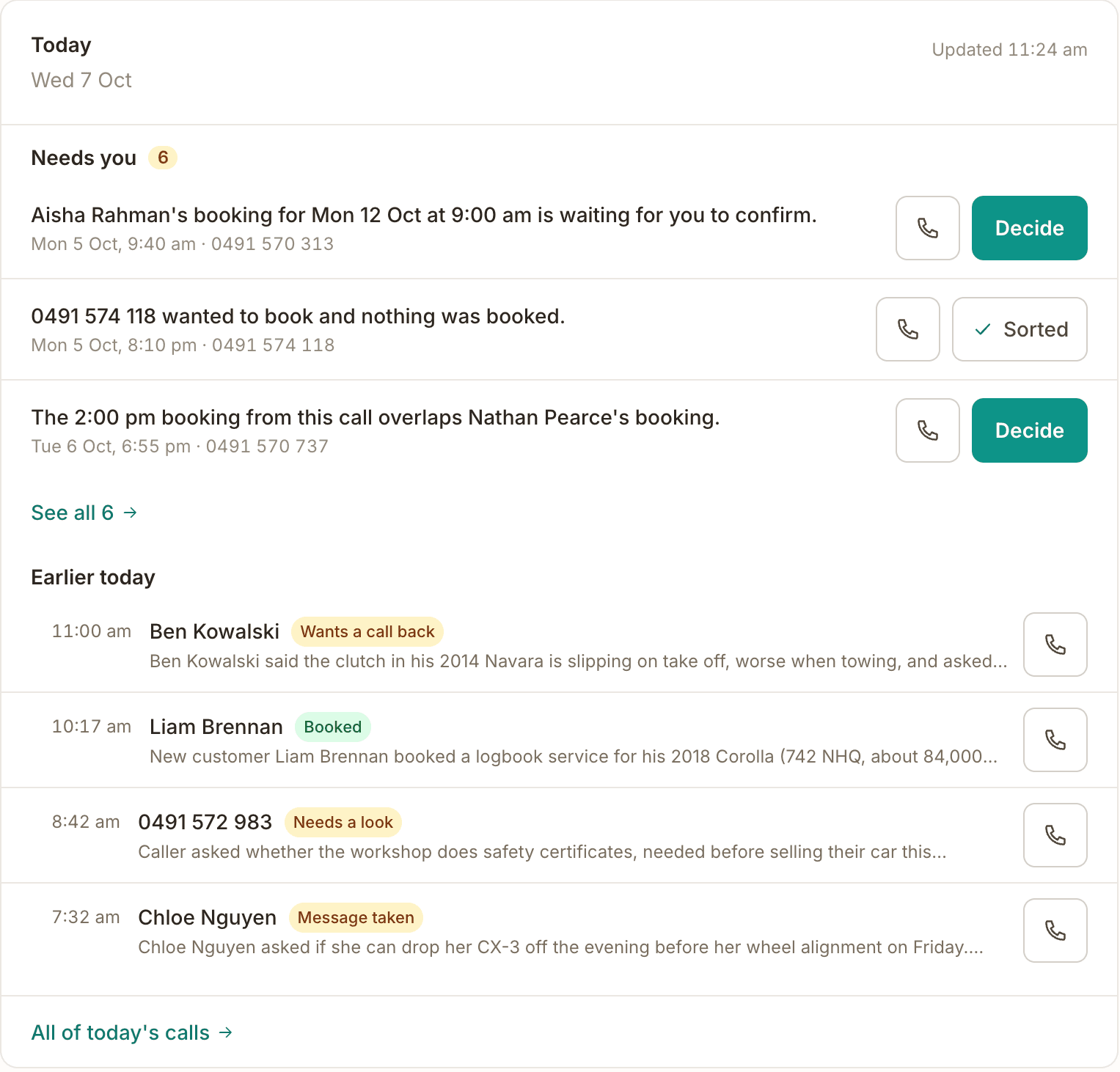
Tells you what needs you
Every call ends as a plain summary with its outcome. The ones that need you sit at the top of Today with Ring, Text and Sorted, and reach your phone as a push, plus a text for the kinds of call you choose.
Example call
Needs you · Priya rang about a noise from the front left wheel and wants a call back today.
[ Ring ] [ Text ] [ Sorted ]
All SMBs
Who it’s for
An AI receptionist for your industry
Different businesses miss calls for different reasons. Here’s how the AI receptionist answers, books and captures for each, in your words, on your rates.
Mechanics & auto electricians
You're under a car and the phone won't stop. The AI books the logbook service or the brake job at your real prices, asks for the rego, the make and model and the kilometres, puts the urgent ones through to you, and saves the answers with the booking, so you know what's rolling in before it arrives.
Tradies & home services
You're on the tools, under a sink or up a ladder, you can't answer. The AI books the job, quotes your standard rates, captures the lead with the job address, and texts a confirmation, so the after-hours emergency call doesn't go to the next plumber on Google.
Clinics & allied health
Front desk on a call, patient at the counter, phone ringing out. The AI picks up the calls your desk can't, books and reschedules into your clinic calendar, handles new-patient enquiries, and puts anything clinical through to your team.
Salons & beauty
Mid-blow-dry you can't stop to take a booking. The AI answers, offers your services and prices, books the slot with the right stylist, and texts the client a reschedule link, turning every missed call into a filled chair.
Real estate
Buyers and renters call about a listing and won't wait. The AI answers instantly, captures the enquiry with the property of interest, books inspections, and tags each call to the campaign that drove it, so you know which portal or ad is ringing the phone.
Professional services
Accountants, lawyers, consultants and agencies lose new-client enquiries to voicemail. The AI screens and captures the lead, answers your hours and intake questions, books the consult, and flags high-value or urgent callers straight to you.
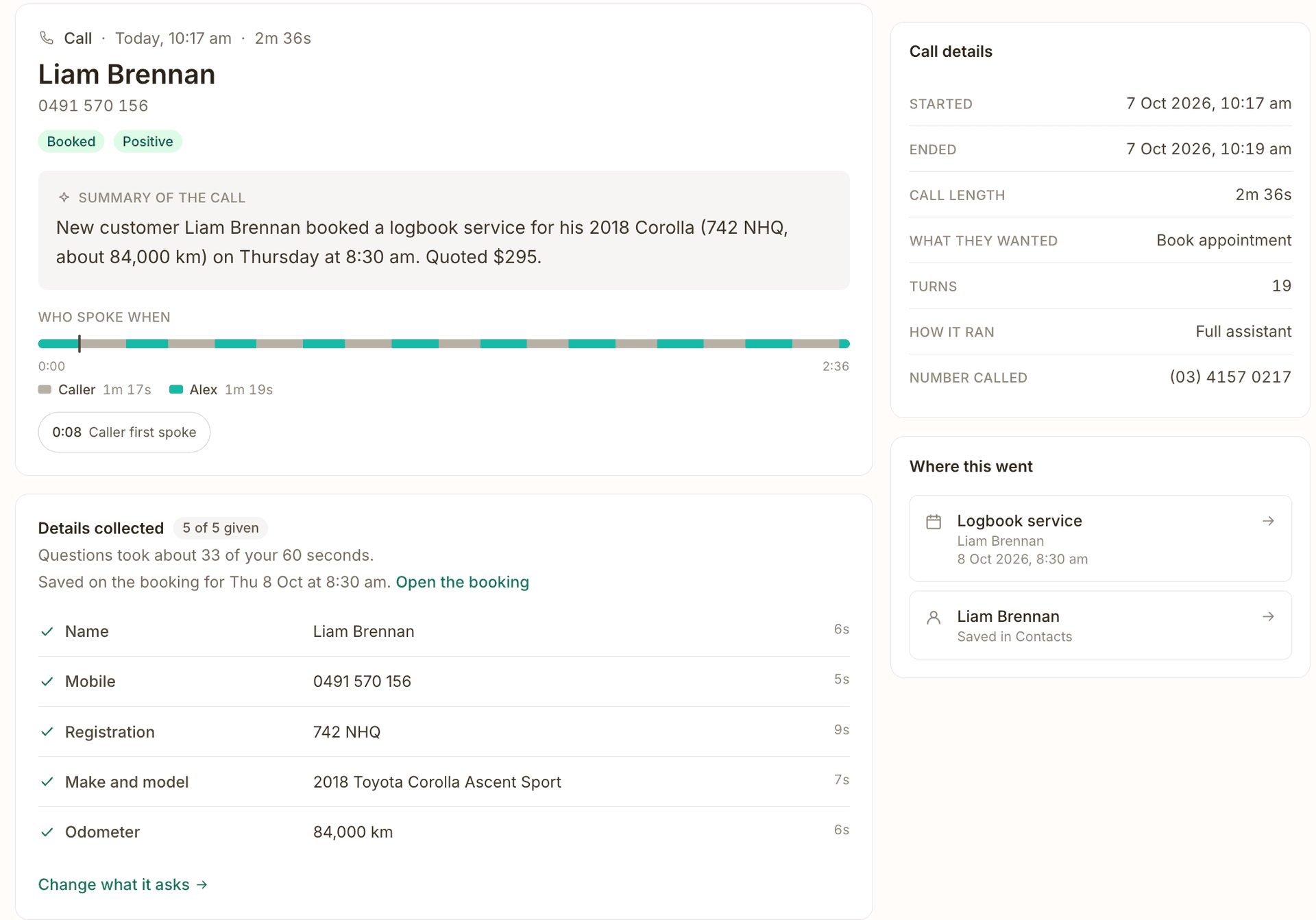
The receptionist works from the questions already on your booking page, the address, the rego, the make and model, the job notes, and you decide how each one is handled on the phone. Ask it of everyone or only new callers, pin the ones it must never skip, put them in your own words and order. A returning caller is asked to confirm what's on file, not to spell it all out again.
A question time limit of 30, 45, 60 or 90 seconds; when time runs short it keeps only the must-asks, so a call never drags
A live preview of the call for a new caller, a returning one, a landline, a private number, or someone who'd rather not say
Every booked call shows Details collected, and anything still missing, on the call's own page
Open the full screen
A booked call in the OneBookPlus Automotive demo: the summary, then the details the receptionist collected and how long the questions took. The caller is sample data.
A person when it matters
Puts the caller through to your mobile
When a caller asks for a person, the receptionist says it's putting them through and rings the mobile you nominate, showing your receptionist number so you know where it came from. Pick up and you're talking to the caller. Miss it, and after about 25 seconds the caller hears that the team will ring them back, and the call lands at the top of your list as one that needs you.
One handover number, set in a minute; leave it blank and it takes a message instead
Pause the receptionist and choose what callers get meanwhile: put through to you, a message, or closed, with an end time up to 14 days out
Never puts through an abusive caller, and never rings you while the line is switched off
On the call
Caller: "Can I speak to someone about my quote?"
AI: "Putting you through now."
[Your mobile rings: receptionist line]
No answer after 25 seconds:
AI: "Sorry, nobody could pick up just now. The team will see your call and ring you back."
The two lines the receptionist says when it puts a call through, word for word; the caller is made up.
Try it before a customer does
A test console, and a check before it goes live
Before your number takes a real call, run the receptionist from the test console with one tap per scenario: book a job, ask for a person, move a booking. Calls from your own phones are marked Test and kept out of Insights. Going live runs a readiness check, and when you change a service or a price the receptionist picks it up within a minute or two, with nothing to re-save.
Scenario buttons for your industry, and a live preview of how the booking questions will sound
Your own phones labelled Test, left out of Insights and alerts
Hours confirmed in one tap, so after-hours calls are handled the way you meant
In the test console
[ Book a job ] [ Ask for a person ] [ Move a booking ]
You: "Hi, can I get a service on Friday?"
AI: "Sure. I have 9:00 or 1:30 on Friday. Which suits?"
The scenario buttons as they read in the console; the conversation is an illustration.
Know what your phone is worth
Attribution + sentiment on every call
Label a number with the campaign it runs in, and tag the calls your website drives with UTM passthrough. Every call is transcribed and logged with its outcome, the caller's sentiment, and the ad or page that drove it, so you finally know which marketing actually rings the phone.
Per-number campaign tagging and web-to-call UTM capture
Caller sentiment (positive / neutral / negative) on every booked, lead or message call
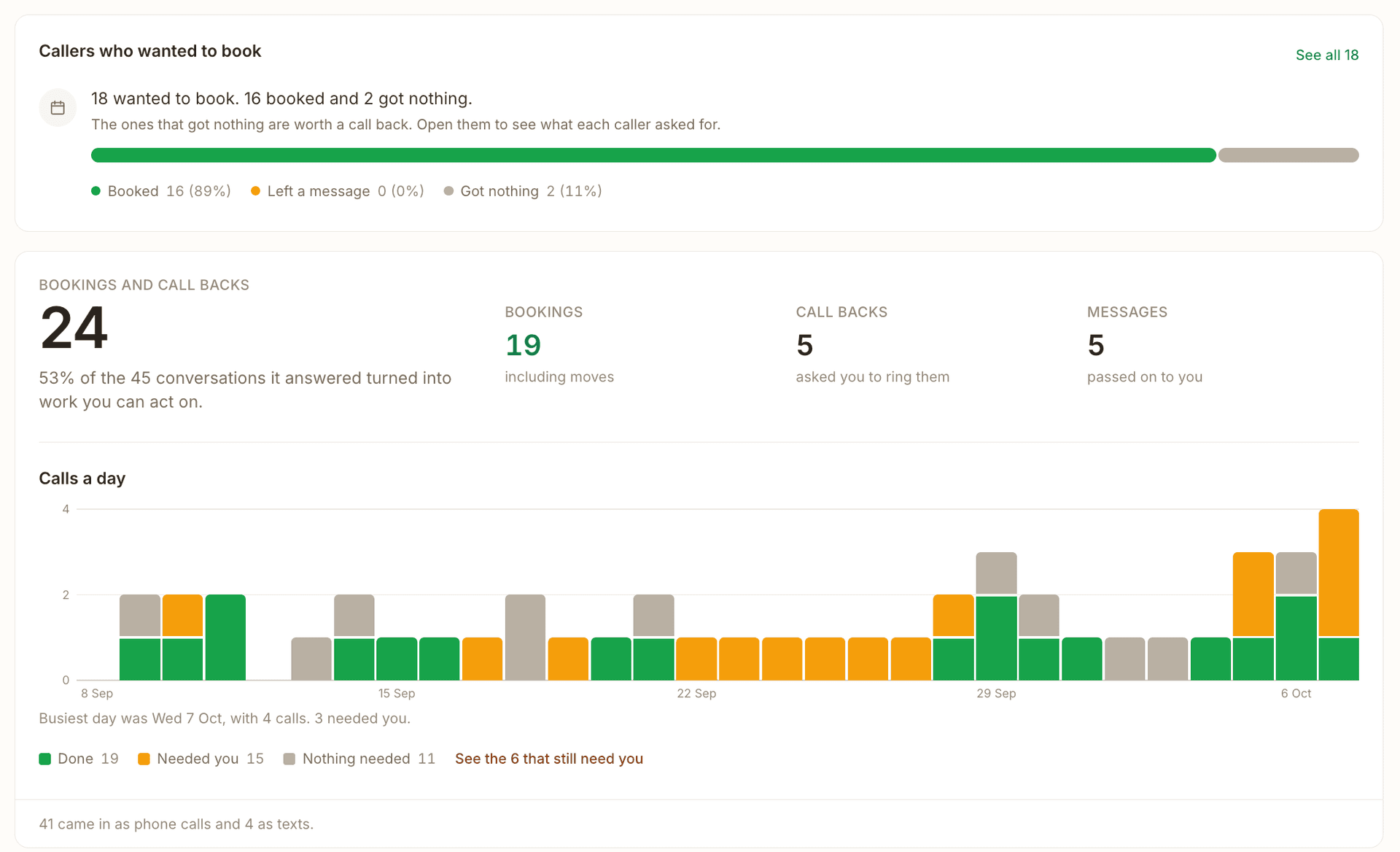
An insights dashboard: calls a day, why people rang, what they asked about, when they ring, and results by campaign
Open the full screen
Insights in the OneBookPlus Automotive demo over 30 days of sample calls: who wanted to book and who did, bookings and call backs, and calls a day.
Inside the app
The screens you work from
Every call lands in the same place as your bookings and customers. These are the screens behind it.
Open the full screen
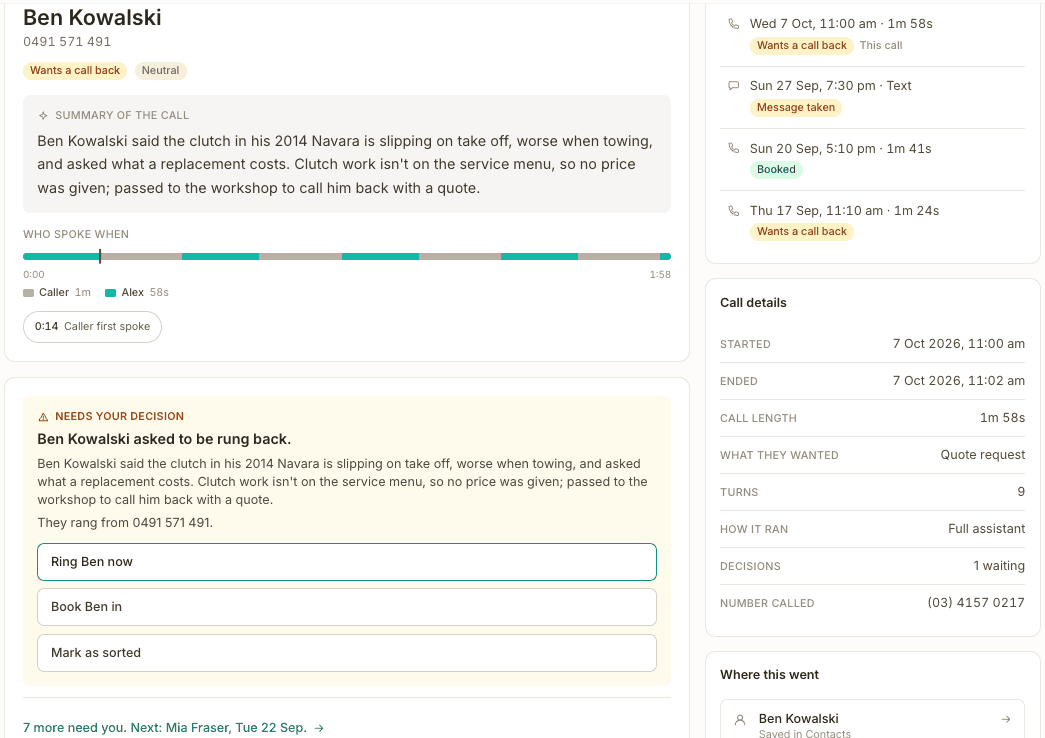
A call that needs youThe caller wanted a call back, so the call's page leads with the decision: ring them now, book them in, or mark it sorted.
Open the full screen
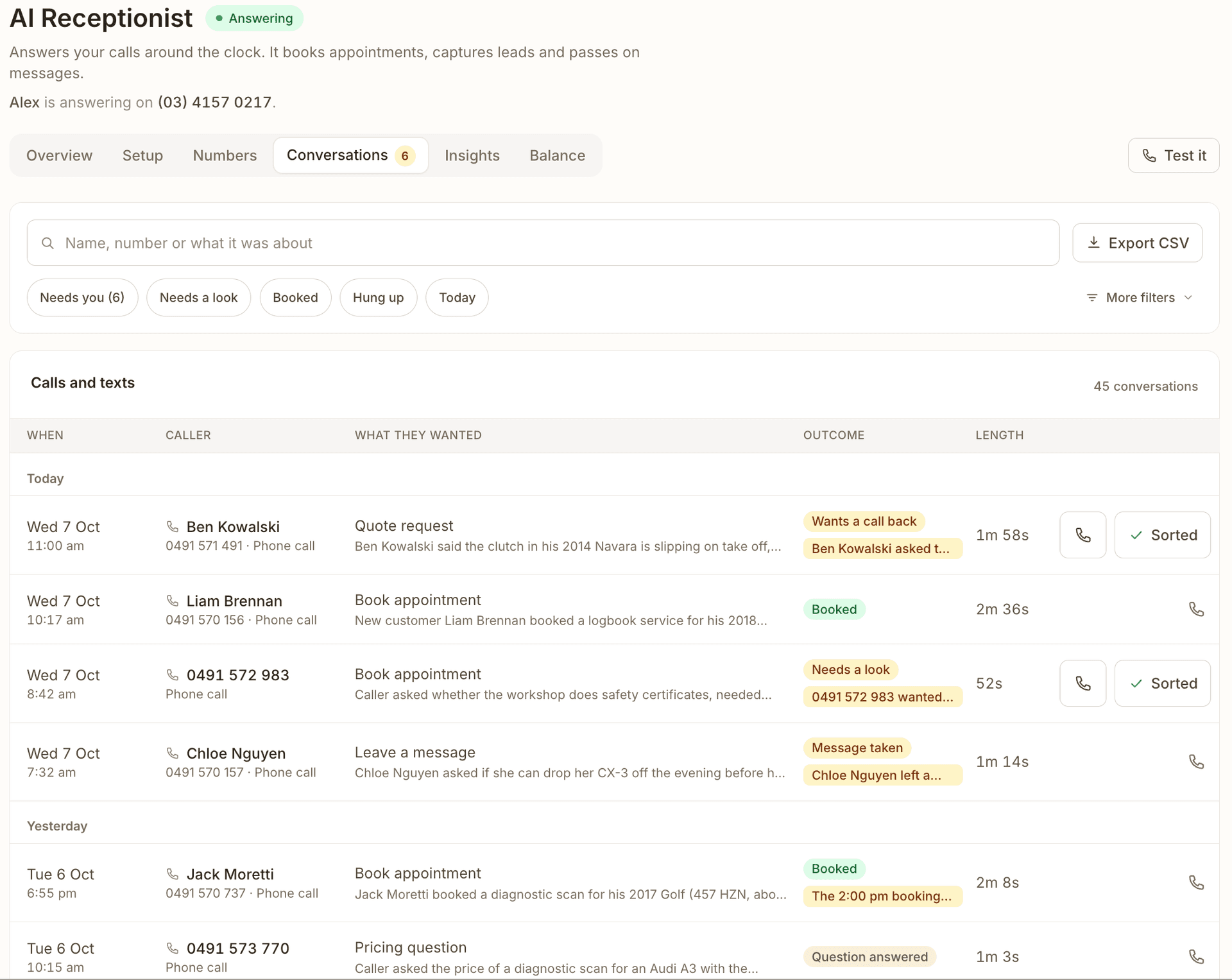
Every call, grouped by dayWho rang, what they wanted, how it ended and how long it took, with Ring and Sorted on the calls that need you.
Open the full screen
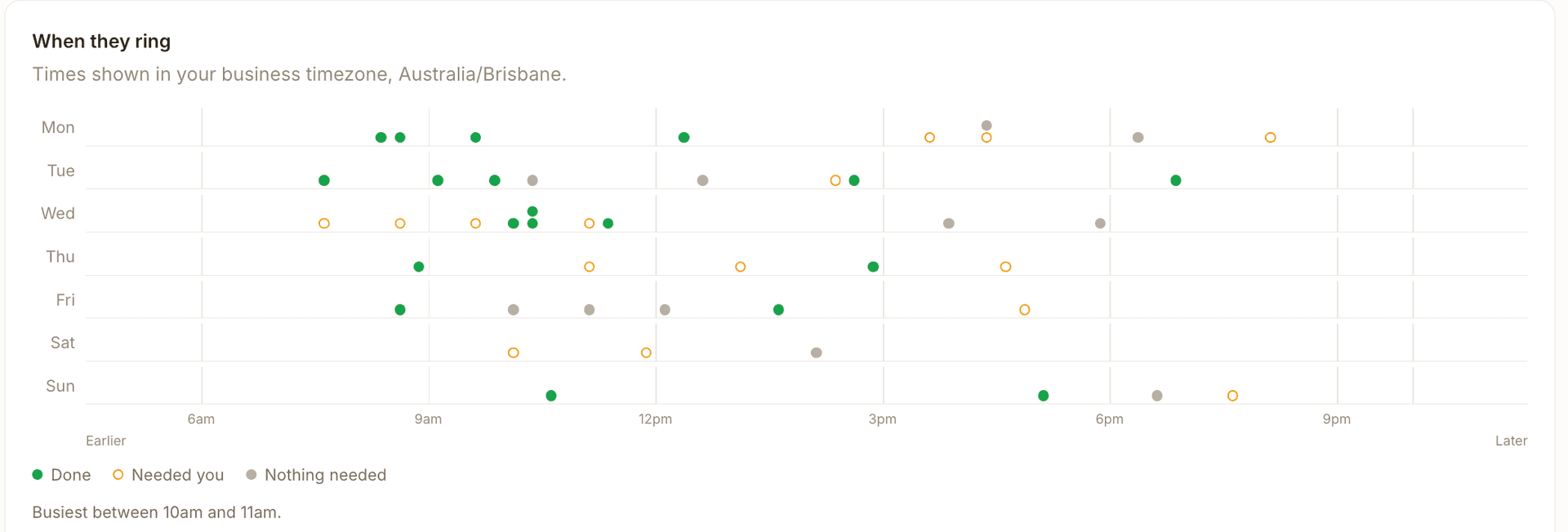
When customers ringA week of calls by day and hour, marked done, needed you or nothing needed, including the early, late and weekend ones.
Open the full screen
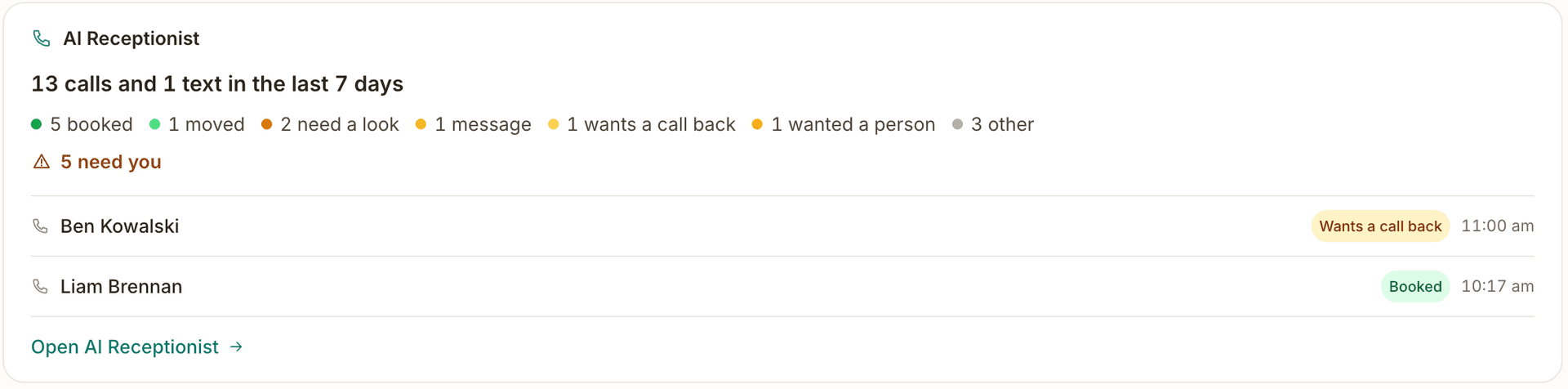
On your dashboard homeWhat came in over the last week, how many need you, and the newest callers, before you open the receptionist at all.
Open the full screen
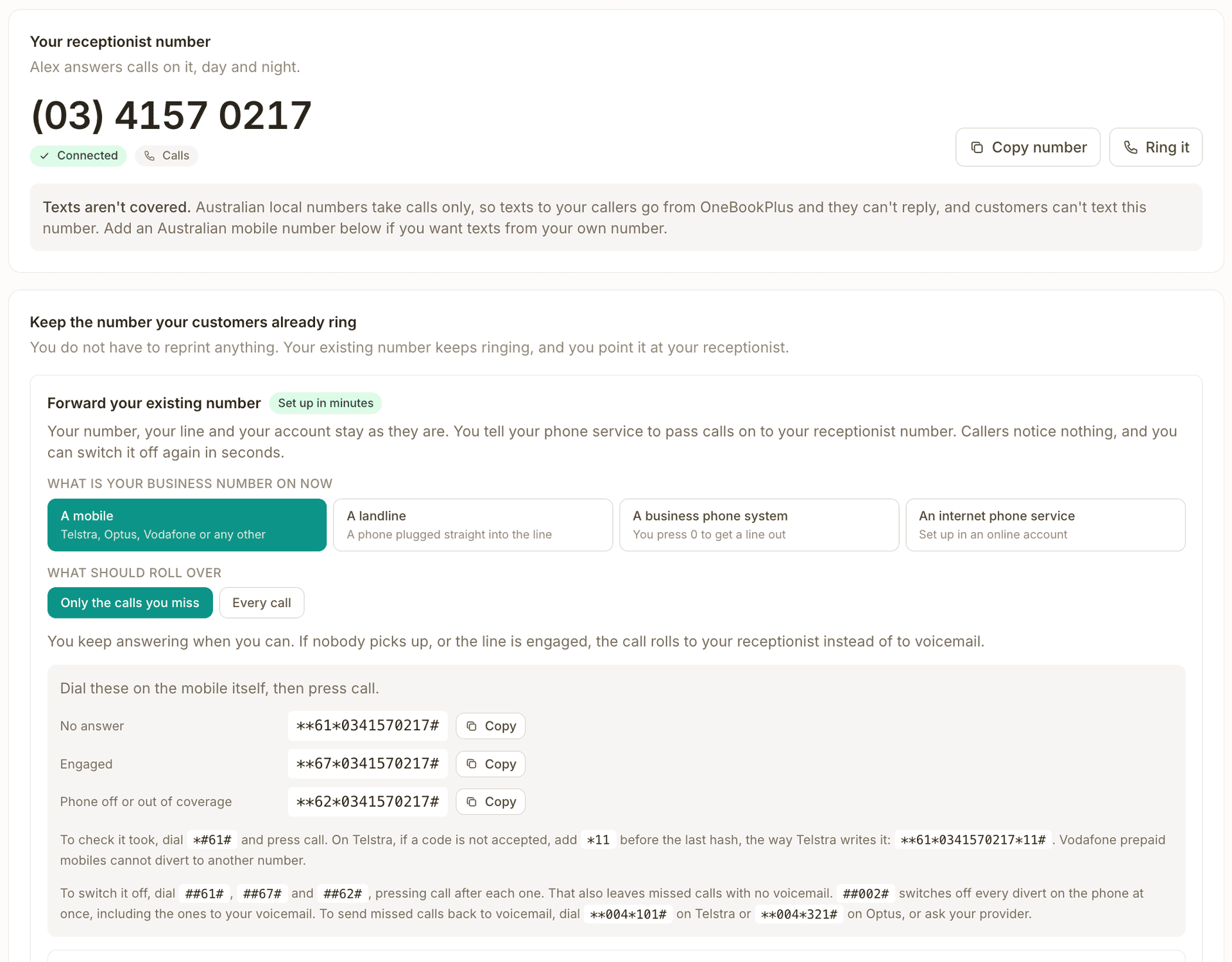
Keep your numberYour receptionist number, what it can and cannot do, and the divert codes to dial on your own phone so missed calls roll to it.
Demo account. OneBookPlus Automotive is a workshop we seeded with sample calls; the screens are the product, the callers and figures are sample data.
How it works
Set up in one sitting, answering the same day
1
Install the AI Receptionist, pick an industry starter template, and choose your number: the free local number, or a mobile if you want callers to text it too. We connect it for you, usually within a few hours.
2
Set your greeting, hours, answers and booking questions, what the AI may handle, and the mobile it puts callers through to. Then try it from the test console before a customer rings.
3
Divert your existing line to the new number. It answers every call, booking the job, answering questions, capturing the lead, taking a message, or putting the caller through to you.
4
Work from Today: calls that need you sit at the top with Ring, Text and Sorted, and every call has a summary, a transcript and the details it collected.
Why it’s different
An answering machine takes a message. This takes the booking.
Voicemail / answering service
Records a message and hopes you call back. It can’t see your calendar, can’t book, doesn’t know your prices, speaks one language, and tells you nothing about where the call came from.
OneBookPlus AI Receptionist
Lives inside the same platform as your bookings, contacts, invoicing and accounting, so it books into your real calendar, asks your own booking questions, captures the lead into your real CRM, answers from your real prices, and logs every call with its outcome, sentiment and source.
AI vs virtual receptionist
AI receptionist or virtual receptionist: which one fits?
A “virtual receptionist” is usually a remote human answering service: real operators, off-site, billed per minute or per call. That model works, but it inherits human limits. Operators cover set hours, queue at peak times, read from a script, and can’t see your calendar, so most calls still end as messages you have to return. An AI receptionist removes those limits: it answers every call instantly, at 3pm or 3am, holds your actual prices and availability, and books the job while the caller is still on the line.
Virtual receptionist (human, off-site)
OneBookPlus AI Receptionist
Availability
Staffed hours; after-hours often costs extra
24/7, every day, including public holidays
Billing
Per minute or per call; busy months cost more
Flat $79/mo inc. GST, 100 calls and texts included; a call over 4 minutes counts more than once
Simultaneous calls
One operator, one call; queues at peak
Answers more than one call at a time
Putting calls through
Transfers if you're free, otherwise a message
Rings your mobile and puts the caller through; if you miss it, the caller is told you'll ring back
Your calendar
Takes a message for you to action
Books straight into your OneBookPlus calendar, asking your own booking questions
Attribution + sentiment
Not offered
Every call tagged to its campaign and scored
Weighing up specific providers, human or AI? Read the AI receptionist alternatives comparison for cited side-by-sides on pricing, hours and what each service actually does with a call. And when a caller needs a human, they still get one: the receptionist puts them through to your mobile, and tells them you’ll ring back if you can’t pick up.
Before you choose
The questions that decide an AI receptionist, answered for this one
Price, what counts toward it, whether it books, whether a caller can reach a person, and where the data goes are what every comparison weighs. Here is each answer for the OneBookPlus AI Receptionist, including the ones that are a no.
The question
OneBookPlus AI Receptionist
Does it book, or only take a message?
It books and reschedules into your OneBookPlus calendar, offering only your own open times, and never double-books when it moves a booking.
What do I pay each month?
$79/mo inc. GST plus AI Companion at $25/mo, so $104/mo; on the Growth plan AI Companion is included. No setup fee, no contract, 14-day trial.
What counts toward the price?
Answered calls and texts, not minutes. 100 are included each billing month (20 in the trial). A call up to 4 minutes counts once; a longer one counts once for every 4 minutes or part of 4 minutes.
What happens past the allowance?
By default it keeps answering and takes messages at no charge. Or buy extra conversations, which never expire: 50 for $39, 200 for $139, 500 for $299.
Can a caller reach a person?
Yes. It puts them through to the mobile you nominate; if nobody answers in about 25 seconds, the caller is told the team will ring back and the call is flagged for you.
Can I keep my number?
Yes. Divert your existing line to the receptionist's number; the caller's own number still comes through. Moving a number across outright is a manual carrier process we run case by case.
Can customers text it?
On a mobile number ($22 a month), yes, and it answers. The included local number takes calls only; texts it sends come from the name OneBookPlus.
Are calls recorded?
Every call is transcribed and every greeting says so. Audio is recorded only if you switch recording on (premium voice), and each recording is deleted after 7 days.
Where is the data kept?
Transcripts, call records and contacts are kept in Australia (AWS Sydney). The live call passes through our phone and voice providers in the United States.
Which languages?
English, in a natural voice, Australian by default.
How long does setup take?
One sitting for the settings. The number is connected by hand, usually within a few hours, and you can test from the console before you divert.
What does it connect to?
It books into OneBookPlus itself and can send each lead and booking to your CRM by webhook. No ServiceM8 or Simpro integration, and no live Xero or MYOB sync.
When something else fits better
You need a phone system for a team, with desk phones, extensions, ring groups or call queues. A cloud phone system with AI built in does that; this answers the number you divert to it.
You want the AI to make outbound calls or run call campaigns. It answers calls; it does not make them.
Many of your callers need a language other than English.
You want a trained person on every call, or call audio kept for months. A live answering service, or a rival that records every call as standard, fits better.
Your jobs live in ServiceM8 or Simpro and you plan to stay there. A receptionist that writes into that system will save you double entry.
Honest, cited side-by-sides against the AI answering services and call-tracking tools, including where each one genuinely wins. One page covers Smith.ai, Ruby, Goodcall, Rosie, Dialpad, Synthflow, Slang.ai, Sophiie AI, Hooroo, Valory, OfficeHQ, Johnni, WildJar, Delacon, CallRail and CallTrackingMetrics.
AI Receptionist is a marketplace app at $79/mo on any plan, with a 14-day free trial.
Free
$0/mo
AI Receptionist
$79/mo app
AI Companion, which it runs on
$25/mo app
Australian local number
Included
Conversation allotment
Included, top-ups beyond it
Starter
$29/mo
AI Receptionist
$79/mo app
AI Companion, which it runs on
$25/mo app
Australian local number
Included
Conversation allotment
Included, top-ups beyond it
Plus
$49/mo
AI Receptionist
$79/mo app
AI Companion, which it runs on
$25/mo app
Australian local number
Included
Conversation allotment
Included, top-ups beyond it
Growth
$69/mo
AI Receptionist
$79/mo app
AI Companion, which it runs on
Included
Australian local number
Included
Conversation allotment
Included, top-ups beyond it
AI Receptionist is a marketplace app at $79/mo on any plan, with a 14-day free trial.
$79/mo inc. GST (requires AI Companion at $25/mo), with a free Australian number included and 100 answered calls and texts each billing month, and 20 for the whole free trial. Each call up to 4 minutes counts once, and a longer call counts once for every 4 minutes or part of 4 minutes. Past the included ones it takes messages at no extra charge, unless you choose to buy extra conversations, and free promo credits never fund telephony.
Included
Free AU number
A local Australian number with your subscription. Add a mobile ($22 a month) for two-way texts, or a 1800 number ($49 a month). Divert your existing line to it. Moving a number across is a manual carrier process we run case by case, so ask us first.
Flat fee
$79 / month
Inc. GST. Includes 100 calls and texts each billing month; extra conversations from $39 for 50, and they never expire.
Requires
AI Companion
Runs on the same AI engine ($25/mo). Together they answer the phone and run your follow-ups.
AI receptionist vs a human answering service vs an in-house receptionist
Virtual receptionist costs in Australia vary wildly with how the line is staffed and billed. Here’s how a flat-fee AI receptionist compares to the two traditional options.
AI receptionist
$79/mo flat
inc. GST · requires AI Companion ($25/mo), $104/mo in total off Growth
One predictable monthly fee, nothing billed by the minute
Answers every call 24/7 and puts the ones that need you through to your mobile
Books into your real calendar and saves the lead to your CRM
Free Australian number included; past your included calls it takes messages at no extra charge
Human answering service
Per‑minuteor per‑call
typical billing model · cost scales with volume
Usually billed per minute or per call, so a busy month, exactly when you’re winning work, costs the most.
Operators read a script and take a message; they can’t see your calendar or book the job directly.
Limited hours or call queues at peak times; overflow often still hits voicemail.
No campaign attribution or sentiment, you can’t tell which ad drove the call.
In-house receptionist
Hundredsper week, part‑time
part-time wage plus super & on-costs
A part-time receptionist costs hundreds of dollars a week in wages, plus superannuation and on-costs.
Covers business hours only, calls after five, on weekends and on public holidays still go unanswered.
One person, one call at a time; sick days, breaks and leave leave the phone unattended.
Recruiting, training and managing the role is on you.
Answering-service and wage figures describe the typical billing models in the Australian market, not any specific provider’s quote, your own costs will depend on call volume, hours and award rates. The OneBookPlus AI Receptionist price is the flat amount you pay, shown up front.
Compliance & trust
Built for Australian calls, upfront with callers
Callers are told up front
Every greeting says the call is transcribed. Switch call recording on (it works on the premium voice) and the greeting says the call is recorded too, and an owner or admin can play each recording back for 7 days before it is deleted.
Always discloses it's AI
The greeting states it's an automated assistant. No pretending to be a person.
Your records stay in Australia
Transcripts, call records and contacts are kept in Australia (AWS Sydney), with the rest of your OneBookPlus data. Our phone and voice providers in the United States handle the live call, and our premium voice provider deletes the audio and transcript of each call 7 days after it ends.
You set the guardrails
Scope limits, a never-say list, booking windows and escalation keywords keep the AI strictly inside what you've allowed, it treats caller input as data, never as instructions.
FAQ
About the AI Receptionist
Does it sound like a robot?
It uses a natural premium voice, an Australian one by default, and speaks conversationally: it asks one thing at a time, reads booking details back to confirm, and keeps replies short. It always says up front that it's an automated assistant, on every call, and callers book, ask questions and leave messages just as they would with a person.
What languages can it handle?
It answers in English. Our standard voice can offer callers a "press 1 for English" menu with ten other languages, including Spanish, Mandarin, Hindi and Arabic, but every line we set up today runs on the premium voice, which sounds more natural and speaks English. If many of your callers need another language, talk to us before you sign up.
Do I get a phone number?
Yes. One Australian local number is included with the subscription. Customers can ring it but not text it, and any text the receptionist sends from it, such as a booking confirmation, comes from the name OneBookPlus, or your business name once a sender name is approved for you. If you want callers to text you and get answers back, add a mobile number for $22 a month; a 1800 number is $49 a month. Both prices include GST and are shown before you confirm. Your existing line usually stays where it is and you divert it to the new number, so the number on your signage keeps working. Moving a number to us outright is a manual carrier process we run case by case rather than something you can do from the app, it takes weeks and can be refused, and an Australian landline moved across can take calls but not texts. Ask us first.
Can I keep my number, and will I still see who's calling?
Yes, and yes. A free Australian local number comes with the subscription, and you divert your existing line to it, so the receptionist answers the number already on your vans, your signage and your Google listing and nothing has to change. Setup gives you the divert code for your carrier and checks that the divert works. A diverted call still arrives with the caller's own number, so the receptionist recognises returning customers, matches them to their records, and texts the right person.
Can it put a caller through to me?
Yes. Set a handover mobile and, when a caller asks for a person, the receptionist says "Putting you through now" and rings that mobile, showing your receptionist number. Answer and you're talking to the caller. If nobody picks up in about 25 seconds, the caller hears that the team will ring them back, and the call sits at the top of your list as one that needs you. With no handover number set, it takes a message instead.
Can it ask my own questions, like the rego or the job address?
Yes. It asks the questions on your booking page, and you choose how each is handled on the phone: ask everyone, ask new callers only, never ask, or must ask. You can reword them, reorder them and set a time limit of 30, 45, 60 or 90 seconds for the questions as a whole. Returning callers are asked to confirm what's on file. The answers are saved with the booking, the same way an online booking saves them, and the call's page shows what was collected and anything still missing.
Can I test it before customers call?
Yes. The test console lets you run a call yourself with one tap per scenario, such as booking a job, asking for a person or moving a booking, and the Booking details tab previews how the questions will sound for a new caller, a returning one, a landline or a private number. Calls from your own phones are marked Test and kept out of Insights.
Will it know when I change my prices or services?
Yes. When you change a service, a price, your business name or your menu, the receptionist picks up the change within a minute or two, without you re-saving anything. A $0 service is described as priced on quote unless you chose to call it free, and if you charge different prices on different days, callers are told the price for the day they book.
Does it book into my actual calendar?
Yes, it books and reschedules straight into your OneBookPlus calendar (the same one your bookings, jobs and staff already use), offers only your own open times, checks that the weekday a caller says matches the date, and never double-books when it moves a booking. Then it texts the caller a confirmation with a self-service reschedule link. There's no Calendly hop or separate sync to maintain.
How is it different from a call-tracking tool like WildJar or CallRail?
Call-tracking tools measure and analyse the calls you already get, dynamic numbers, recording, attribution. The AI Receptionist actually answers and books them, and still gives you per-number and UTM attribution plus sentiment. If you want to convert calls rather than only measure them, that's the difference, see our side-by-side comparisons below.
Are there per-minute or per-call fees?
Nothing is billed by the minute. It's a flat $79/mo (requires AI Companion) that includes 100 answered calls and texts each billing month, and 20 for the whole free trial. Each call up to 4 minutes counts once, and a longer call counts once for every 4 minutes or part of 4 minutes, so a 6 minute call counts twice. Past the included ones it takes messages at no extra charge, unless you choose to buy extra conversations, which never expire; a long call uses one for every 4 minutes or part of 4 minutes.
Does it need AI Companion?
Yes, the AI Receptionist runs on the same AI engine as AI Companion ($25/mo), so it requires an active AI Companion subscription. Together they answer your phone and run your follow-ups.
Is it compliant for Australian calls?
It is built to be upfront with callers. Every greeting says it is an automated assistant and that the call is transcribed. Call recording is off unless you switch it on, which works on lines that use the premium voice, and then the greeting says the call is recorded too. Your transcripts and call records are kept in Australia (AWS Sydney). The live call is handled by our phone and voice providers in the United States, and our premium voice provider deletes the audio and transcript of each call 7 days after it ends. You control what the AI is allowed to say and do, with a never-say list and scope limits. This is general information, not legal advice: rules on recording calls differ between states, so check your own obligations.
What happens after hours, or when it's unsure?
You choose: the AI keeps answering and booking 24/7 (it mentions you're closed when that matters), or after hours it takes a message and books nothing. When a caller asks for a person, it puts them through to your handover mobile if you've set one; otherwise, or when nobody picks up, it takes the details and the call lands in your list as one that needs you, with a push to your phone.
How many minutes are included?
It counts calls, not minutes. You get 100 answered calls and texts each billing month (20 for the whole free trial). A call up to 4 minutes counts once, so 100 calls can run to 400 minutes, and a longer call counts once for every 4 minutes or part of 4 minutes. Most calls are far shorter: the calls our customers' lines have answered average about a minute and a half. On the $79 price that is 79 cents a counted call. Past the included ones it takes messages at no charge by default, or you can buy extra conversations that never expire: 50 for $39, 200 for $139 or 500 for $299.
Is it a phone system? Does it replace my phones?
No. It answers the number you divert to it, and puts callers through to one mobile when they need a person. It has no desk phones, extensions, ring groups or call queues, and it does not make outbound AI calls. If you need a full phone system for a team, a cloud phone system with AI built in is the better fit, and our comparison of AI receptionist alternatives names a few.
Does it work with ServiceM8, Xero or my CRM?
It doesn't need to connect to a job or booking system, because it books into OneBookPlus itself, where the same booking becomes the job, the invoice and the customer record. It can also send each lead and booking to your own CRM by webhook. There is no ServiceM8 or Simpro integration. No Xero or MYOB sync. Data exports as Xero and MYOB-ready CSV. A live two-way sync is not built and is not on a date.
How much does an AI receptionist cost in Australia?
The OneBookPlus AI Receptionist is a flat $79/mo inc. GST (it runs on AI Companion at $25/mo, so the two together are $104/mo) with a free Australian number and 100 answered calls and texts included each billing month. Each call up to 4 minutes counts once, and a longer call counts once for every 4 minutes or part of 4 minutes, and nothing is billed by the minute. That's a single predictable amount, unlike traditional human answering services that typically bill per minute or per call (so a busy month costs more), and far below a part-time in-house receptionist, who in Australia costs hundreds of dollars a week in wages plus super and on-costs and still only covers business hours.
What's the difference between an AI receptionist and a virtual receptionist?
A virtual receptionist is a remote human (or a team) who answers your calls from off-site, usually billed per minute or per call, with limited hours and a queue at peak times. An AI receptionist answers every call instantly, 24/7, on a flat monthly fee with nothing billed by the minute, and because it lives inside OneBookPlus it books straight into your real calendar, saves the lead to your CRM, and logs each call with its outcome, sentiment and source. When a caller wants a human, it puts them through to your mobile.
Bishal spent a decade running digital projects for Australian small businesses before founding OneBookPlus. The OneBookPlus AI Receptionist is built and maintained for Australian small to medium businesses, answering, booking, and capturing leads inside the same platform that runs your invoicing, bookings, CRM and accounting, with a greeting that tells every caller it is an automated assistant and that the call is transcribed.