Estimating software for Australian trades and contractors
Build the job cost up the way you price: labour hours at your charge-out rate, materials at what you pay plus markup, travel, then 10% GST. Every line comes from your own catalogue, so the same job costs the same whoever prices it. When the numbers are right, the estimate goes out as a quote the client accepts online.
Free plan available, no card needed. 10% GST built in.
What estimating software has to do
Estimating is the part of winning work that happens before the client sees anything. It is hours against a charge-out rate, materials at what the merchant charged you, a markup that has to survive a delivery fee and a warranty callback, and the GST on top. Get it wrong low and you work for free; get it wrong high and you lose the job to someone who did the sums. Most contractors do that working-out in a notebook or a spreadsheet nobody else can read, which is exactly why the same job gets priced three different ways by three different people in the same business.
Cost estimating software fixes that by making the build-up a record rather than a memory. In OneBookPlus every estimate is line items pulled from your own services and products catalogue, each with a quantity and a unit price, with a discount on the quote total and 10% GST calculated line by line and totalled automatically. Change a rate in the catalogue once and it flows into every estimate you price from that point on, so consistency stops depending on who happens to be doing the pricing that afternoon.
It is cloud based, which matters more than it sounds. The estimate you build on your phone at the front gate is the same record the office opens ten minutes later, on the web app or the iOS app, with nothing to sync and no file to email around. There is no desktop licence to install on one machine and no version of the price list that is three months out of date on a laptop in someone else's ute.
An estimate and a quote are two stages of the same numbers, not two different documents. The estimate is your cost build-up and your best assessment of what the job will come to; the quote is the fixed price you put to the client, which is why it carries a validity date, your terms and a timestamped record of the acceptance. In OneBookPlus that is one record rather than two, so the estimate you build becomes the quote you send with nothing retyped, and the accepted quote becomes the invoice with every line item, quantity, discount and GST amount carried across exactly.
And the estimate does not stop being useful once it is right. Set a validity date so old pricing cannot be accepted by mistake, duplicate a similar job rather than rebuilding it, then send the finished numbers out as a quote your client accepts online. From there it converts to an invoice with every line intact. If you want to check the maths before you sign up for anything, the free tradie quote calculator runs the same build-up in your browser, and it answers the pricing questions that sit around it, including the difference between a quote and an estimate.
What the estimate looks like in OneBookPlus
Screenshots taken from the product itself: the priced line items, the catalogue they come from, and the quote the finished numbers go out as.
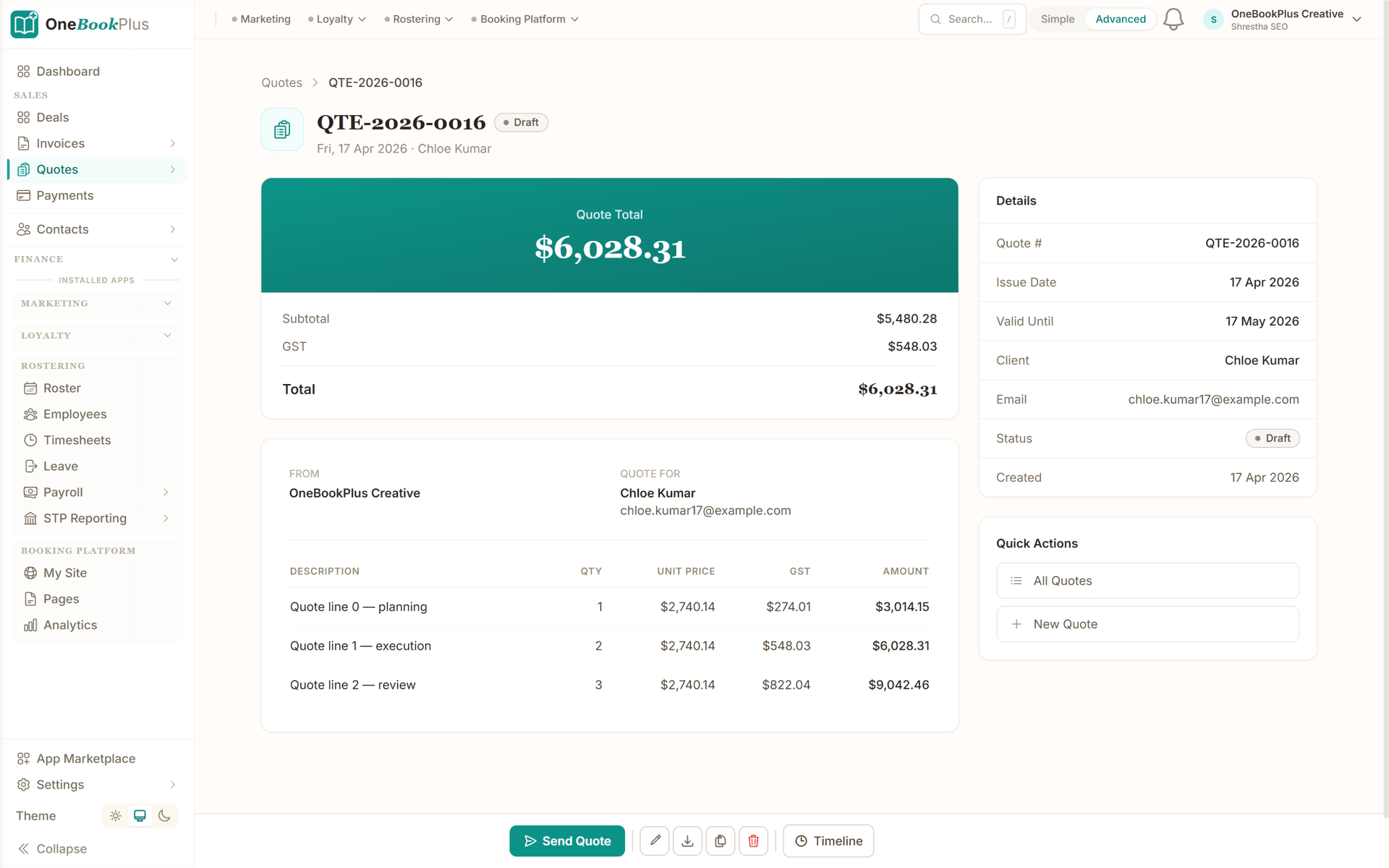
The estimate, line by line
Quantities, unit prices and 10% GST totalled as you go. Nothing rounded into a single figure the client cannot question and you cannot defend six weeks later.
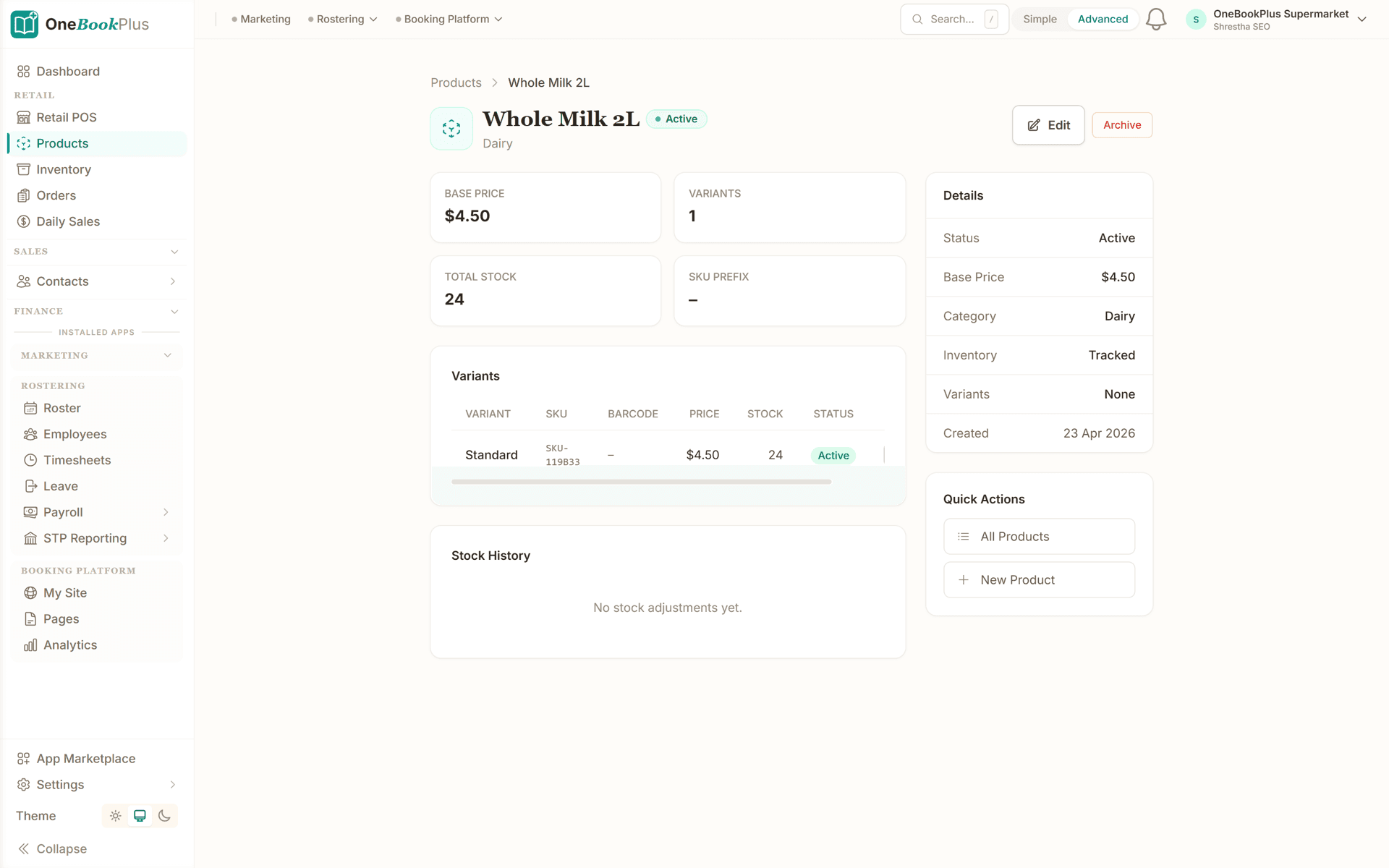
Your own catalogue, your own prices
Services and products you price regularly live in one catalogue with your descriptions and rates, so every estimate pulls the same numbers instead of someone guessing from memory.
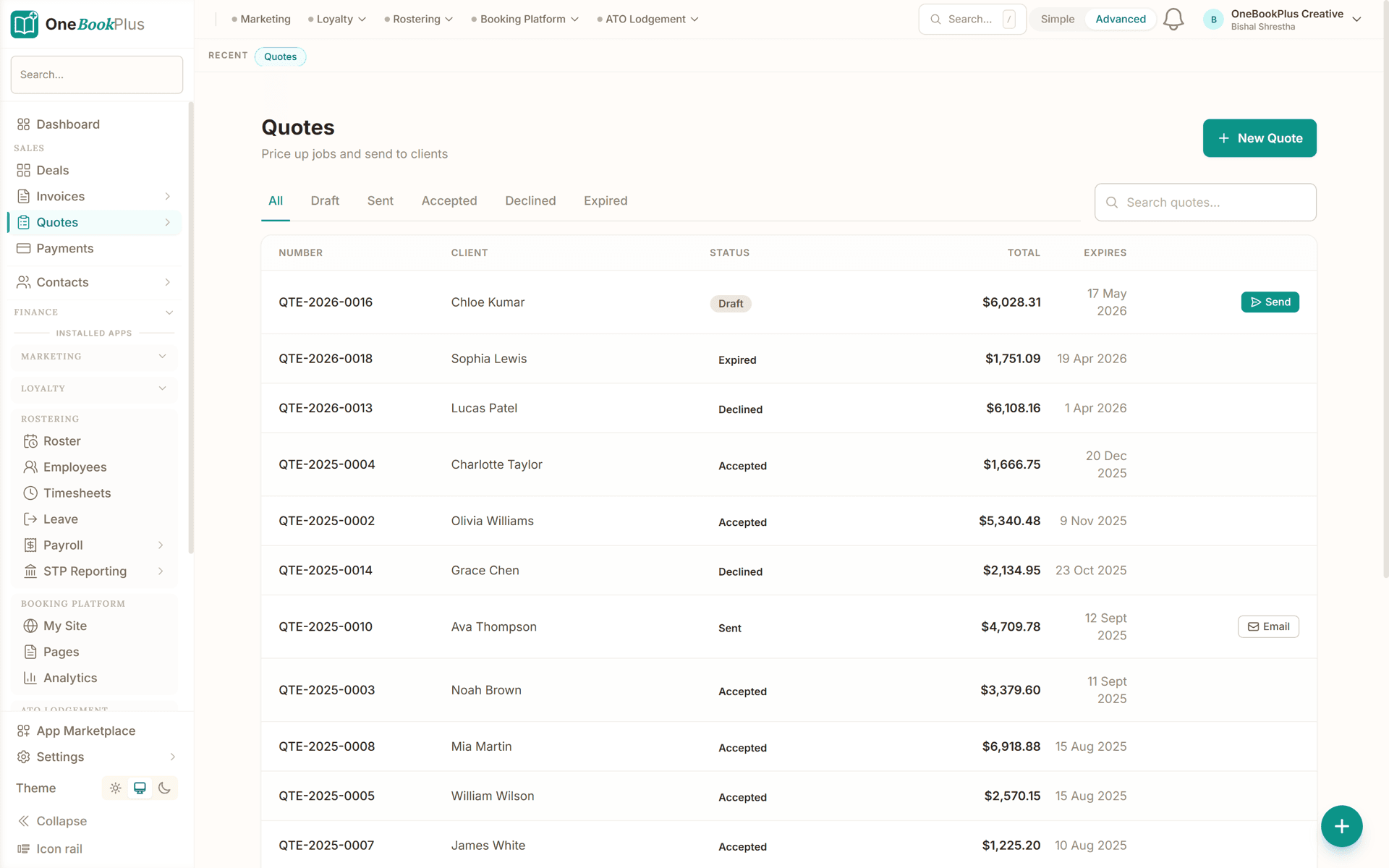
Then it goes out as a quote
Once the build-up is right, the estimate is sent for online acceptance and tracked through Sent, Viewed, Accepted, Declined and Expired, so you know which client read it twice and went quiet.
How to build the estimate up
This is the sequence Australian trades price to, and the one the free calculators on this page follow. Do it in this order and the total at the bottom is a number you can stand behind.
Cost the labour
Hours on site multiplied by your charge-out rate, not your wage. Your rate has to carry tools, vehicle, insurance, super, downtime and profit, so work it out once with the free hourly rate calculator and reuse it on every job.
Price the materials at cost plus markup
Enter what the parts cost you, then add the markup that covers sourcing, delivery, warranty and the cash-flow gap before the client pays. Markup and margin are not the same number, and the free markup and margin calculator converts between them.
Add travel, callout and anything else billable
Callout fees, tip runs, plant hire, parking. Every line that costs you money goes on the estimate as its own item with its own quantity and unit price, so nothing gets absorbed into a round number you regret later.
Apply GST and check the total
GST is calculated line by line at 10% and totalled automatically, tax-inclusive or exclusive to match how you sell. If you are registered, it goes on; if your turnover has not reached the $75,000 threshold, it does not. The estimate reflects where your business sits.
The charge-out rate underneath every estimate
Every labour line on an estimate multiplies hours by one number, and most contractors inherit that number from whatever their first boss charged rather than working it out. The charge-out rate is not a wage. It has to carry the vehicle, the tools, the insurance, the super, the profit, and every hour that cannot be billed to anyone: the quoting, the travel between jobs, the supplier runs and the invoice-chasing. Divide what you need to earn by the hours you work and the rate looks fine; divide it by the hours you can bill and it usually does not. A rate that only covers the wage wins jobs that lose money, one estimate at a time.
The admin hours are the part of that arithmetic you can move. Every hour a quote, a job sheet or an invoice takes to produce is an hour the charge-out rate has to absorb, which is why job management software that turns the accepted quote into the job and then the invoice, without anything retyped, feeds straight back into the rate you can afford to charge.
Materials carry the second silent number. A 20% markup is not a 20% margin, and pricing a whole year of materials on the wrong one of those two compounds quietly. The markup and margin calculator above converts between them; once the estimate is accepted, the same lines flow through to the GST invoice with every quantity, discount and GST amount carried across. And if you only need to check what a figure looks like with the 10% on or off, the free GST calculator does that in your browser with nothing to sign up for.
Three calculators that do the estimating maths
You do not need an account to price a job. These run entirely in your browser and cover the three numbers contractors most often get wrong.
Estimating by trade
What changes between trades is what sits in your catalogue, not the software around it. Here is what the build-up usually looks like, and where to read about the rest of the job for each trade.
Electrical
Point and light counts, cable runs, switchboard and safety-switch materials, plus the hours to install and test. Priced off your own catalogue so a double GPO costs the same on every estimate you send.
OneBookPlus for electriciansPlumbing
Fixtures, tapware, pipe and fittings at what you pay the merchant, with your markup on top, plus labour split between rough-in and fit-off so the client can see what each stage costs.
OneBookPlus for plumbersHVAC and refrigeration
Unit and ductwork supply, mounting and electrical connection, commissioning time, and the service visits after it. Multi-head systems get a line each rather than one lump sum nobody can question.
OneBookPlus for HVAC and refrigerationPainting
Square metres by surface, coats, prep and patching hours, and paint by the tin at trade price plus markup. Keep interior and exterior on separate lines so trimming the job back to one of them is an edit, not a rebuild.
OneBookPlus for paintersRoofing
Sheet or tile area, flashings, gutter and downpipe runs, scaffold or height-safety hire, and removal and tip fees, which is where a roofing job quietly loses its margin if you leave it off.
OneBookPlus for roofersFlooring and tiling
Area plus wastage allowance, adhesive, grout, trims and waterproofing, then lay rate by the square metre. Uplift and disposal of the old floor goes on as its own line rather than into the labour figure.
OneBookPlus for tilersLandscaping
Soil, turf, plants, paving and aggregate by the tonne or square metre, machine hire by the day, and crew hours. Staged works come out as one estimate per stage, duplicated from the last rather than rebuilt.
OneBookPlus for landscapersFencing
Lineal metres of fence, posts and panels by the run, concrete per hole, gates as their own item, and demolition of the old fence costed rather than thrown in.
OneBookPlus for fencing contractorsHandyman and small works
Short jobs where the estimate has to take five minutes or it will not get done. Pull the usual items straight from your catalogue, set the hours, send it before you leave the driveway.
OneBookPlus for handyman businessesBuilding houses needs a different tool
Everything above is honest for a trade or contracting business pricing jobs from a catalogue. It is not enough for a residential builder. A build needs reusable recipes so one quantity explodes into every component, a markup or margin toggle for the whole estimate and a markup percentage on every line, prime-cost and provisional-sum allowances for what the client has not chosen yet, wastage percentages on materials, and a reviewer that reads the whole thing before it goes out.
Those live in the Builder Suite, a $99 per month add-on that sits on top of any core plan including Free, with no per-seat charge for the app itself and a 14-day free trial. Logins are set by your core plan rather than by the add-on. If you are pricing extensions, renovations or new builds, start there instead of here: the construction estimating module for builders covers the cost catalogue, recipes, margin and allowances, and digital plan takeoff from a PDF or photo measures the quantities that feed it. Stage billing on the won job runs through progress claims against a schedule of values.
Two pages, one product, and a boundary drawn on purpose. A page that claimed recipes and allowances for a $0 account would be selling you something that is not in the plan you signed up to.
What estimating costs, ours and theirs
OneBookPlus starts at $0 with unlimited jobs, 5 quotes and 10 invoices a month, and goes to $29 per month for unlimited quoting. Prices are in AUD and include GST, and every plan carries invoicing, contacts and GST reporting alongside the estimating, so there is no second subscription for the books.
The trade platforms price differently, and it is worth knowing how before you compare monthly figures. Tradify publishes $48 to $62 per user per month ex GST on its Australian pricing page, so a three-person crew multiplies. ServiceM8 runs $29 to $349 per month on job-volume tiers, with a free plan capped at 30 jobs a month sitting below Starter, so the bill moves with how busy you are. AroFlo does not publish a price at all. Its pricing page is a request-a-price form, so the cost only comes out of a sales conversation, and we will not print an estimate of someone else's price. None of the three includes accounting, so a GST and BAS tool sits on top of whichever you pick.
Competitor pricing is read from our published competitor registry rather than typed into this page. The Tradify figures were last checked against tradifyhq.com/au/pricing on 2 August 2026, and the ServiceM8 figures against servicem8.com/au/pricing on 2 August 2026. AroFlo’s pricing page carried no figure when it was checked on 2 August 2026. Vendors change pricing, so check the vendor page before relying on any figure here. Our own numbers come from the OneBookPlus pricing page.
Example walkthrough
From a site visit to an accepted price
An illustrative walkthrough of a painter estimating a three-bedroom repaint
Tuesday, 8:40am. You walk a three-bedroom weatherboard with the owner: full exterior, plus the hallway and two bedrooms inside. Standing in the driveway afterwards you open OneBookPlus on your phone and start the estimate rather than writing numbers on the back of a business card.
Labour first. You know your charge-out rate because you worked it out once in the hourly rate calculator and it has not changed this year. Exterior prep and two coats is four days for two of you; the interior rooms are another day and a half. Those go on as separate labour lines so the owner can drop the interior without you rebuilding anything.
Materials next. Primer, exterior topcoat, interior low-sheen, filler, tape and drop sheets all come straight out of your catalogue at trade price, with the markup you set once already on them. Scaffold hire for the high gable goes on as its own line, and so does the tip run for the old drop sheets and scrapings, which is the line most painters leave off and then absorb.
GST is calculated on each line at 10% and totalled at the bottom. You set the estimate to expire in 30 days so this month's paint pricing cannot be held against you in November, check the total against what the job feels like, and send it as a quote before you pull out of the street.
The owner opens it at lunch, which flips the status to Viewed on your dashboard, and accepts that evening. Your phone shows the accepted value, a draft job appears in your list with the priced scope already on it, and when the last coat is on you convert the accepted quote to an invoice in one click. The total matches what the owner agreed to, so there is nothing to argue about, and the pay-online link goes out with it.
Australian Owned
Built in Melbourne, AU
GST Compliant
ATO-ready from day one
Encrypted & Isolated
TLS in transit, AES-256 at rest, tenant isolation at the database layer, read the security page
Free Plan Available
No credit card needed
Price the next job properly
Start free with unlimited jobs, 5 quotes a month, your own catalogue, GST and online acceptance included. No credit card required.
Free calculators: hourly rate calculator · markup and margin calculator · tradie quote calculator
About OneBookPlus estimating software
What is estimating software?
Estimating software is where you build the cost of a job up before a price exists: labour hours at your charge-out rate, materials at what you pay plus a markup, travel and plant, then GST. It is the working-out, not the document the client sees. In OneBookPlus you build that up as line items priced from your own services and products catalogue, and once the numbers are right the estimate goes out as a quote the client can accept online.
Where does the estimate stop and the quote start in OneBookPlus?
The estimate is everything before the price is fixed: line items pulled from your services and products catalogue with quantities and unit prices, a discount on the quote total, 10% GST calculated line by line, and a total you can still change. It becomes a quote the moment you send it, and that is when the numbers pick up a validity date, your terms, your ABN and logo on the PDF, and a secure link the client opens and accepts or declines from any device with no login. Nothing is retyped at that boundary, because it is one record moving through Draft, Sent, Viewed and Accepted rather than two documents. Quotes past their validity date flip to Expired automatically, so pricing you built in July cannot be accepted in November.
Is there free estimating software for a small contractor?
Yes. The OneBookPlus Free plan includes unlimited jobs and 5 quotes a month with the catalogue, line items, GST and online acceptance all included, and no credit card to start. Unlimited quoting is $29 per month, prices in AUD and inclusive of GST. Three of the calculators on this page (hourly rate, markup and margin, and the tradie quote calculator) are free with no signup at all, so you can price a job before you create an account.
How much does estimating software cost in Australia?
OneBookPlus starts at $0 with no cap on jobs and runs to $29 per month for unlimited quoting, AUD and GST inclusive. For comparison against the trade platforms: Tradify publishes $48 to $62 per user per month ex GST on its Australian pricing page (checked 2 August 2026), and ServiceM8 runs $29 to $349 per month on job-volume tiers with a free plan capped at 30 jobs a month below Starter (checked 2 August 2026). AroFlo publishes no figure at all: its pricing page is a request-a-price form (checked 2 August 2026), so the only way to learn what AroFlo costs is to ask AroFlo, and we will not put a number in its mouth. None of those three include accounting, so a GST and BAS tool sits on top of them.
Does it handle electrical, plumbing and HVAC estimating?
Yes, and the mechanics are the same for all three: quantities and unit prices from your own catalogue, labour hours at your rate, materials at cost plus markup, GST line by line. What changes between an electrical estimate and an HVAC one is your catalogue, not the software, which is why there is one estimating tool rather than a separate program per trade. The trade section above links each trade to its own page for the jobs, compliance and invoicing side.
Is it cloud based, and can I estimate on site?
Yes. OneBookPlus runs in the browser on any device with nothing to install, so the estimate you build in the ute is the same record your office sees a minute later. There is a native iOS app on the App Store, and a quick-quote form stripped back for phone use so a small job can be costed and sent from the driveway rather than rebuilt at the kitchen table that night.
Can I estimate from my own price list?
Yes. Your services and products catalogue holds your descriptions and prices, and every estimate pulls line items straight from it, so the same job costs the same on every estimate anyone in the business sends. You can still type one-off items freehand when a job needs something you do not stock, and set the quantity and unit price on every line, with a discount applied to the quote total.
I build houses. Is this the right page?
No, and the difference is real rather than a naming choice. Residential building work needs a cost catalogue, reusable recipes and assemblies, a markup or margin toggle, prime-cost and provisional-sum allowances, wastage percentages and an AI reviewer that reads the estimate before it goes out. Those live in the Builder Suite, a $99 per month add-on on top of any core plan including Free, charged once for the whole business rather than per seat, with a 14-day free trial. Logins are set by your core plan rather than by the add-on. See the construction estimating module for builders for what it covers.
Can I measure quantities off a plan instead of counting by hand?
Yes, in the Builder Suite. Digital plan takeoff reads a PDF or a photo of a drawing, measures areas and lineal runs, counts every instance of a symbol from one example you tap, and drops each measurement onto the drawing for you to accept or correct. It is a first draft you check, not an automatic answer, and only the quantities you accept flow into the priced estimate. Plan takeoff needs the Builder Suite, and there is a monthly allowance on the AI runs. See the digital plan takeoff page for how the measuring works.
Can two people price jobs without the numbers drifting apart?
That is what the catalogue is for. Every estimate pulls its line items from the same services and products catalogue, so a double GPO, a callout or a square metre of tiling carries the same rate whoever builds the estimate that afternoon. Change a rate in the catalogue once and it flows into every estimate priced from that point on, rather than into one person's spreadsheet. One-off items can still be typed freehand for the jobs that need something you do not stock, which is the release valve that stops anyone going back to the notebook.
I am not registered for GST yet. Can I still build estimates?
Yes. GST is calculated line by line at 10% and can be presented tax-inclusive or tax-exclusive to match how you sell, and if you are not registered it is not applied, so the estimate reflects where your business sits rather than what the software assumes. Registration becomes compulsory once annual turnover reaches $75,000, and some contractors register earlier so they can claim credits on tools and materials. Which side of that line suits you is a conversation for your accountant, and this is general information rather than tax advice. If you only need to see a figure with the 10% added or stripped, the free GST calculator on this site does it in the browser.
What happens to the estimate once the client says yes?
The estimate goes out as a quote with a secure link, and the client accepts or declines from any device with no login. You get an in-app notification and an SMS if you have alerts enabled, and for trades businesses a draft job is created automatically with the priced scope carried across. From there the accepted quote converts to an invoice in one click with the totals matching exactly what the client agreed to, and payment tracking closes the loop.
Last reviewed and updated: by Bishal Shrestha
About the author

Bishal Shrestha
Founder & CEO, OneBookPlus
Bishal spent a decade running digital projects for Australian small businesses before founding OneBookPlus. OneBookPlus is built and supported from Melbourne for Australian small and medium businesses. The estimating described on this page is what every plan includes: line items priced from your own services and products catalogue, 10% GST, and conversion to a quote and then an invoice. The deeper construction estimating engine (cost catalogue, recipes, margin and allowances) is a separate Builder Suite add-on, and this page links there rather than claiming it.
Read the founder bio