Construction project management software for Australian builders
One record per contract, from the day it is signed to the day the retention is released. Schedule of values, stages, variations, progress claims and live cost against budget, all hanging off the estimate you already priced.
Free plan available, no card needed. Every progress claim goes out as a GST tax invoice carrying your ABN.
Key takeaways
5- OneBookPlus is construction project management software for Australian builders: the accepted quote becomes a contract job with its schedule of values, and every stage, variation, retention amount and claim hangs off that one record.
- Progress claims go out by completed stage or percentage complete as GST-compliant tax invoices with a Pay Now button for card or bank debit, and claimed-to-date is tracked so a claim cannot exceed the contract.
Show 3 moreShow less
- Retention is withheld at the rate your contract sets, shown as its own line on the claim invoice, and the running total held is on the claims screen, so held money is visible per contract instead of hiding inside a part-paid invoice. You raise the release claim yourself at the milestone your contract sets.
- Live cost control compares committed costs, actuals and forecast against the project budget and alerts you when a cost code trends over.
- Core plans run $0 to $69/mo in AUD; the project layer, including progress claims and retention, is the Builder Suite app at $99/mo on top of any core plan, with no per-seat fee for the add-on and a 14-day free trial, while logins stay banded by your core plan.
A build is a contract, not a to-do list
A build has a contract value, a set of stages that value is broken into, a list of things the client changed their mind about, money held back until the defects period ends, and a margin that only tells the truth at the end. Generic project management software models tasks and dates. Generic accounting models one invoice per sale. Neither knows what a frame-stage claim is, which is why so many builders end up running the real project in a spreadsheet beside both, and why the spreadsheet is where the errors live.
OneBookPlus keeps the contract as the record. The estimate you priced becomes the quote the client accepts online, the accepted quote becomes the contract job and its schedule of values, and every claim, variation, cost and retention movement afterwards attaches to that same job. There is no re-keying between an estimating tool, a project tracker and a ledger, because there is one of each and they are the same system. That is the difference between construction project tracking software and a folder of spreadsheets named after suburbs.
Pricing the work is a separate module and stays that way. Building the cost up before there is a price lives in construction estimating software, and measuring quantities off the drawings lives in digital plan takeoff. This page is about everything that happens once the price is agreed and the job is real.
Five stages of a project, one record
This is the whole lifecycle a construction project management system has to carry. Every step below hands its output to the next one, so nothing is retyped and nothing is remembered.
Contract and schedule of values
The accepted quote converts into a contract job carrying its schedule of values: the stages or trades you will claim against, priced the way you priced the job. Nothing gets rebuilt in a spreadsheet, because the claim structure is the estimate.
Stages, subbies and the site record
Issue RFQs so subbies and suppliers price the scope you wrote, assign them to the stages they are on, and keep a dated site diary with photos, weather and who was on site. The paper trail builds itself while the build runs.
Cost control against the budget
Committed costs, actuals and forecast run live against the project budget, with an alert the moment a cost code trends over. Quoted versus actual margin is visible while you can still do something about it, not at handover.
Claim, retain, get paid
Claim a completed stage or a percentage against each line, hold retention at the rate your contract sets, and send a GST-compliant claim invoice with a Pay Now button for card or bank debit. Claimed-to-date is tracked so a claim can never quietly overshoot the contract.
Defects, the release claim, handover
Log defects and close them out through to handover. The running total of retention held sits on the claims screen against the contract, so when the release milestone in your contract arrives you raise the claim for it yourself, the same way as any other claim. There is no one-tap retention release yet, but the balance is never lost.
What the project looks like on screen
Screens from OneBookPlus itself. These captures come from other trades on the same product rather than from a build: the jobs list, a quote and the invoice a claim becomes.
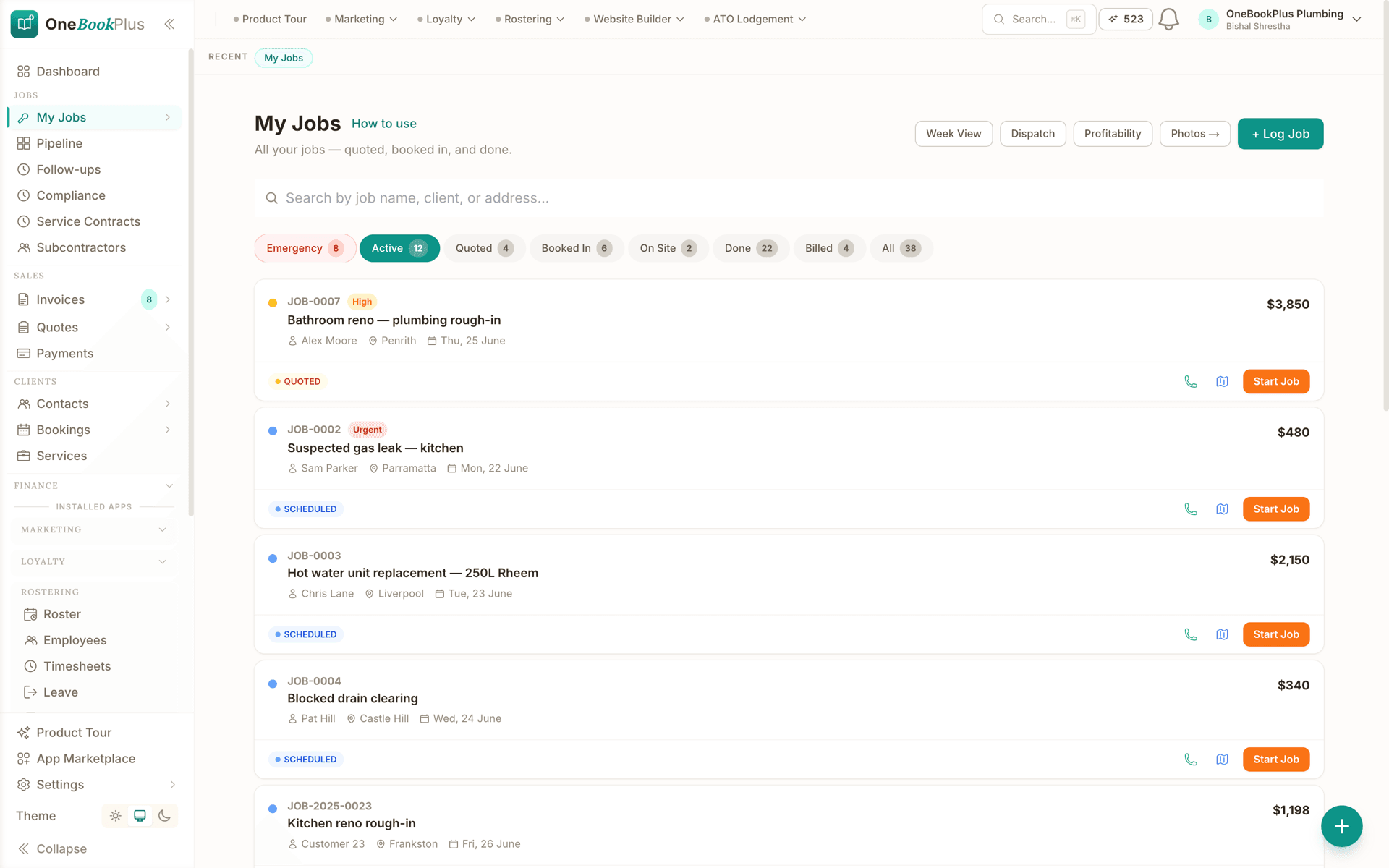
Every job, in the state it is in
The jobs list with each job under its current status, quoted, booked in, on site, done or billed, so where work has stalled is a glance rather than a round of phone calls. This capture is from a plumbing account on the same screen a builder uses.
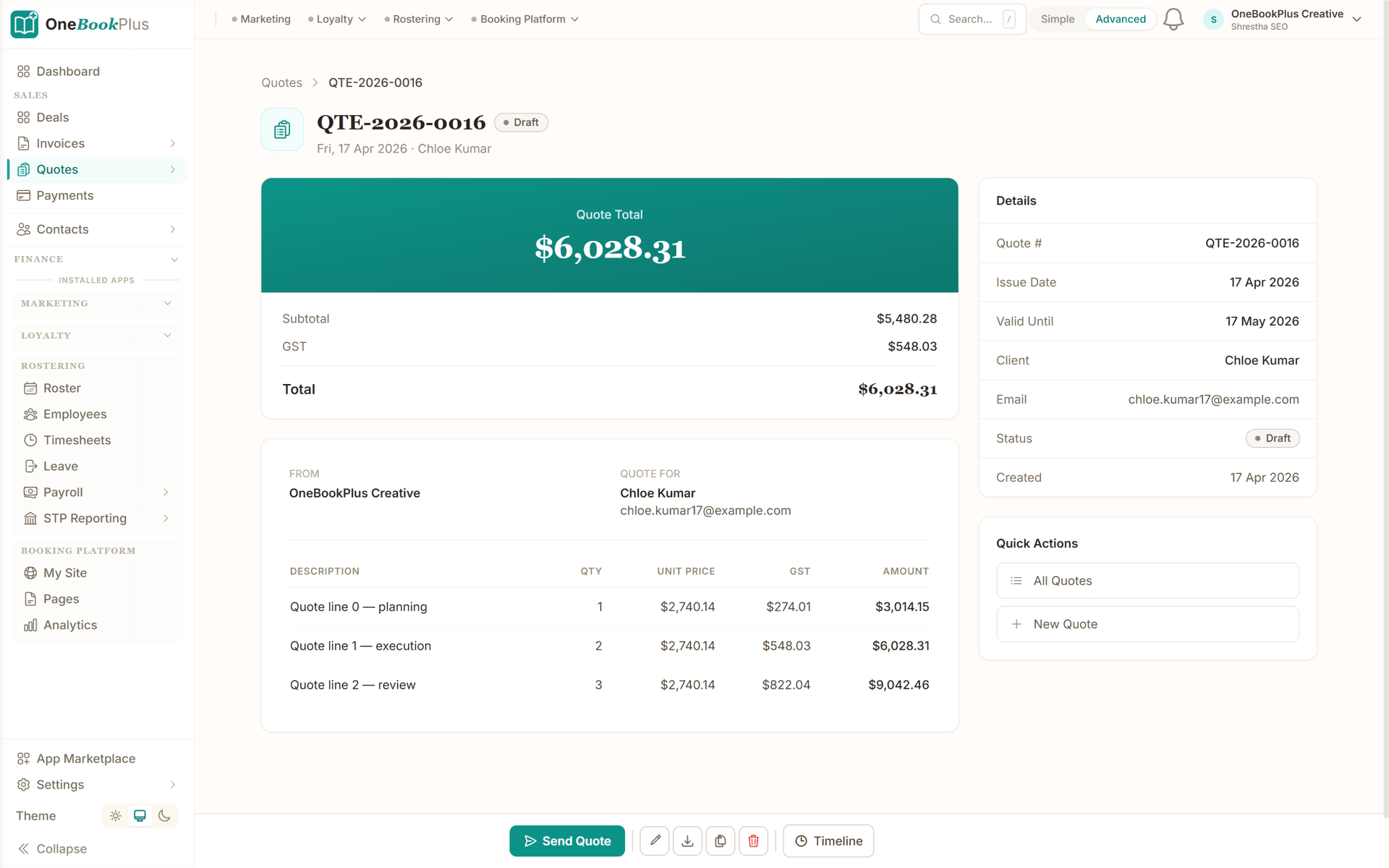
The quote that becomes the contract
A quote with itemised lines and GST. When the client accepts it online, it converts to the contract job and the schedule of values you will claim against. This capture is from a services account, so the lines are that trade's rather than a build's.
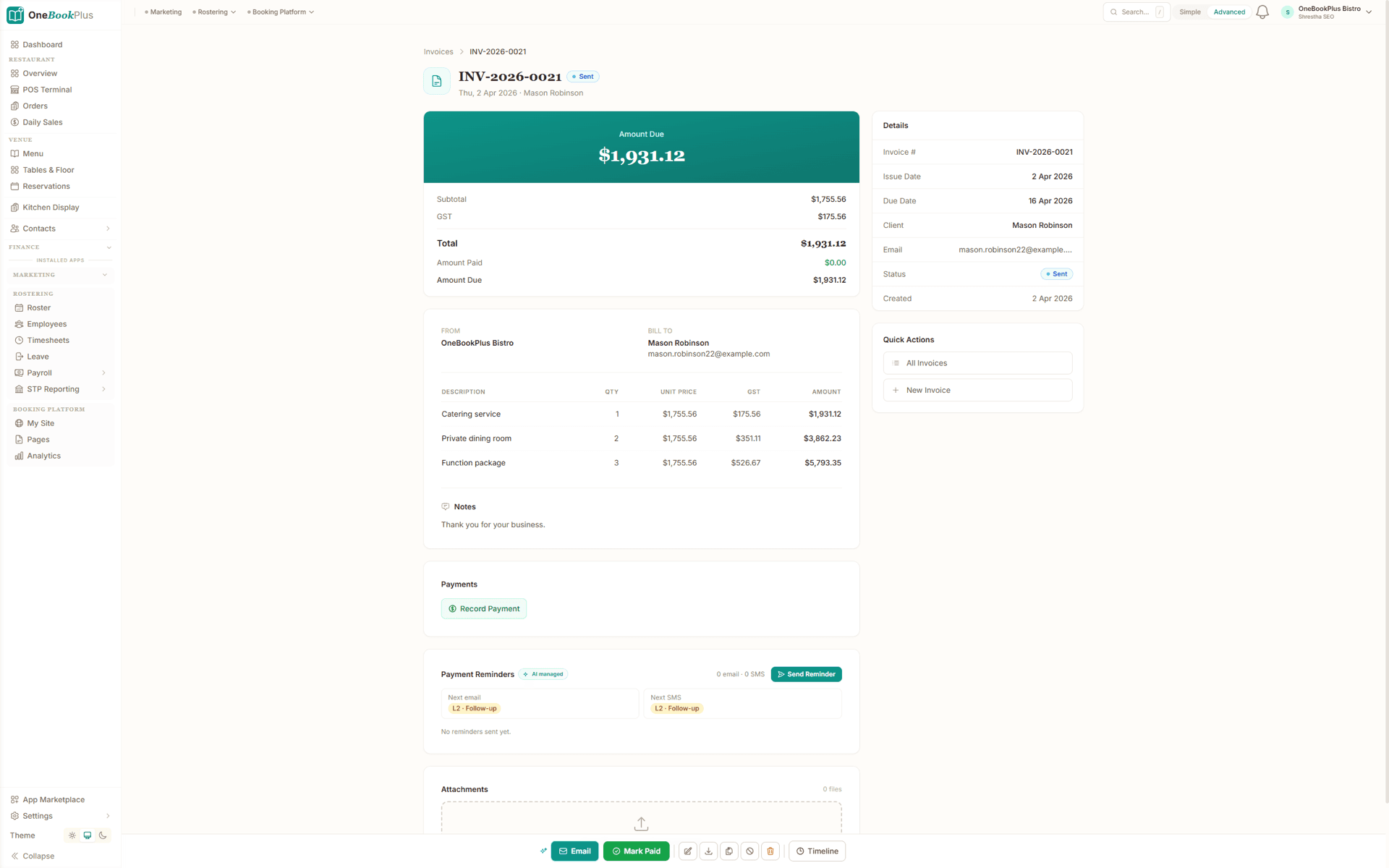
The invoice a claim becomes
Every progress claim lands as a GST tax invoice like this one, with the subtotal, GST, amount paid and amount due on the face of it and a payment link for card or bank debit. This capture is a standard invoice from a hospitality account rather than a build.
Three places a project quietly loses its margin
The first is the variation nobody billed. A client asks for something on site, the crew builds it, and six weeks later it is a conversation about what was agreed. In OneBookPlus a variation is priced, sent for the client to approve, and once approved it lifts the contract value and becomes claimable on the next progress claim. The scope change and the money follow each other instead of drifting apart.
The second is retention. Contracts commonly let the client hold back a percentage of every claim until the defects liability period ends, and in software that has no concept of retention that money shows up as a part-paid invoice or an overdue debtor and gets written off in someone's head. Here the retention is withheld on the claim at the rate you set, shown as its own line on the tax invoice, and the running total held stays on the claims screen against the contract, so at the release milestone you raise the claim for it off a balance that was never lost.
The third is budget drift, and it is the expensive one. Committed costs, actuals and forecast run against the project budget while the build is live, with an alert when a cost code starts trending over, so construction cost management software earns its keep in week six rather than at handover. Every supplier bill and subbie invoice is booked against its job, which means quoted versus actual margin is a number you can look at today, and the GST credits on all of it flow into the same BAS summary as the claims you have issued.
How we compare
How the project side compares to Buildxact, Xero and a spreadsheet
Every row below is about the mechanics of running a contract: the schedule of values, the claim against it, the retention held, and whether the client can pay it.
| Feature | OneBookPlus | Buildxact | Xero | Spreadsheet |
|---|---|---|---|---|
| Schedule of values built from your estimate | Yes | Yes | No | No |
| Claim by stage or percentage complete | Yes | Yes | No | No |
| Retention withheld on the claim, with the balance held tracked | Yes | Yes | No | No |
| Claimed-to-date tracked against the contract | Yes | Yes | No | No |
| Approved variations lift the contract value | Yes | Yes | No | No |
| AI drafts % complete from your site photos | Yes | No | No | No |
| Client pays the claim online (card + bank debit) | Yes | No | Yes | No |
| GST-inclusive tax invoices (AU) | Yes | No | Yes | No |
| Native accounting ledger and BAS summaries | Yes | No | Yes | No |
| Connected to estimating and plan takeoff | Yes | Yes | No | No |
| Flat add-on price, no per-seat fee for the app | Yes | Yes | No | Yes |
| Price | $0 to $69/mo + $99/mo suite | From $199/mo | From $37/mo | $0 |
Four questions that decide a construction project tool
Feature lists all look the same at 11pm on a Tuesday. A build is a contract, so the shortlist should turn on what the software does with the contract, not on how many modules it counts. These are the four we would put to every tool on your list, including this one.
- 01
Does the schedule of values come out of the estimate you priced?
If the claim structure has to be retyped from the estimate into a second system, every variation after that is two edits and one of them gets forgotten.
- 02
Can you claim a percentage of a single line, and does claimed-to-date hold the line?
Stage claims are the easy case. Percentage-complete against one trade, with the running claimed-to-date stopping a claim from quietly overshooting the contract, is the case that separates the tools.
- 03
Is retention withheld on the claim and tracked through to release?
In anything without a concept of retention it lands as a part-paid invoice or an overdue debtor, and it is written off in someone's head rather than claimed at the end of the defects period.
- 04
Can the client pay the claim from the claim, and does the GST land in your BAS?
A claim that has to be re-raised in an accounting package to be paid is two documents, two numbers and a reconciliation every month.
How the usual shortlist answers them
Four different kinds of tool turn up on a builder's shortlist, and they fall down on the four questions in four different places. Every vendor figure below comes from the same sourced data as our line-by-line comparison pages, so it says the same thing here as it does there.
Estimating-first builder software
Buildxact
Buildxact comes at the build from the estimate, and it is genuinely fast there: that is its heritage, along with live Australian supplier price files and flat tiers with unlimited users (Foundation $199/mo, Pro $399/mo, Master $599/mo, ex GST). For the project half, watch where the line sits. Job management, invoicing, the mobile app and accounting sync start at the Foundation tier, and even there it carries no payment collection of its own, the pricing engine is tax-exclusive only so GST-inclusive entry is not available, and the books still sync out to Xero, MYOB or QuickBooks rather than living in the same account.
Enterprise Australian field service
AroFlo and simPRO
AroFlo is built for fleets of twenty-plus technicians and simPRO for twenty-plus-staff trade businesses and commercial contractors. Both are deep on job and project costing, and at that size they earn the look. Two things to weigh before either goes on a shortlist for a five-build residential pipeline. Neither carries its own accounting ledger, so Xero or MYOB stays in the stack and stays a sync. And neither is bought off a price page: AroFlo asks you to request a figure and adds a setup fee, simPRO is a custom quote, and implementation is a real line item at that end of the market.
Named but not compared
Procore and Buildertrend
Procore and Buildertrend come up in the same searches. We have not published a verified comparison against either, so this page will not tell you what they do, what they cost or who they suit, and you would be right to discount any page that does it without sources. What we can hand you is the test. The four questions above are answerable in ten minutes of any demo, including ours, and the answers are what the shortlist should turn on.
Accounting plus a spreadsheet
Xero and a spreadsheet
The most common incumbent is not a construction tool at all. Xero is a strong ledger and is not trying to be a job or project system: it models one invoice per sale, with no job management of its own. So the schedule of values, the claimed-to-date column and the retention balance end up in a spreadsheet beside it, which is exactly where the errors live and exactly the gap this page exists to close.
Where OneBookPlus fails the shortlist, and it does: there is no Gantt chart with task dependencies and a critical path, no procurement, warehouse or plant registers, and the claims it produces are GST-compliant tax invoices structured as progress claims, not statutory Security of Payment claims. If any of those three is the reason you are buying, buy the tool that does it. On the four questions above: the schedule of values comes out of the estimate you priced, you can claim a percentage of any single line with claimed-to-date holding it inside the contract, retention is withheld on every claim with the balance held sitting on the job, and the client pays the claim from the claim with the GST landing in your BAS. One qualifier on the third: claiming the retention back at the release milestone is a claim you raise yourself, not a one-tap release.
Example walkthrough
One two-storey extension, contract to retention release
An illustrative walkthrough of a five-stage contract run over four months
February. You win a two-storey rear extension. The estimate you priced is already in OneBookPlus, so the client accepts the quote online and it converts to a contract job carrying the schedule of values you quoted against: demolition, slab, frame, lock-up, fixing and completion. Before a shovel moves you send RFQs to your concreter, framer and roof plumber, and their prices come back against the job as committed costs rather than as texts you have to remember.
March. The slab goes down. You raise the slab claim from the schedule of values, hold retention at the rate your contract sets, and send it as a GST tax invoice with a Pay Now link. The owners pay by card that evening. Halfway through the frame they ask for a wider opening onto the deck. You price the variation, send it for approval, and once they sign it lifts the contract value and sits ready to claim with the next stage instead of turning into an argument in June.
April. The cost-control view flags the framing code trending over budget: the timber order came in above the estimate. You see it in week two of the stage rather than at handover, and pull the difference back on the roofing package while there is still a package left to move. Every supplier bill and subbie invoice is booked against the job, so the quoted-versus-actual margin you are looking at is the real one.
June. Practical completion. The last claim goes out with the approved variation included and claimed-to-date reconciling exactly against the contract, because nothing was ever typed twice. Two defects get logged at the walkthrough and closed out in a fortnight, and at the release milestone your contract sets you raise the final claim for the retention you have been holding, off a running balance the job has carried all along. The final margin is a number you can read off the project, and the GST on every claim is already in the quarter's BAS summary.
Residential, renovation and small commercial
The contract shape this models, a head contract broken into a schedule of values, claimed by stage or percentage, adjusted by approved variations and reduced by retention, is common to new homes, extensions, renovations and small commercial fitouts. Those are the builders it is built for, and everything on this page is aimed squarely at them.
Two honest limits. Larger civil contracting brings requirements this does not carry: plant-hire fleet registers, inspection and test plan libraries, and bill-of-quantities schedules for tendered packages. And there is no Gantt chart with task dependencies and a critical path; stages sit on the job calendar with crew and subbies assigned, and the scheduling detail some builders want lives in other tools. We would rather you knew both before you signed up than after.
If what you are shopping for is a tool for the whole building business, the trade, the pricing and the stack it replaces, rather than the mechanics of one contract, start with construction software for builders. Trades running a service book rather than contract builds are better served by job management software, and the ledger side, GST, BAS and reporting, sits in the Finance module.
From claim to cash
A progress claim only helps cash flow if the client can pay it without a second document being raised somewhere else. In OneBookPlus the claim goes out as a GST tax invoice carrying this claim, retention held, claimed to date and the balance due on one page, with your ABN on it, and the client pays it by card or bank debit from the link in the claim itself. The claim you raised is the document the money arrives against, not a summary you re-key into an accounting package when the cheque finally clears. What a compliant tax invoice has to show, and how payment and reminders run against it, is covered on the GST invoicing feature page.
The GST side follows on its own. The GST on every claim you issue lands in the same quarterly BAS summary as the GST credits on the supplier bills and subbie invoices you booked against the job, because the claims and the ledger are one system rather than two products and a sync. If you want to sanity-check the arithmetic on a single claim before it goes out, the free GST calculator adds or strips the 10% instantly.
And if the shortlist you are working through also includes the larger commercial platforms, the same four questions from earlier on this page apply there too. The OneBookPlus vs simPRO comparison walks the contract mechanics through a tool built for twenty-plus staff contractors, including where simPRO is genuinely the better fit, so the answer you land on is an informed one either way.
Australian Owned
Built in Melbourne, AU
GST Compliant
ATO-ready from day one
Encrypted & Isolated
TLS in transit, AES-256 at rest, tenant isolation at the database layer, read the security page
Free Plan Available
No credit card needed
Run the next build off one record
Start free, quote a build in stages, and add the project layer when the contracts justify it. No credit card required.
Also on the build: construction estimating software · digital plan takeoff · progress claims
About construction project management in OneBookPlus
What should construction project management software do that generic project software cannot?
A build is a contract, not a task list. The software has to hold a contract value, a schedule of values broken into stages, the variations that move that value, the amount claimed to date against it, and the retention the client is holding back. Generic project tools model tasks and dates; generic accounting models one invoice per sale. Neither knows what a frame-stage claim is, which is why builders end up running the real project in a spreadsheet beside both. OneBookPlus keeps the contract as the record and hangs every stage, variation, cost and claim off it.
How is this different from the OneBookPlus page for builders?
Deliberately, they cover different halves of the same business. The construction software for builders page covers the whole building business: the trade, the pricing, the free plan, the tool stack it replaces. This page covers the project itself, from the signed contract through stages, variations, retention and progress claims to defects and handover. If you are choosing software for your building business, start there. If you are working out how a specific build gets tracked, claimed and closed out, you are in the right place here.
Can I see whether a project is over budget while the build is still running?
Yes, that is the point of the cost-control view. It shows committed costs (what you have ordered or approved), actuals (what has been invoiced or paid) and forecast against the project budget, and it alerts you when a cost code trends over rather than reporting it after the fact. Every expense, supplier bill and subbie invoice is booked against its job, so quoted versus actual margin is live per build rather than a quarterly surprise.
Does it schedule the build like a Gantt chart?
No, and we would rather say so plainly than let you find out later. Stages live on the job calendar with the crew and subbies assigned to them, but there is no Gantt chart with task dependencies and a critical path. If the Gantt screen is the one you live in, the OneBookPlus vs Buildxact comparison says the same thing in more detail and names it as a genuine Buildxact strength. What OneBookPlus does instead is tie the stages to money: the schedule of values, the claim against it, and the cost booked to it.
Is OneBookPlus a construction ERP?
No. Builders searching for construction ERP software are usually after one system instead of five, and that part is fair: estimating, project delivery, claims, online payment and the GST ledger are one account here, with no sync jobs between them. But an enterprise ERP means procurement modules, warehouse inventory, plant and equipment registers and multi-entity consolidation, and OneBookPlus does not carry those. It is built for a builder running builds, not a contracting group running divisions.
Does it suit civil or commercial projects, or only residential?
The contract shape it models, a head contract with a schedule of values, staged or percentage claims, variations and retention, is common to residential, renovation and small commercial work, and those are the builders it is built for. Larger civil contracting brings requirements it does not carry, including plant-hire fleet registers, inspection and test plan libraries, and bill-of-quantities schedules for tendered civil packages. If those are on your list, this is not the right tool and we would rather tell you now.
How do subbies and suppliers get their prices into the project?
Send an RFQ with the scope you wrote, and their prices come back against the job rather than into your inbox and out of your memory. Those prices become the committed costs the cost-control view watches, and each subbie invoice books against the stage it belongs to, so the trade breakdown you priced is the trade breakdown you are tracking. Builder Suite itself has no per-seat fee, it is one price for the whole business. Subbies and staff you only put on the roster, who never sign in, are free and unlimited. Anyone who needs their own login counts against your core plan's login allowance, which is 1 on Free, 3 on Starter, 5 on Plus and 10 on Growth, with extra logins on Growth at $9 each a month.
The client approved a variation on site. How does that get into the contract?
Price it as a variation and send it for approval before the work goes on, even when you already have a verbal yes. Once it is approved it lifts the contract value and becomes claimable on the next progress claim, so the scope change and the money move together and the approval carries a date rather than a recollection. The record worth having six months later is the priced variation the client signed, sitting on the same job as the claim it turns up on. What your contract and your state's building legislation require for a variation to be enforceable is a separate question, and this is general information rather than advice.
Do I need Builder Suite from day one, or can I start on a core plan?
Start where the work is. Quoting, jobs, GST invoicing, expenses, contacts and the accounting ledger are core-plan features, so you can price work, win it and get paid without the add-on at all. The project layer is what Builder Suite adds: progress claims, retention, priced variations, the cost catalogue and recipes, RFQs, live cost control, the site diary and defects. It is $99/mo on top of any core plan including Free, with no per-seat fee for the add-on itself and a 14-day free trial, so the usual order is to run the business first and switch the add-on on when the first contract with a schedule of values and retention lands.
Which parts of this are in the core plan and which need Builder Suite?
Quoting, jobs, GST invoicing, expenses, contacts and the accounting ledger are in the core plans, which run $0 (Free), $29 (Starter), $49 (Plus) and $69 (Growth) per month in AUD. The whole project layer sits in the Builder Suite app instead: progress claims with retention withheld and the running balance held shown on the job, priced variations, the cost catalogue and recipes, AI plan takeoff, RFQs, live cost control with overrun alerts, the site diary and defects. Builder Suite is $99/mo on top of any core plan, including Free, with no per-seat fee for the add-on and a 14-day free trial. Logins stay banded by your core plan: 1 on Free, 3 on Starter, 5 on Plus and 10 on Growth, with extra logins on Growth at $9 each a month. Retention is not a core-plan feature and it is not included on Growth, so if retention is the reason you are here, it is the add-on you want.
How do I compare this against Procore, Buildertrend, Buildxact and AroFlo?
On the contract mechanics, not the feature count. Ask each tool whether the schedule of values comes out of the estimate you priced or gets retyped, whether you can claim a percentage of a single line with claimed-to-date stopping a claim from overshooting the contract, whether retention is withheld on the claim and tracked through to release rather than showing up as a part-paid invoice, and whether the client can pay the claim from the claim with the GST landing in your BAS without a sync job. We have published line-by-line comparisons against Buildxact and AroFlo. We have not published a verified comparison against Procore or Buildertrend, so this page will not tell you what they do; put the same four questions to them and compare the answers to ours.
Last reviewed and updated: by Bishal Shrestha
About the author

Bishal Shrestha
Founder & CEO, OneBookPlus
Bishal spent a decade running digital projects for Australian small businesses before founding OneBookPlus. OneBookPlus is built and supported from Melbourne for Australian small and medium businesses. The construction project layer covers contract jobs with a schedule of values, stage and percentage progress claims, priced variations, retention withheld on every claim with the balance held tracked, RFQs to subcontractors, a dated site diary and defects close-out, with GST-compliant claim invoices clients pay online.
Read the founder bioIndustries
Comparisons