Bookkeeping software for Australian small business
Track invoices and expenses, calculate 10% GST automatically, and stay BAS-ready every quarter, without an accountant on retainer or a stack of apps that don't talk to each other. Bookkeeping that keeps itself tidy, whether you keep your own books or a client's.
Free plan available, no card needed. GST and BAS built in.
The records you have to keep, kept for you
Bookkeeping is the part of running a small business that nobody started a business to do: logging every invoice, filing every receipt, working out how much GST you've collected versus paid, and making sure the numbers line up when the BAS deadline arrives. Most sole traders either let it pile up into a shoebox-and-spreadsheet panic each quarter, or pay a bookkeeper to untangle it after the fact, which is the most expensive way to keep records.
A good bookkeeping app removes the panic by keeping the books current as you work. When you send an invoice, the GST is already calculated. When you log an expense, it's already categorised and counted against the GST you can claim. By the time BAS is due, the quarterly summary is a review, not a reconstruction. That's the difference between bookkeeping software and a spreadsheet: the spreadsheet stores numbers, the software keeps them straight.
OneBookPlus handles the Australian-specific parts natively, automatic 10% GST on every invoice and quote, ABN-validated tax invoices, AUD formatting, and a BAS-ready summary that rolls up GST collected, GST paid, and net GST payable. Try the maths first with the free GST calculator and BAS calculator, or estimate what you currently spend with the bookkeeping cost calculator.
The bookkeeping lives inside the broader OneBookPlus Finance module, so your invoices, expenses, and GST position all share one database, no CSV exports, no copy-pasting between an invoicing tool and an accounting tool. A paid invoice updates your GST position and your customer record at the same time.
What the bookkeeping looks like
Screenshots captured from the OneBookPlus Finance module itself, the reports and records your BAS is built from.
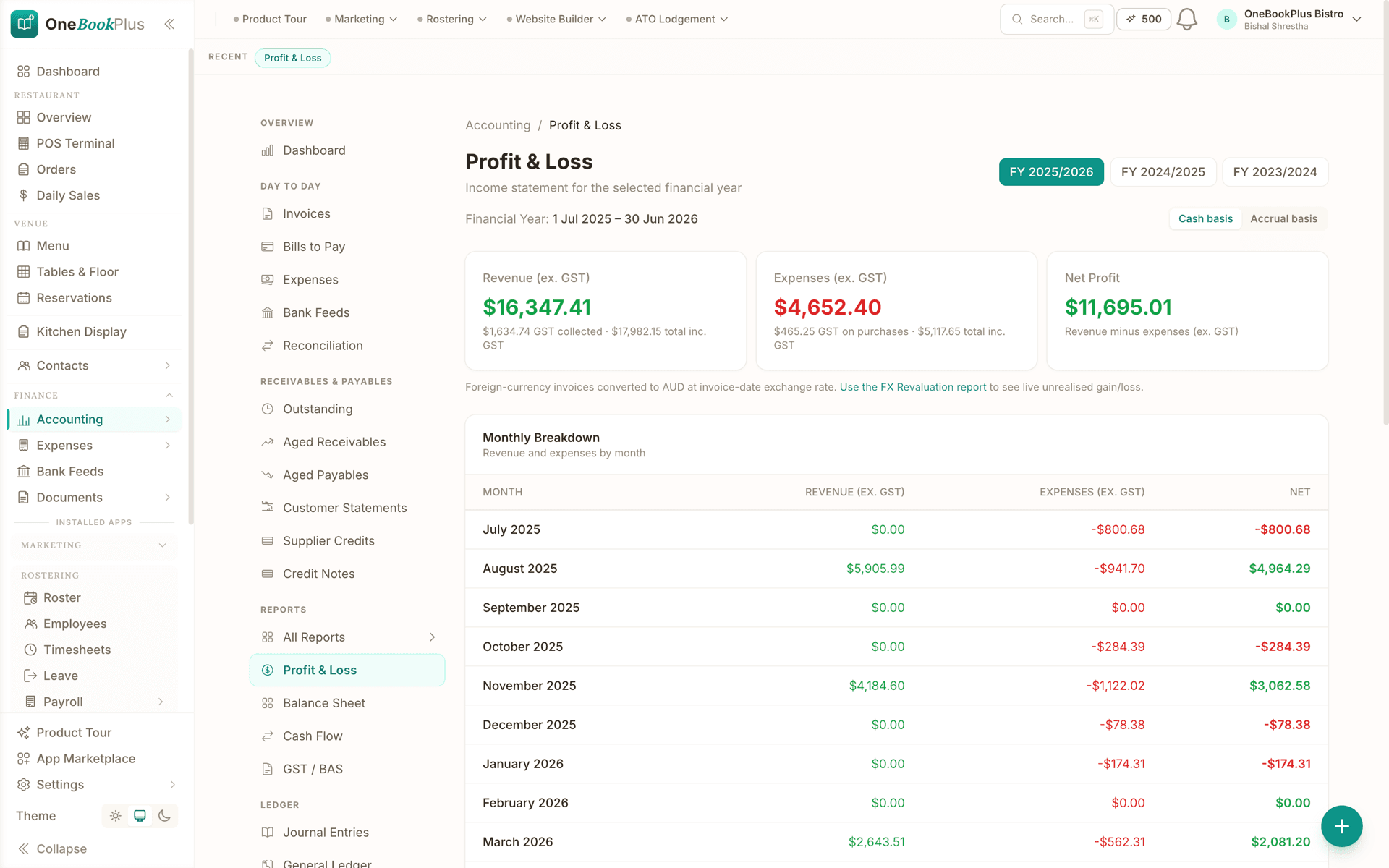
Profit & Loss, always current
The P&L report with a cash/accrual toggle and comparative columns, built from your invoices and expenses as they happen, not reconstructed at quarter end.
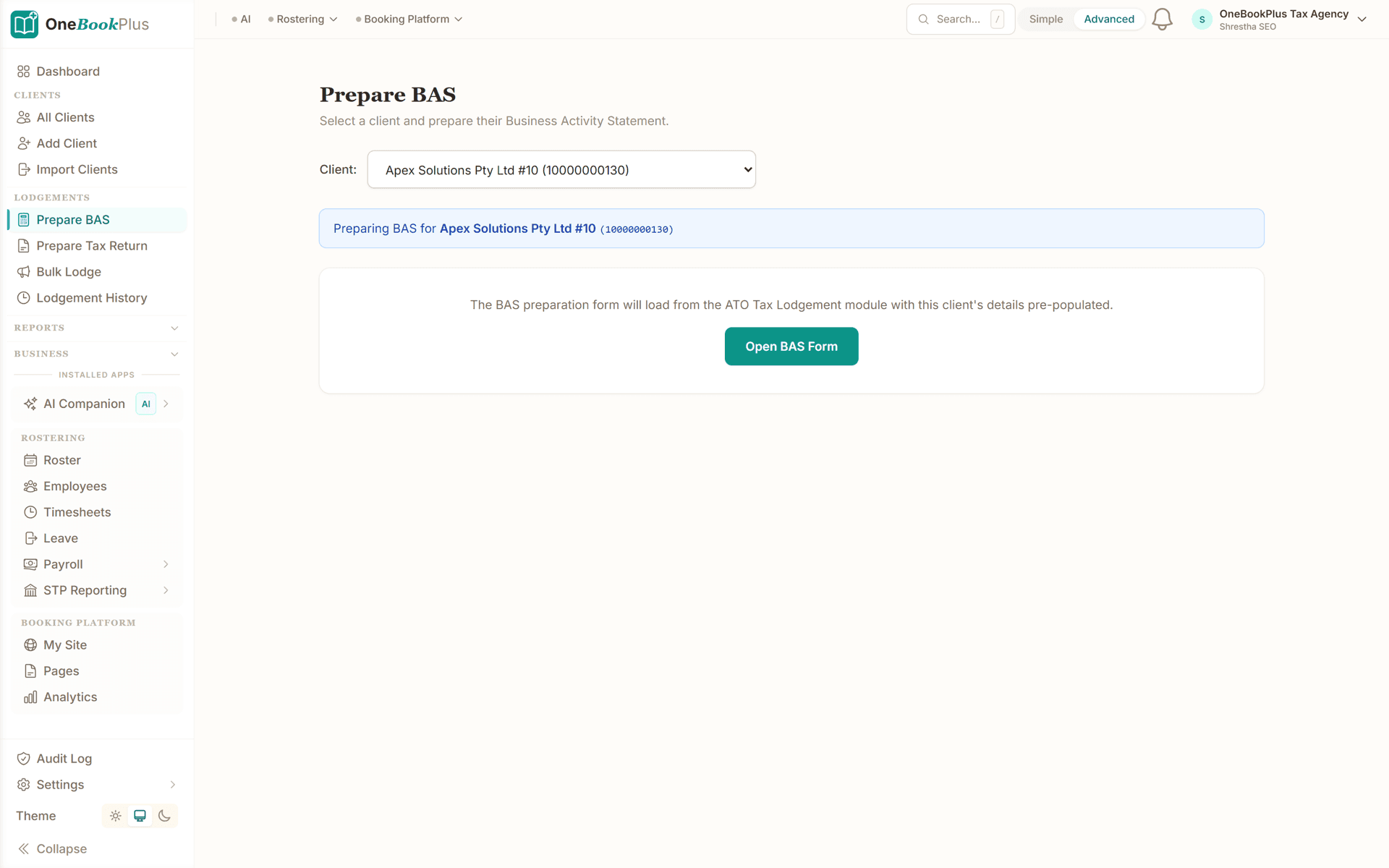
The BAS-ready GST summary
GST collected, GST paid, and net GST payable rolled up with the G1 to G11 label breakdown the BAS form asks for, a review at quarter end, not a rebuild.
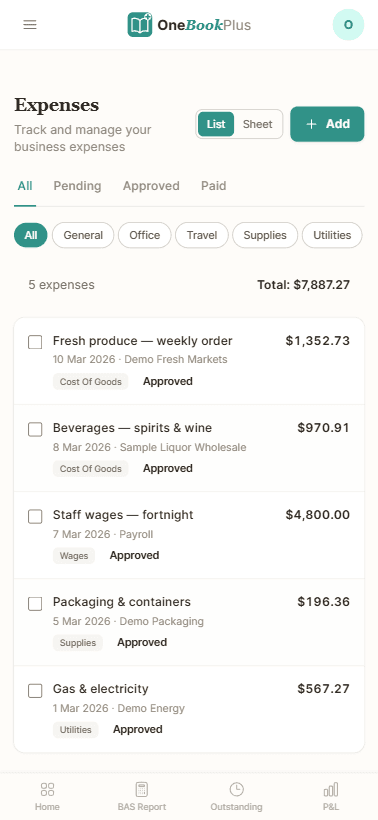
Expenses with a receipt inbox
Log an expense, attach the receipt photo, and accept the suggested category. Each one counts against the GST you can claim as you go.
Bookkeeper software that works both sides of the handover
A search for bookkeeper software usually means one of two people: an owner who wants software that does the bookkeeping for them, or a bookkeeper or BAS agent who keeps the books for clients. OneBookPlus is built for both, because they share the same problem: records scattered across an invoicing tool, a banking app, a phone camera roll, and a spreadsheet that only one person understands.
If you run the business, you can invite your bookkeeper or BAS agent as a team member with their own login. They see your invoices, expenses, receipts, and GST position as they stand today, not as a CSV export and a folder of photos emailed at quarter end. The handover stops being an archaeology project, and the questions ("what was this $214 at Bunnings?") get answered while the answer is still fresh.
If you keep client books, each business you look after is its own OneBookPlus account, isolated at the database level, and you switch between them from a single login. The records arrive already structured: every invoice carries its 10% GST, every expense carries its receipt and category, and the quarterly summary rolls GST collected, GST paid, and net GST payable into the G-label breakdown the BAS form asks for. Client bookkeeping becomes review and lodgement rather than data entry, which is a better use of the hours you bill.
For business owners
- Invite your bookkeeper or BAS agent with their own login
- Books stay current as you invoice and log expenses
- Quarter-end handover is a review, not a shoebox
For bookkeepers & BAS agents
- Switch between client businesses from one login
- Every client isolated at the database level
- BAS-ready GST summaries with the G-label breakdown
How we compare
OneBookPlus bookkeeping vs Xero, MYOB & QuickBooks
The full accounting suites do everything, and bill you for everything. For small businesses that mainly need invoicing, expenses, GST, and BAS, here's where the lighter all-in-one approach lands.
| Feature | OneBookPlus | Xero | MYOB | QuickBooks |
|---|---|---|---|---|
| Automatic 10% GST on invoices | Yes | Yes | Yes | Yes |
| Expense & receipt tracking | Yes | Yes | Yes | Yes |
| BAS-ready quarterly GST summary | Yes | Yes | Yes | Yes |
| Free plan for sole traders | Yes | No | No | No |
| Online bookings in the same app | Yes | No | No | No |
| CRM & marketing in the same app | Yes | No | No | No |
| No add-on subscriptions to sync | Yes | No | No | No |
| Price | Free to $69/mo | From $37/mo | From $11/mo | $33/mo |
Each figure is that vendor’s own cheapest published plan. Vendor prices verified 2 August 2026. QuickBooks’ Australian pricing page could not be read on that day, so no QuickBooks figure is stated. Feature rows describe what each product includes on the plan priced above; where we could not check a competitor from its own published pages, the row is left out rather than guessed.
Weighing up the full accounting suites? See the line-by-line OneBookPlus vs MYOB comparison for established Australian businesses.
Example walkthrough
From a week of invoices and expenses to a BAS-ready quarter
An illustrative walkthrough of a sole trader electrician's quarter
Monday. You finish a switchboard upgrade and raise the invoice from your phone before you pull out of the driveway. OneBookPlus adds the 10% GST and stamps your ABN on the tax invoice. The customer pays by card from the link two days later, and that payment lifts your GST-collected total for the quarter and updates the customer's record in the same moment.
Across the week you photograph receipts as you go: cable from the wholesaler, fuel, a new multimeter. Each one is logged as an expense, categorised, and counted against the GST you can claim back, so the GST-paid side builds while you work instead of being reconstructed from a glovebox of paper in July.
End of quarter, there is no shoebox session. The Finance module already holds GST collected, GST paid, and net GST payable as a BAS-ready summary. You check the figures against the free BAS calculator, then either hand a clean set to your BAS agent or lodge it yourself. The bookkeeping happened while you worked, not in a panic the night before the deadline.
Snap the receipt, and the bookkeeping is done
Most bookkeeping falls behind in the gap between spending the money and sitting down at a desk. The OneBookPlus iOS app closes that gap: photograph a receipt at the counter and the AI scanner reads the supplier, date, GST, and total for you, so the expense is captured and categorised before the receipt hits the glovebox. Every account includes five free receipt scans, and the AI Companion add-on covers ongoing scanning once you're hooked.
The rest of the day-to-day bookkeeping works from the same phone: raise an ATO-compliant tax invoice on-site with 10% GST and your ABN applied automatically, and get a push alert the moment it's paid. Everything syncs with the web app in real time, so the books your bookkeeper reviews on a desktop are the ones you kept from the ute. You can download the OneBookPlus iOS app from the App Store, and the web app works in any phone browser if you're on Android.
What BAS-ready records look like
BAS-ready is a specific standard, not a mood. On the income side it means every sale is backed by a proper tax invoice: your ABN on the document, the words Tax Invoice, the GST amount itemised rather than buried in the total, and a sequence you can account for. On the spending side it means every expense you want to claim GST credits on carries its receipt, its category, and the GST actually paid, so the claim can be substantiated if the ATO ever asks. The quarter's position is then simple arithmetic: GST collected on sales, minus GST paid on purchases, mapped to the G labels the BAS form asks for. What makes records fall short is rarely the maths, it is the gaps, the cash job that never became an invoice, the receipt that faded in the glovebox, the expense logged as a round number with nothing behind it.
OneBookPlus enforces the invoice side automatically through the invoicing module, and if you want to see the required fields before signing up, the free tax invoice generator produces a compliant document you can inspect. The expense side is the receipt-and-category habit the iOS scanner builds for you. Come tax time, sole traders can sanity-check their position with the free sole trader tax calculator, and practices that keep books for clients should start from the accountants and bookkeeping practices page. This is general record-keeping information, not tax advice; your BAS agent or accountant remains the authority on your own lodgement.
Australian Owned
Built in Melbourne, AU
GST Compliant
ATO-ready from day one
Encrypted & Isolated
TLS in transit, AES-256 at rest, tenant isolation at the database layer, read the security page
Free Plan Available
No credit card needed
Keep the books straight without the busywork
Invoicing, expenses, GST and BAS-ready summaries are included on every plan, Free included. No card needed to start.
Free utilities: BAS calculator, GST calculator, bookkeeping cost calculator
Watch it done
See the bookkeeping done
Scan a receipt and a supplier bill straight into your books, then read your profit and the GST you owe.
About OneBookPlus bookkeeping software
How do I choose bookkeeping software for an Australian small business?
The right fit depends on how you run your business. If you invoice customers, track expenses, and need BAS-ready GST totals, but don't want to pay for and learn full accounting software, OneBookPlus covers the bookkeeping basics with native 10% GST, ABN-validated tax invoices, and quarterly BAS summaries. It's built in Melbourne for the Australian market, so GST, AUD, and ATO record-keeping are there from day one rather than retrofitted.
Do I need an accountant if I use bookkeeping software?
Most sole traders and small businesses use bookkeeping software to keep their day-to-day records straight, invoices, expenses, and GST, and bring in an accountant or BAS agent only at tax or quarter time. OneBookPlus keeps your numbers BAS-ready throughout the quarter so the handover (or the self-lodge) is a review, not a rebuild. It doesn't replace registered tax advice, but it removes the shoebox-of-receipts problem that makes accountant time expensive.
Does the bookkeeping software calculate GST and BAS automatically?
Yes. Every invoice and quote applies 10% GST automatically (inclusive or exclusive pricing supported), and the Finance module rolls up GST collected, GST paid, and net GST payable into a BAS-ready summary each quarter. You can also pre-check the maths with the free BAS calculator and GST calculator before you sign up.
How much does bookkeeping software cost in Australia?
The established accounting suites publish their own entry plans: Xero from $37/mo, MYOB from $11/mo, and QuickBooks publishes no ongoing figure on its Australian pricing page at all, so we do not state one for it. Vendor prices verified 2 August 2026. Many small businesses bolt on a separate invoicing or booking tool on top of whichever they choose. OneBookPlus includes invoicing, expense tracking, GST, and BAS summaries in every plan, including a Free tier, with paid tiers at $29, $49, and $69 per month, so bookkeeping isn't a separate subscription. The bookkeeping cost calculator estimates what you'd otherwise pay a bookkeeper or for a tool stack.
What does the free plan include, and what does it cost after that?
The Free plan is permanent rather than a trial: unlimited jobs and one-off bookings, then 10 invoices and 5 quotes a month, 250 contacts, one booking page and one team member, with 10% GST on every invoice and the BAS-ready summary included. Paid tiers are Starter at $29 a month, Plus at $49 and Growth at $69, in AUD including GST, and each carries a 14-day trial with no credit card. If you decide not to continue, the account drops back to the Free plan rather than locking you out of your records.
Where do the receipts and records live, and how long do they stay there?
Every invoice, expense and receipt photo stays in your account, with the image attached to the expense it substantiates rather than sitting in a separate folder, which is what makes a GST credit straightforward to back up later. Australian record-keeping rules expect you to hold those records well beyond the quarter you lodge, so the safe habit is to treat the account as the filing cabinet rather than as this quarter's workspace. This is general record-keeping information, not tax advice; your BAS agent or accountant can confirm the retention period that applies to you.
Can I switch from spreadsheets or another bookkeeping app?
Yes. Many OneBookPlus users come from spreadsheets, a shoebox of receipts, or a single-purpose invoicing tool. Because invoicing, expenses, contacts, and BAS reporting share one database, you stop copy-pasting between tools, a paid invoice updates your GST position and your customer record at the same time.
What's the difference between OneBookPlus bookkeeping software and the Finance module?
They're the same product seen from two angles. This page covers the day-to-day bookkeeping: raising GST invoices, logging expenses, scanning receipts, and keeping the quarterly BAS summary current. The OneBookPlus Finance feature page covers the fuller small-business accounting picture that sits on top of those records, including Profit and Loss reporting and accounting for sole traders. If you're comparing accounting software for a sole trader, start with the Finance page; if you want the record-keeping itself handled, this is the right place.
Can my bookkeeper or BAS agent work in OneBookPlus with me?
Yes. Invite your bookkeeper or BAS agent as a team member with their own login, and they see your invoices, expenses, receipts, and GST position as they stand today rather than a quarterly export. Bookkeepers who look after several businesses can join each client's account and switch between them from one login, and every business stays isolated at the database level. Quarter-time work becomes review and lodgement instead of data entry.
Is there a bookkeeping app for my phone that scans receipts?
Yes. The OneBookPlus iOS app is on the App Store: photograph a receipt and the AI scanner reads the supplier, date, GST, and total for you, so the expense is captured before the receipt is lost. Every account includes five free receipt scans, and the AI Companion add-on covers ongoing scanning. You can also raise GST invoices on-site and get a push alert the moment an invoice is paid, and the web app works in any phone browser.
Is OneBookPlus a full accounting package like Xero or MYOB?
OneBookPlus covers the bookkeeping most small businesses need day to day, invoicing, expenses, GST, and BAS-ready summaries, alongside bookings, CRM, and marketing in one app. A double-entry ledger with profit and loss, balance sheet and BAS-ready GST summaries, built for the bookkeeping a small business does day to day. Automatic bank feeds are not available today, and there are fewer report variants than Xero or MYOB. If you want the line-by-line comparison, see how OneBookPlus measures up against MYOB.
Last reviewed and updated: by Bishal Shrestha
About the author

Bishal Shrestha
Founder & CEO, OneBookPlus
Bishal spent a decade running digital projects for Australian small businesses before founding OneBookPlus. OneBookPlus is built and supported from Melbourne for Australian small and medium businesses. The bookkeeping software covers invoicing, expenses, 10% GST, and BAS-ready summaries natively, designed so sole traders and small teams can keep accurate records without a full accounting suite or a bookkeeper on retainer.
Read the founder bioFeatures
Comparisons
More